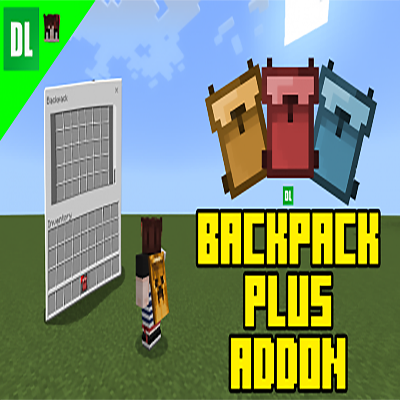
Backpack Plus Addon
Bedrock add-on listed for Minecraft 1.21–26.x (behavior + resource pack). File opened and checked on 10 Oct 2026; installs from the MC Bedrock Mods app on Android.
I don't know my version
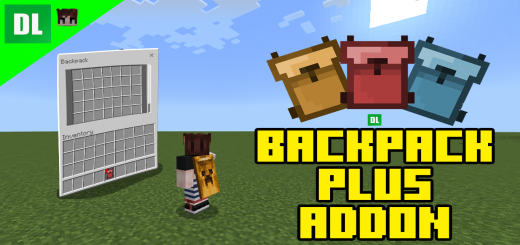
Do you want a backpack addon that works very similar to the Backpack mods from java? or do you want to carry alot of things but don't have anymore space in your inventory? This addon is just for you!
If you have played any backpack mods from Java you might be familiar to how this addon will work.
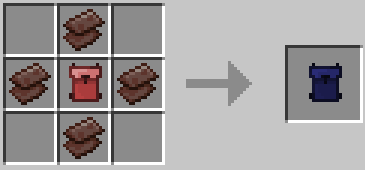
Crafting Recipes:
Small Backpack [16 slots]:
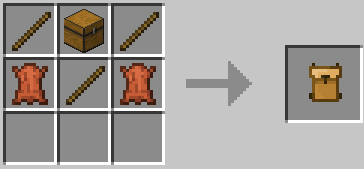
Medium Backpack [32 slots]:
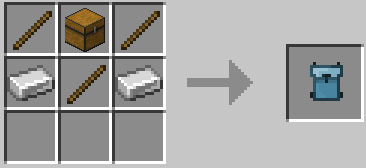
Big backpack [42 slots]:
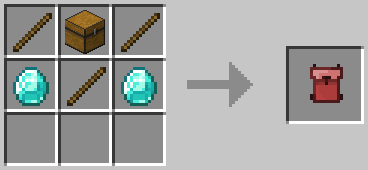
Big backpack [63 slots]:
Do no upgrade existing BIG BACKPACK with items inside, ITEMS WILL NOT CARRY OVER
Now, if you are on a PC just right click while the backpack is on your main hand and you can now access the backpack's inventory.
If you are on MOBILE simply tap the "open" button, or long tap the screen while holding the backpack.
Pc and Mobile has the same backpack GUI.
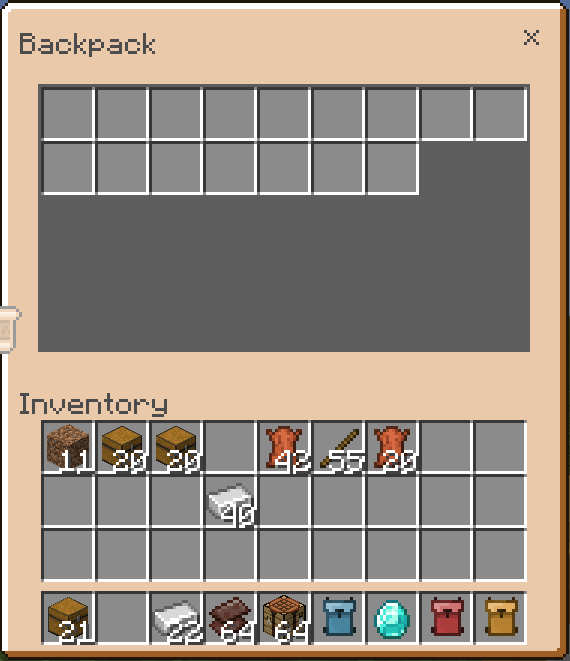
The items are saved per Backpack so you can put items in the backpack and share the backpack with your friends.
Backpack Commands:
Improved Commands
- /bps:reset - Reset the backpack item your holding.
- /bps:clear bp - Deletes all backpacks and item recovery.
- /bps:see <ID:int> - See specific backpack items.
- /bps:retrieve <ID:int> - Retrieve backpack items.
- /bps:set <ID:int> - Manually set your backpack id.
- /bps:delete <ID:int> - Delete backpack and recovery items.
- /bps:clean - Delete all empty backpack entities.
- /bps:sudo <Player Name> <Backpack Command> - Allows to execute a backpack command as another player.
- /bps:bplist - See all backpack IDs
- /bps:bphelp - See all available commands
<ID:int> is just the backpack id number found in the backpack item. When using commands with this simply put the id number. For example `/bps:see 9004`
Showcase Video:
ENJOY :D
My Twitter @Dewdimpple
Also join my discord server for addon problems or addon updates https://discord.gg/TchBCRcaaG.
Reminders:
- Make sure to turn on the backpack resource pack in your world if you are using this addon.
- If the UI of the backpack is not the same in the images it means another resource pack is breaking the UI. To fix this move the resource pack of the backpack at the very top.
- As always, backup world first if you are updating from an older version of the backpack just to be safe.
- Using /kill in your world will break the backpacks.
- Edition: Minecraft Bedrock
- File type: .mcpack or .mcaddon
- Minecraft versions listed: 26.30, 1.21.122
- How to install: Download the .mcpack or .mcaddon file. → Open it — Minecraft imports it. → In your world: Behavior Packs → Available → Activate, then the same under Resource Packs.
- Where to get it: Opens on CurseForge — not every file is mirrored on our own servers.
Install steps are the general flow for this file type — How to install Minecraft Bedrock addons & mods walks through it step by step.
- Pack type: .mcaddon — behaviour and resource pack in one file
- Manifest requires Minecraft 1.26.31 or newer
- Complete pack — everything it depends on is inside the file
- Download size: 131 KB
- Download link checked 7 Oct 2026 — working
These come from our own check of the pack file, not from the source page.


