GTV | DODGE CARS
🇺🇲 Dodge Car addon for Minecraft Bedrock: cars with emissive headlights, customizable colors, real fueling, progressive speed, speedometer, animations…
I don't know my version
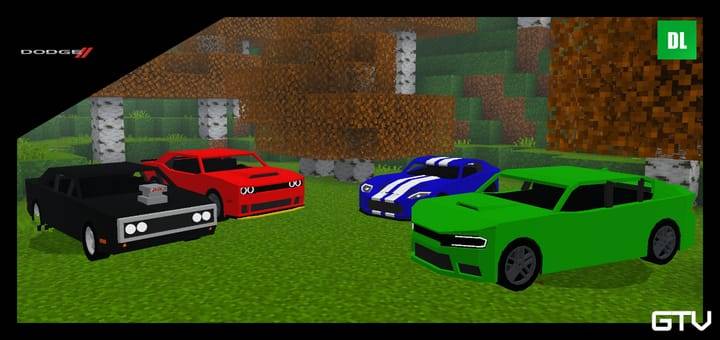
🚘 American muscle and raw power unleashed in Minecraft Bedrock.
Feel the roar of Dodge engines and the brutal torque of true American muscle. This addon brings iconic Dodge muscle cars and performance vehicles to Minecraft Bedrock, delivering aggressive acceleration, heavy-hitting power, and immersive driving mechanics — built for burnouts, straight-line speed, and pure domination of the streets.
⚠️ ATTENTION!!!
This addon is an independent fan-made project created exclusively for use in Minecraft and intended solely for entertainment purposes.
It has no official connection, partnership, authorization, sponsorship, or endorsement from Dodge or any other real-world automotive manufacturer, brand, or company.
All trade names, trademarks, and references mentioned belong to their respective owners and are used strictly for informational and descriptive purposes.
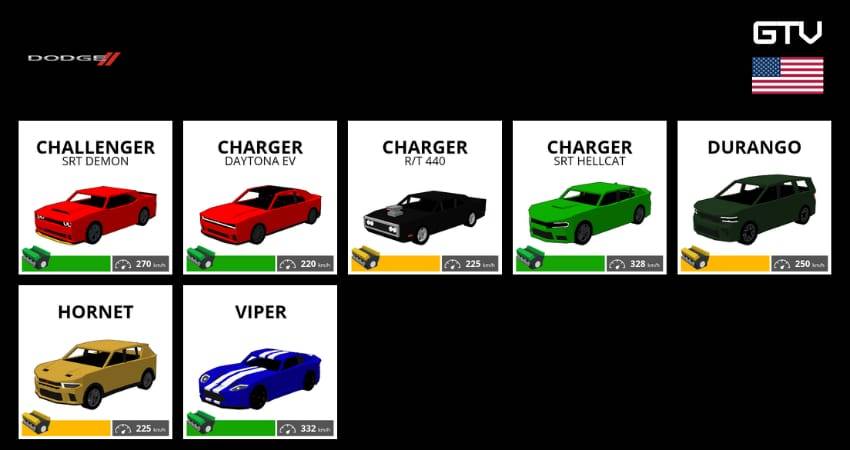
VEHICLES:
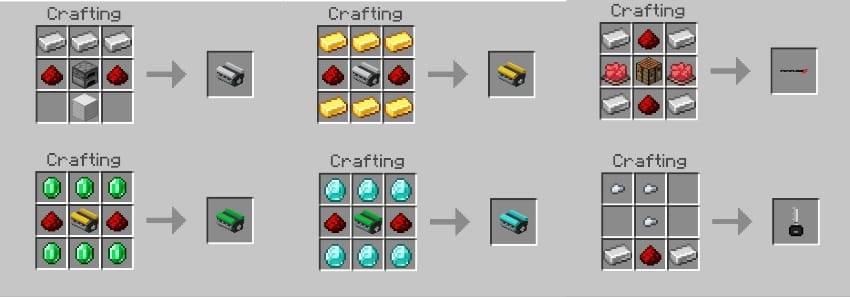
CRAFTINGS:
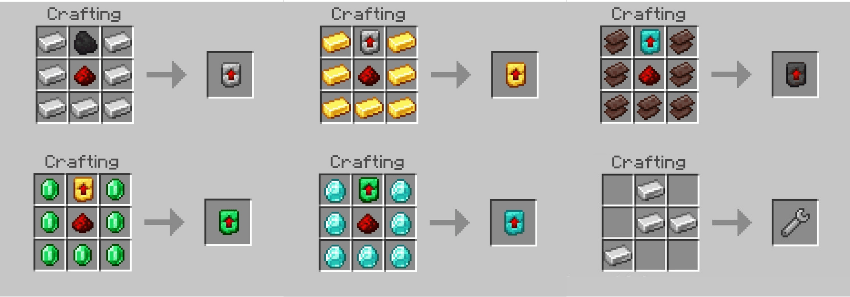
MECHANICS:
⚙️ SPEED: The addon features a smooth and progressive acceleration system, providing more realistic vehicle behavior and driving experience.
🔄 GEAR: Vehicles now feature a manual-style gear system. To shift gears, simply hit while mounted inside the vehicle.
📈 RPM: The speedometer now includes an RPM bar that simulates the engine’s revolutions for a more immersive driving experience.
🔧 ENGINE UPGRADE SYSTEM: Vehicles can be upgraded with different engine stages to improve overall performance. Each upgrade increases the car’s top speed and acceleration, allowing for faster and more powerful driving. Upgrades are applied using special engine items and can significantly change how each vehicle performs.
🔧 VEHICLE REMOVAL: Vehicles can now be despawned using the Wrench item.
🔊 SOUNDS: Vehicles now feature immersive sound effects.
🔑 IGNITION: Vehicles can only be started from inside the car using a key.
⛽ FUEL: Each vehicle can be powered by different fuel types: Coal (Combustion), Redstone (Electric) and Hybrid (Coal + Redstone). Fuel consumption is now based on both distance traveled and vehicle speed. The faster you drive, the more fuel the vehicle consumes.
📊 SPEEDOMETER: A functional speedometer shows your current speed in km/h, the RPM bar, and the remaining amount of fuel, allowing precise control while driving.
💡 LIGHT EMISSION: Vehicles now feature emissive lights that simulate real headlights. Players can turn the lights on and off while driving.
💥 MOB COLLISION: Vehicles can now hit mobs. Damage is based on the vehicle’s current speed — higher speed causes greater damage.
🎨 COLORS: Paint your car using any Minecraft dye.
🛍️ SHOP: Shop system using iron ingots + the required engine.
HOW TO PLAY:
Fuel requirement: Before driving any vehicle, it must be fueled using coal or redstone.
How to refuel: Hold the fuel item in your hand and interact with the vehicle.
Refueling condition: The vehicle must be turned off before adding fuel.
Key requirement: After refueling, a key is required to operate the vehicle. Otherwise, the message "No Key" will be displayed.
Starting the vehicle: Hold the key in your hand and interact with the car. The "Start" option will appear.
Driving the vehicle: After starting the engine, remove the key from your hand and drive normally.
Gear shifting: To change gears, hit while mounted inside the vehicle.
Turning off the vehicle: To turn it off, hold the key again and interact with the car. The "Stop" option will be displayed.
- Edition: Minecraft Bedrock
- File type: .mcpack or .mcaddon
- Minecraft versions listed: 1.21, 1.21.30, 1.21.120
- How to install: Download the .mcpack or .mcaddon file. → Open it — Minecraft imports it. → In your world: Behavior Packs → Available → Activate, then the same under Resource Packs.
- Where to get it: In MCModsHub, or directly above on this page.
Install steps are the general flow for this file type — How to install Minecraft Bedrock addons & mods walks through it step by step.
- Pack type: .mcaddon — behaviour and resource pack in one file
- Complete pack — everything it depends on is inside the file
- Download size: 658 KB
- Download link checked 18 Jun 2026 — working
These come from our own check of the pack file, not from the source page.


