Better Flight System
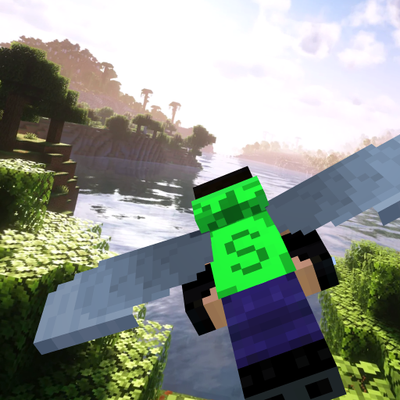
This addon adds a smooth flight system with tilt camera, speed-based FOV, and immersive flying experience using elytra. Inspired by barrel roll mechanics.
⬇ Download on CurseForge
Better Flight System adds a smooth and immersive flying experience to Minecraft Bedrock using Elytra.
This addon introduces a barrel roll-style camera system that makes flying feel more dynamic and realistic. Instead of normal straight gliding, the camera slightly tilts based on your movement, creating a better sense of motion.
✈️ What's New? (v2.0)
🎥 Camera Improvements
- Completely reworked flight camera.
- Much smoother camera movement.
- Improved banking effect while turning.
- Better camera follow with reduced jitter.
- Camera orbit effect for a more cinematic flight experience.
🚀 Flight Experience
- Added speed-based camera distance for a stronger sense of speed.
- Improved dive and pull-up camera behavior.
- Better camera recovery after sharp turns.
- More natural flight feeling.
⚡ Performance
- Optimized camera calculations.
- Improved camera interpolation.
- Better multiplayer compatibility.
- Reduced unnecessary camera updates.
🛠️ Fixes
- Fixed camera spinning when crossing ±180° yaw.
- Improved angle interpolation.
- Fixed several camera stability issues.
- General bug fixes and code cleanup.
(SHOWCASE v2.0)
(SHOWCASE)
✨ Features:
- Smooth camera tilt while flying
- Speed-based FOV effect
- More immersive Elytra control
- Lightweight and performance friendly
🎮 How to Use:
1. Equip Elytra
2. Jump and start gliding
3. Move left and right to feel the tilt effect
⚠️ Note:
- This addon does not add real 360° barrel roll due to engine limitations
- It creates a realistic illusion using camera movement
📱 Works on:
- Minecraft Bedrock Edition (Windows / Android)
🔧 Installation:
1. Download the .mcaddon file
2. Open it with Minecraft
3. Activate Behavior Pack & Resource Pack
4. Enable Experimental Features
Enjoy a new flying experience!
- Edition: Minecraft Bedrock
- File type: .mcpack or .mcaddon
- Minecraft versions listed: 1.21.120, 1.21.122, 1.21.121
- How to install: Download the .mcpack or .mcaddon file. → Open it — Minecraft imports it. → In your world: Behavior Packs → Available → Activate, then the same under Resource Packs.
- Where to get it: Opens on CurseForge — not every file is mirrored on our own servers.
Install steps are the general flow for this file type — How to install Minecraft Bedrock addons & mods walks through it step by step.
- Pack type: .mcaddon — behaviour and resource pack in one file
- Manifest requires Minecraft 1.20.0 or newer
- Complete pack — everything it depends on is inside the file
- Download size: 641 KB
- Download link checked 25 Aug 2026 — working
These come from our own check of the pack file, not from the source page.