Fortune Extender — Duplicator
Bedrock add-on listed for Minecraft 1.21–26.x (behavior pack only). File opened and checked on 13 Oct 2026; installs from the MC Bedrock Mods app on Android.
I don't know my version
⚠️ FAIR WARNING BEFORE YOU START:
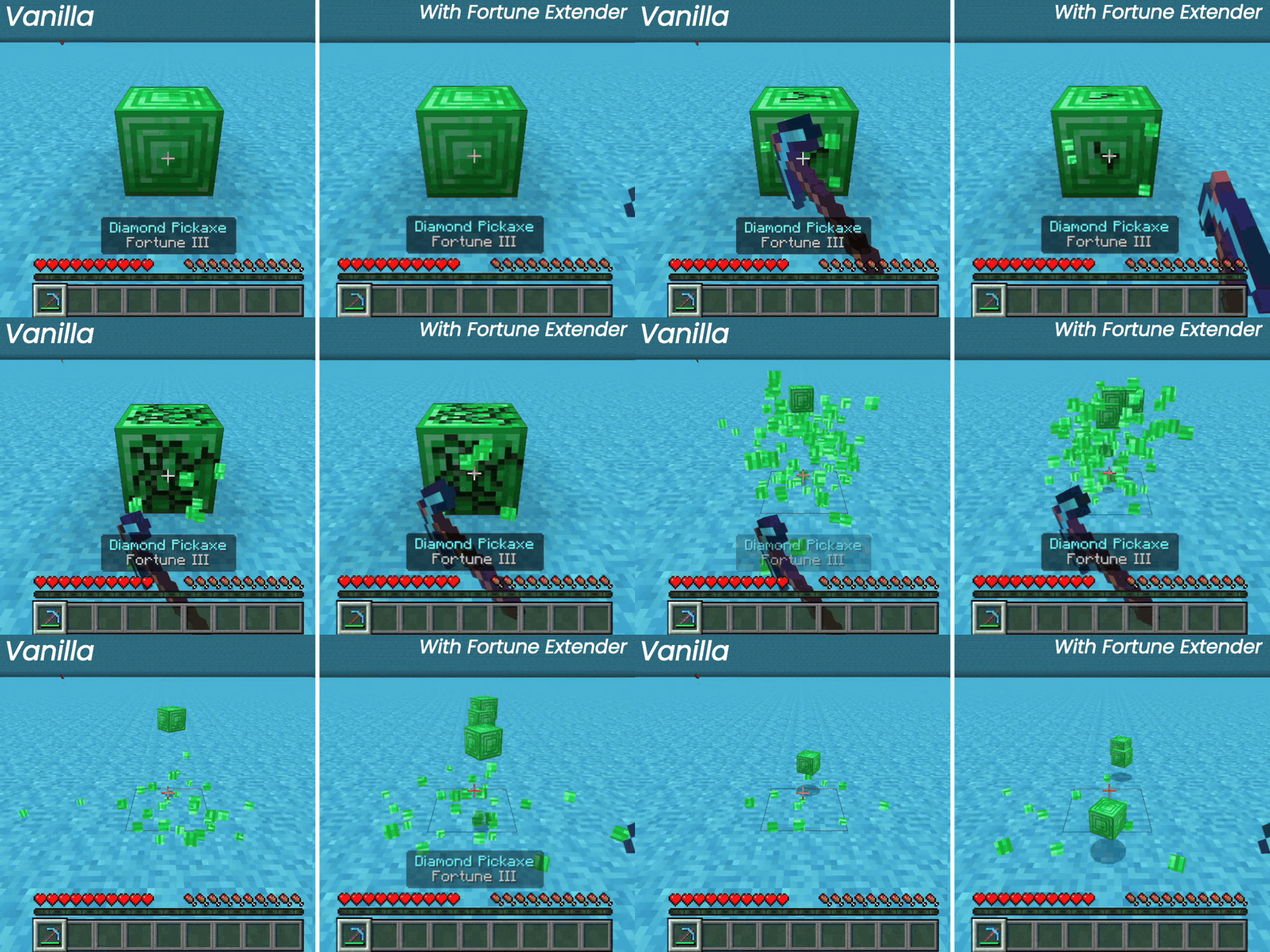
This may affect your survival, this add-on works as a duplicator. Valuable blocks can be duplicated using Fortune.
If you're looking for a balanced experience, this is not for you — but if you just want to have fun, feel free to use this thing.
---
HOW IT WORKS:

Fortune Extender listens for every block you break.
If your tool has Fortune and no Silk Touch, it rolls a bonus drop based on the enchantment level:
• Fortune I = 67% for +0, 33% for +1 drop.
• Fortune II = 50% for +0, 25% for +1, 25% for +2 drops.
• Fortune III = 40% for +0, 20% for +1, 20% for +2, 20% for +3 drops.
This works for all tools that are enchanted with Fortune.
Vanilla Fortune blocks (ores, glowstone, etc.) are untouched to prevent conflict.
---
Compatibility:

Blocks from other add-ons are automatically supported as long as they use standard block tags (stone, wood, dirt, plant, minecraft:is_pickaxe_item_destructible, etc.). No configuration needed from other developers.
Perfect combo with my other add-on Hold To Enchant — Auto enchant any tools you're holding.
This add-on doesn't disable achievements!
---
Configuration:
Type /fe:on in chat to toggle on/off the script globally (Operator only).
Status feedback appears as a broadcast when toggled.
---
Requirements:
- Minecraft Bedrock 1.21.20+
---
How To Install?
1. Download the behavior pack (.mcpack)
2. Import to Minecraft
3. Activate it in your world.
- Edition: Minecraft Bedrock
- File type: .mcpack or .mcaddon
- Minecraft versions listed: 26.20, 26.30, 26.40
- How to install: Download the .mcpack or .mcaddon file. → Open it — Minecraft imports it. → In your world: Behavior Packs → Available → Activate, then the same under Resource Packs.
- Where to get it: Opens on CurseForge — not every file is mirrored on our own servers.
Install steps are the general flow for this file type — How to install Minecraft Bedrock addons & mods walks through it step by step.
- Save it as Fortune Extender v1.2.1 (release-131026).mcaddon before opening — it downloads as .mcpack, but it is a .mcaddon pack
- Manifest requires Minecraft 1.21.20 or newer
- Complete pack — everything it depends on is inside the file
- Download size: 16 KB
- Download link checked 5 Oct 2026 — working
These come from our own check of the pack file, not from the source page.
🧩 In these setups curated mod combos that play well together




Related Bedrock mods

RarityForge Addon (26.x, 1.21) – MCPE/Bedrock Mod

Blue Cheese 16x Texture Pack (26.x, 1.21) – MCPE/Bedrock

Stone Factory Addon (26.x, 1.21) – MCPE/Bedrock Mod
Spartan's Mech Addon (1.20) – MCPE/Bedrock Mod

Mini Apocalypse - v0.0.3