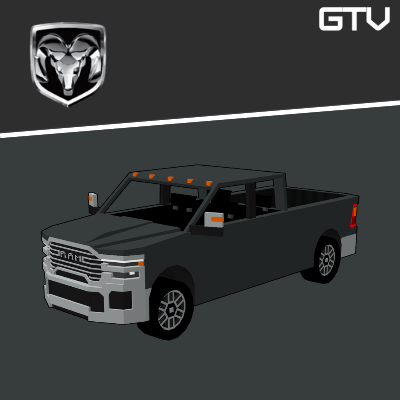
HomeBedrockAddonsGTV | RAM CARS
GTV | RAM CARS
AddonsBedrock

GTV | RAM CARS

by GTV · on CurseForge

🇺🇸RAM Cars addon for Minecraft Bedrock: cars with emissive headlights, customizable colors, real fueling, progressive speed, speedometer, animations…

Which Minecraft do you have?

Every version of the game needs its own build. Pick yours, then download — the wrong build installs fine and then does nothing in the game.

⬇ Download for 1.21.130–26.0⬇ Download for 1.21.101⬇ Download for 1.21.100⬇ Download for 1.21.90⬇ Download for 1.21.70⬇ Download for 1.21
I don't know my version
Open Minecraft and look at the bottom-left corner of the main screen — the version is printed there, like v1.26.30.
The game writes a 1. in front; the buttons above leave it off. v1.26.30 in the game is 26.30 here.
GTV | RAM CARS — screenshot 1

🚘 Heavy-duty power and unstoppable capability brought to Minecraft Bedrock.

Step into the world of Ram, where strength, durability, and torque define every drive. This addon brings powerful Ram trucks to Minecraft Bedrock, delivering massive pulling power, strong acceleration, and immersive driving mechanics — built for hauling, off-road challenges, and dominating any terrain with confidence.


⚠️ATTENTION!!!

This addon is an independent fan-made project created exclusively for use in Minecraft and intended solely for entertainment purposes.

It has no official connection, partnership, authorization, sponsorship, or endorsement from RAM or any other real-world automotive manufacturer, brand, or company.

All trade names, trademarks, and references mentioned belong to their respective owners and are used strictly for informational and descriptive purposes.


VEHICLES:


ENGINES:


MECHANICS:


Start → Neutral

Neutral → Drive

Drive → Neutral (only when stopped)


    1. After fueling the vehicle, a key is required to operate it. Without the key, the interaction "No Key" will be displayed.
    2. To start the vehicle, hold the key in your hand and interact with the car. The "Start" option will appear, allowing you to drive.
    3. To turn off the vehicle, repeat the same process while holding the key — the "Stop" option will be displayed.


Each fuel type has its own maximum capacity. Players must manage fuel carefully to keep their vehicles running efficiently.


  1. To drive any vehicle, it must be fueled beforehand using coal or redstone before entering the car.
  2. To refuel, hold the fuel item in your hand and interact with the vehicle.
  3. When refueling, the vehicle must be turned off before adding more fuel.


🇧🇷 Brazil (Português), 🇧🇬 Bulgaria (България), 🇨🇦 Canada (English / Français), 🇨🇳 China (中文), 🇨🇿 Czech Republic (Čeština), 🇩🇰 Denmark (Dansk), 🇫🇮 Finland (Suomi), 🇫🇷 France (Français), 🇩🇪 Germany (Deutsch), 🇬🇷 Greece (Ελληνικά), 🇭🇺 Hungary (Magyar), 🇮🇩 Indonesia (Bahasa Indonesia), 🇮🇹 Italy (Italiano), 🇯🇵 Japan (日本語), 🇲🇽 Mexico (Español), 🇳🇱 Netherlands (Nederlands), 🇳🇴 Norway (Norsk), 🇵🇱 Poland (Polski), 🇵🇹 Portugal (Português), 🇷🇺 Russia (Русский), 🇸🇰 Slovakia (Slovenčina), 🇰🇷 South Korea (한국어), 🇪🇸 Spain (Español), 🇸🇪 Sweden (Svenska), 🇹🇼 Taiwan (繁體中文), 🇹🇷 Turkey (Türkçe), 🇺🇦 Ukraine (Українська), 🇬🇧 United Kingdom (English), 🇺🇸 United States (English).

Quick facts

Install steps are the general flow for this file type — How to install Minecraft Bedrock addons & mods walks through it step by step.

Verified by MCModsHub

These come from our own check of the pack file, not from the source page.

Explore more