HomeBedrockAddonsRussian Road Signs+
Russian Road Signs+
AddonsBedrock

Russian Road Signs+

by BlueSlime · on CurseForge

ussian Road Signs+ will add signs, traffic lights and barriers to your world, and the Road Addon will add a road. Build your city in which there will be…

⬇ Download on CurseForge
Russian Road Signs+ — screenshot 1

Map "Aitrsk City [1.20+] bedrock port by D.W.S system"

>>Links<<

If you found an bugs or wanted to contact me, visit my discord or telegram server.

Alternative links to all files + textures for editing + old versions

>>DLC<<

Belarusian Road Signs
Ukraine Road Signs
Kazakhstan Road Signs


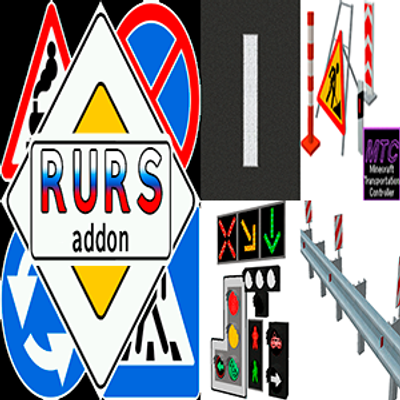
Russian Road Signs is an addon that will add more than 100 types of road signs to your world, and its additions will add guard rails, traffic lights, road and markings, and several road decorations. But about each add-on in order.


>>Russian Road Signs<<

The signs and poles are made in the form of blocks, to receive them, put the item "group" or poles in the stonecutter.


To place the pole vertically, place it under yourself or above the installation site, otherwise the pole will be placed horizontally.


The signs of each group will be shown below (not all signs are shown, to save space in the screenshot).


Types of poles and LED panels (not all poles and panels are shown)


>>Traffic Lights addon<<

This addon will add traffic lights (transport, reverse, pedestrian and others), sections and semaphores, as well as sound signals for semaphores. The /function command is used for operation. You can download the file with the commands in along with the addon.


To create a working environment in which traffic lights will work, you need to know how the command block works!

Basic commands:
- summon - for the exact location of both the traffic light and its sections.
- tag - for marking traffic lights to which commands will be applied.
- function - to activate the desired animation.

Sequence:
1. summon tl:traffic_light_1 1 -57 7 90 (creating a traffic light in the right place).

2. tag @e[type=tl:tl_1 aa, r=2] add "tag" (Available tags are a, b, c, d. We are issuing an tag for the traffic light that we created. It can be set to either one or several traffic lights).

3. (in the command block) function tl_1aa_yellow (animation playback).

A world with a couple of examples of intersections will be available for download. You can study how traffic lights work.


>>Road addon<<

This addon will add 4 types of asphalt, markings (2 colors), semi-blocks, artificial bumps and the inscriptions school, stop, speed limit and more.


To get the markings, put the asphalt of the desired color into the stonecutter.


>>Guard rails addon<<

The addon is suitable for the Road addon because it adds guard rails.


To get the rest of the guard rails variations, put the desired guard rails into the stonecutter.


>>Road decorations addon<< 

The addon will add several decorations for the map such as cones, columns, photo radars, etc.


The addon works together with the Minecraft Transport Controller, which allows you to place wires (this addon is not required to be installed)

Using MTC, place the addon below other addons! This is mandatory!


To download, you will have a choice of several versions of the RRS, Traffic Lights and Road addon addons. Below is an explanation for each version.

RURS:

HIGH - textures 300x300 and above (not suitable for devices with 4GB of RAM)

MEDIUM - textures 128x128 and above

LOW - textures 32x32 and higher


Traffic Lights:

FULL - all traffic lights and semaphores

LITE 1 - only old-style traffic lights (tl1), tram and reverse

LITE 2 - only semi-flat traffic lights (TL2), tram and reverse

LITE 3 - flat traffic lights only (TL 3), tram and reverse

TLA Semaphores - semaphores only


Road Addon:

HIGH - FULL - 4 types of asphalt, texture size 300x300

HIGH - LITE - 2 types of asphalt, texture size 300x300

LOW - FULL - 4 types of asphalt, texture size 32x32

LOW - LIFE - 2 types of asphalt, texture size 32x32


Update 05/09/2026

RRS:


Road Addon:


Traffic Lights:


Road Decorations:


Guard rails:


Quick facts

Install steps are the general flow for this file type — How to install Minecraft Bedrock addons & mods walks through it step by step.

Verified by MCModsHub

These come from our own check of the pack file, not from the source page.

📺 Bedrock videos for Russian Road Signs+ watch on YouTube ↗

Russian Road Signs + Road Addon MINECRAFT IN TAMIL #1 #minecraftYouTubeRussian Road Signs + Road Addon MINECRAFT IN TAMIL #1 #minecraftPondy ClickzRoads Plus Add-on Signs and Markings Update - Minecraft Marketplace TrailerYouTubeRoads Plus Add-on Signs and Markings Update - Minecraft Marketplace TrailerMobBlocksIN RUSSIA ROAD IS ROAD #shorts #minecraft #shortsminecraft #minecraftshortsYouTubeIN RUSSIA ROAD IS ROAD #shorts #minecraft #shortsminecraft #minecraftshortsStargamesHow to make Custom Highway Signs in MinecraftYouTubeHow to make Custom Highway Signs in MinecraftThe Swedish PandaMinecraft Freeways A1- A54 with ROAD MOD and SIGNS [Minecraft Realistic Driving]YouTubeMinecraft Freeways A1- A54 with ROAD MOD and SIGNS [Minecraft Realistic Driving]Highways in Minecraft MM
🎬Made a video about Russian Road Signs+? Feature it #1 here for free — put the mcmodshub.com link near the top of your description, or in a pinned comment.

Explore more