

Waypoints Teleport
Save, teleport to, and manage named waypoints across all dimensions
Download both the resource and behaviour pack for crafting the waypoint rod
else bp is enough when using /wp to open menu

Features
Commands
| Command | Effect |
|---|---|
/wp |
Open the Waypoints main menu |
/wprod |
Get a Waypoint Rod |
Getting Started
Obtaining the Waypoint Rod
Craft it: (new)
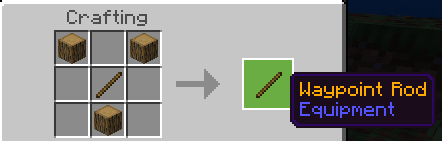
- R = Oak_Log, S = Stick
Or use /wprod to receive one directly.
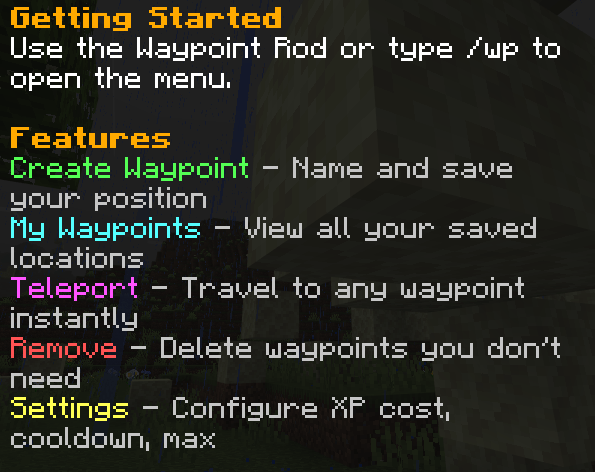
Using the Menu
- Right-click (use) the Waypoint Rod, or type
/wp - Choose from:
- Create Waypoint Enter a name and save your position
- My Waypoints View all saved locations
- Teleport Select a waypoint to travel to
- Remove Delete waypoints
- Settings Adjust XP cost, cooldown, and limits
Settings
Open Settings from the main menu to change:
- XP Cost per Teleport — Choose from preset values (0, 1, 2, 3, 5, 10 levels)
- Cooldown — Choose from preset values (0, 5, 10, 15, 30, 60 seconds)
- Max Waypoints — Choose from preset values (5, 10, 20, 30, 40, 50)
Quick facts
- Edition: Minecraft Bedrock
- File type: .mcpack or .mcaddon
- Minecraft versions listed: 1.21.101, 1.21.100, 1.21.111
- How to install: Download the .mcpack or .mcaddon file. → Open it — Minecraft imports it. → In your world: Behavior Packs → Available → Activate, then the same under Resource Packs.
- Where to get it: Opens on CurseForge — not every file is mirrored on our own servers.
Install steps are the general flow for this file type — How to install Minecraft Bedrock addons & mods walks through it step by step.
Verified by MCModsHub
- Pack type: .mcaddon — behaviour and resource pack in one file
- Manifest requires Minecraft 1.21.100 or newer
- Complete pack — everything it depends on is inside the file
- Download size: 200 KB
- Download link checked 25 Aug 2026 — working
These come from our own check of the pack file, not from the source page.