AddonsBedrock
V-TNT
Bedrock add-on listed for Minecraft 1.19–1.20. Download on the author's site.
⬇ Download on CurseForgeIf you find any addon errors you can use our discord, to report there you can have the update as soon as possible: Join discord.
You can support us using the link "Donate"
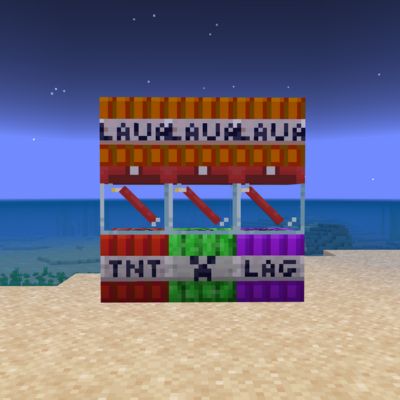
This Add-on adds 4 new tnt to craft, they are blocks .
This Add-On adds 4 new bombs to craft, they are blocks, not entities
 Creeper TNT
A Creeper TNT, which when exploded will spawn several creepers LAG TNT
A TNT that can cause lag, be careful when using this TNT it will make a big explosion leaving fire in its range. Lava TNT
If you use this TNT, it covered everything around it with lava, be careful where you place them, since depending on the level of the Lava-TNT, the size of the lava will be Lava TNT X1

You can support us using the link "Donate"
This Add-on adds 4 new tnt to craft, they are blocks .
How to craft
This Add-On adds 4 new bombs to craft, they are blocks, not entities
Creeper TNTA Creeper TNT, which when exploded will spawn several creepers
LAG TNTA TNT that can cause lag, be careful when using this TNT it will make a big explosion leaving fire in its range.
Lava TNT If you use this TNT, it covered everything around it with lava, be careful where you place them, since depending on the level of the Lava-TNT, the size of the lava will be Lava TNT X1
Quick facts
- Edition: Minecraft Bedrock
- File type: .mcpack or .mcaddon
- Minecraft versions listed: 1.19, 1.20
- How to install: Download the .mcpack or .mcaddon file. → Open it — Minecraft imports it. → In your world: Behavior Packs → Available → Activate, then the same under Resource Packs.
- Where to get it: Opens on CurseForge — not every file is mirrored on our own servers.
Install steps are the general flow for this file type — How to install Minecraft Bedrock addons & mods walks through it step by step.
V-TNT is a free Minecraft Bedrock addon. Compatible with Minecraft 1.19, 1.20. Downloaded 2,845 times (via CurseForge). Download it and open it directly in the game.