MineText Block
Bedrock add-on listed for Minecraft 1.21 (behavior + resource pack). File opened and checked on 23 Sep 2026; installs from the MC Bedrock Mods app on Android.
⬇ Download on CurseForge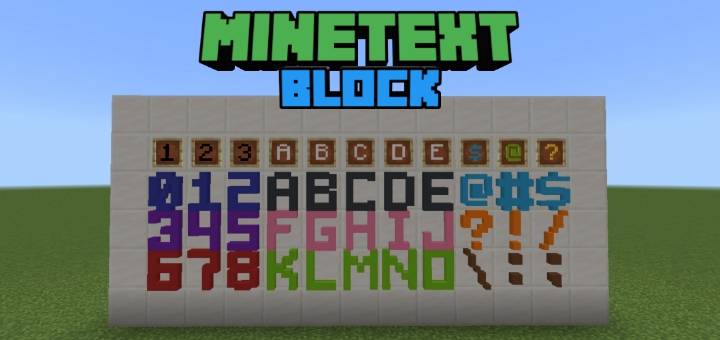
MineText Block introduces 3D block letters, numbers, and symbols to Minecraft, allowing you to design and decorate your structures with these blocks. Use them to create words, label buildings, or add unique decorative elements to your creations.
Obtaining
Obtaining character blocks is simple. Just craft the corresponding crates, place them wherever you'd like, and interact with them to drop the items.
Here's how to craft Crate of Letters

Here's how to craft Crate of Numbers

Here's how to craft Crate of Symbols

Dyeing Characters
The crates drop white character blocks. To create different colors, simply combine the items with dye in a crafting table. The recipe is shapeless, so you can place the items anywhere in the crafting grid.

Glowing Characters
By default, these characters do not emit light. To make them glow, use a glow ink sac and interact with the characters. This will make them emit light, similar to how you can make text on signs glow.

Function Command
You can also use /function command to obtain your desired characters faster.

For future updates or feedback for my addon and to connect with us join in my Discord Server here
- Edition: Minecraft Bedrock
- File type: .mcpack or .mcaddon
- Minecraft versions listed: 1.21.20, 1.21.21
- How to install: Download the .mcpack or .mcaddon file. → Open it — Minecraft imports it. → In your world: Behavior Packs → Available → Activate, then the same under Resource Packs.
- Where to get it: Opens on CurseForge — not every file is mirrored on our own servers.
Install steps are the general flow for this file type — How to install Minecraft Bedrock addons & mods walks through it step by step.
- Pack type: .mcaddon — behaviour and resource pack in one file
- Manifest requires Minecraft 1.21.20 or newer
- Complete pack — everything it depends on is inside the file
- Download size: 2.0 MB
- Download link checked 6 Oct 2026 — working
These come from our own check of the pack file, not from the source page.