AddonsBedrock
QB Furniture
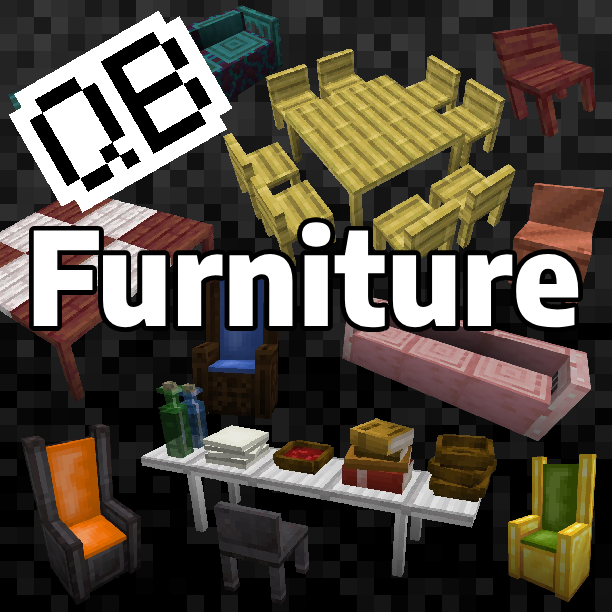
Decorate your Minecraft world using simple furniture, designed to blend into your own worlds, both in survival and creative.
I don't know my version
Open Minecraft and look at the bottom-left corner of the main screen — the version is printed there, like v1.26.30.
The game writes a 1. in front; the buttons above leave it off. v1.26.30 in the game is 26.30 here.


Decorate your Minecraft world using simple furniture.
- All furniture are designed to blend into your own Minecraft worlds, both in survival and creative.
- Includes tables and wall-mounted shelves, and 3 types of seating.
- Interact with a seat to sit on it. Interact with a table to crawl beneath it.
- Plus, for additional decoration, some select Minecraft items can be placed on tables and wall-mounted shelves.
95 Seating Blocks
- 23 Chairs, using wooden and metal variations
- 24 Log Benches, using all wood and stripped variations
- 48 Thrones, using wood, gold and netherite, with padding in all 16 colors each
23 Tables and 23 Wall-mounted Shelves
- Using wooden and metal variations.
- Oak, Birch, Spruce, Jungle, Acacia, Dark Oak, Mangrove, Cherry, Pale Oak, Bamboo, Crimson & Warped
- Iron, Copper (8 variations of oxidization and waxed), Gold & Netherite
Decorate your tables and wall-mounted shelves using standard Minecraft items.
- Place bowls, soups and stews.
- Place stacks of paper or empty maps.
- Place glass or water bottles.
- Place stacks of books on tables, or arrange on shelves.
Interact with furniture and decoration for additional gameplay.
- Interact with any seat to sit in it.
- Interact with the side of a table to crawl beneath it.
- Add items to stacks, or sneak while interacting to take items away.
Additional Information
Crafting
- Tables, chairs, thrones and wall-mounted shelves can be crafted using sticks and either slabs (for wood furniture) or ingots (for metal).
- Log Benches use logs or stripped logs to craft (including stems and bamboo blocks); a log bench cannot be stripped once crafted.
- To craft netherite furniture, combine the gold version with Netherite Scraps.
- Thrones require wool to be crafted and will the same color for the padding.
- Craft any thone with another colored dye to change its color.
Creative
- All furniture can be found in the Creative - Items menu.
- Block versions for items can also be found in this menu.
Placing
- Thrones are 2 blocks high and require an empty space above the block you are placing it onto.
- Consecutively placed tables will automatically remove the adjoining legs. Only legs on corners will remain.
- Shelves will adapt to bend around corners.
- The listed compatible items can only be added individually to the tops of table or shelf blocks.
- But, using Creative mode, their equivelent blocks can be placed anywhere.
- The number of items in a block can be adjusted by interacting in both Creative and Survival.
- Items that stack upwards have no limit to the stack size.
- Items cannot be mixed in the same block; e.g. you cannot add a water bottle to a glass bottle block.
Quick facts
- Edition: Minecraft Bedrock
- File type: .mcpack or .mcaddon
- Minecraft versions listed: 26.0.02, 26.0, 26.3
- How to install: Download the .mcpack or .mcaddon file. → Open it — Minecraft imports it. → In your world: Behavior Packs → Available → Activate, then the same under Resource Packs.
- Where to get it: Opens on CurseForge — not every file is mirrored on our own servers.
Install steps are the general flow for this file type — How to install Minecraft Bedrock addons & mods walks through it step by step.
Verified by MCModsHub
- Pack type: .mcaddon — behaviour and resource pack in one file
- Manifest requires Minecraft 1.26.0 or newer
- Complete pack — everything it depends on is inside the file
- Download size: 1.3 MB
- Download link checked 25 Aug 2026 — working
These come from our own check of the pack file, not from the source page.