

Item Cooldown System
Item Cooldown System lets you set custom cooldowns on any item in Minecraft Bedrock. Want to slow down combat? Need to balance overpowered items? This addon gives you the tools to do it.
What it does:
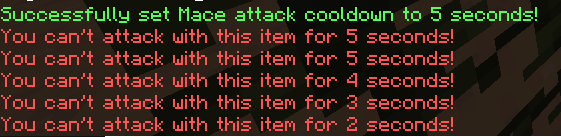
- Attack Cooldowns: Make players wait between attacks with specific items.
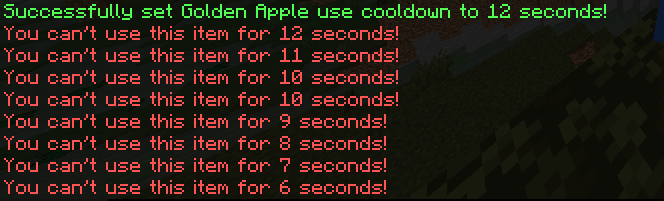
- Use Cooldowns: Add delays to eating, placing blocks, or using items.
- Individual Item Settings: Every item gets its own cooldown (even modded ones!).
How to use:
/itemcooldown help- Shows command info./itemcooldown reset- Clears all cooldowns./itemcooldown attackCooldown <item> [duration]- Set attack delay in seconds./itemcooldown useCooldown <item> [duration]- Set use delay in seconds.
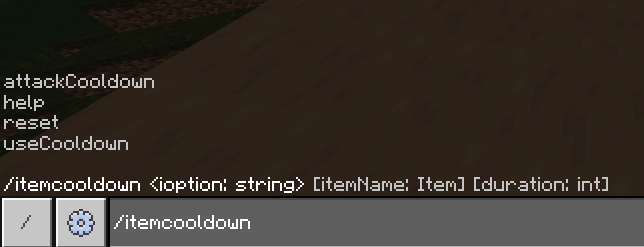
Set cooldown of item to 0 to not have a cooldown it, or -1 to completely disable make an item unusable.
Great for PvP servers, custom maps, or just tweaking gameplay to your liking.
Thanks for downloading :D
Check out my discord server! https://discord.gg/RMp3Wvfn4M
Donate to me on https://ko-fi.com/cennac
Quick facts
- Edition: Minecraft Bedrock
- File type: .mcpack or .mcaddon
- Minecraft versions listed: 1.21.130, 26.0
- How to install: Download the .mcpack or .mcaddon file. → Open it — Minecraft imports it. → In your world: Behavior Packs → Available → Activate, then the same under Resource Packs.
- Where to get it: Opens on CurseForge — not every file is mirrored on our own servers.
Install steps are the general flow for this file type — How to install Minecraft Bedrock addons & mods walks through it step by step.
Verified by MCModsHub
- Pack type: .mcaddon — behaviour and resource pack in one file
- Manifest requires Minecraft 1.21.130 or newer
- Complete pack — everything it depends on is inside the file
- Download size: 62 KB
- Download link checked 25 Aug 2026 — working
These come from our own check of the pack file, not from the source page.