The Runes
I don't know my version
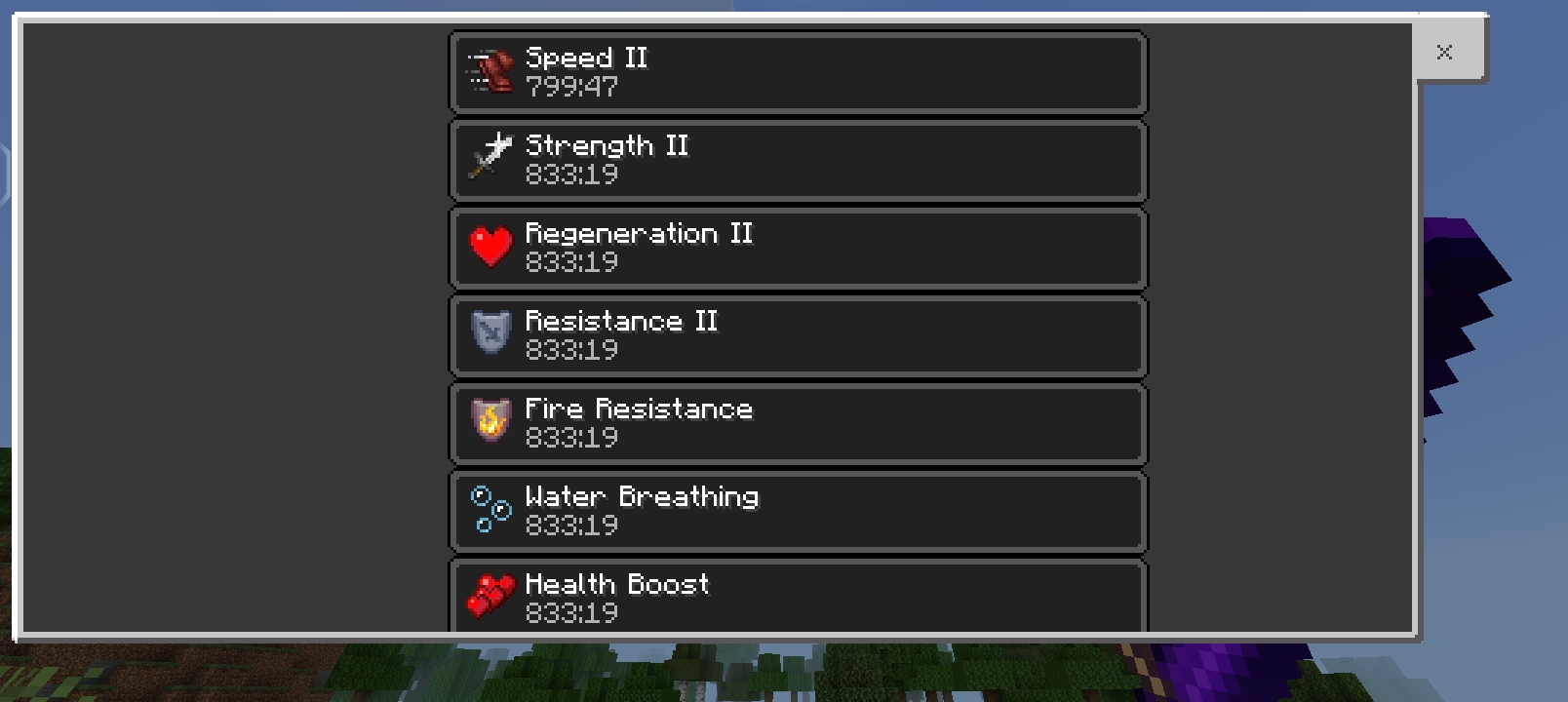
✦ TheRune — Elemental Magic Runes Addon
Version: 1.2.2 Platform: Minecraft Bedrock Edition 1.21+ Category: Items / Magic / RPG
⚡ Overview
TheRune adds 8 Elemental Magic Runes to your world — powerful crystals that grant passive buffs simply by carrying them in your inventory, and devastating Special Abilities you can unleash on command.
Combine all seven elements into the legendary Void Rune — or fuse it with a Diamond Sword to create the ultimate Void Sword.
🔮 The Runes
| Rune | Color | Passive Effect |
|---|---|---|
| 🌀 Wind Rune | Cyan | Regeneration II — heal continuously like a golden apple |
| 🌿 Earth Rune | Green | Strength II + Resistance II — hit harder, take less damage |
| 💧 Water Rune | Blue | Water Breathing — breathe underwater forever |
| 🔥 Fire Rune | Red | Fire Resistance — immune to fire and lava |
| ✨ Light Rune | Gold | +20 Hearts — massively boost your max HP |
| ⚡ Thunder Rune | Yellow | Speed II — move faster permanently |
| 💀 Dark Rune | Dark Gray | Night Vision — see clearly in complete darkness |
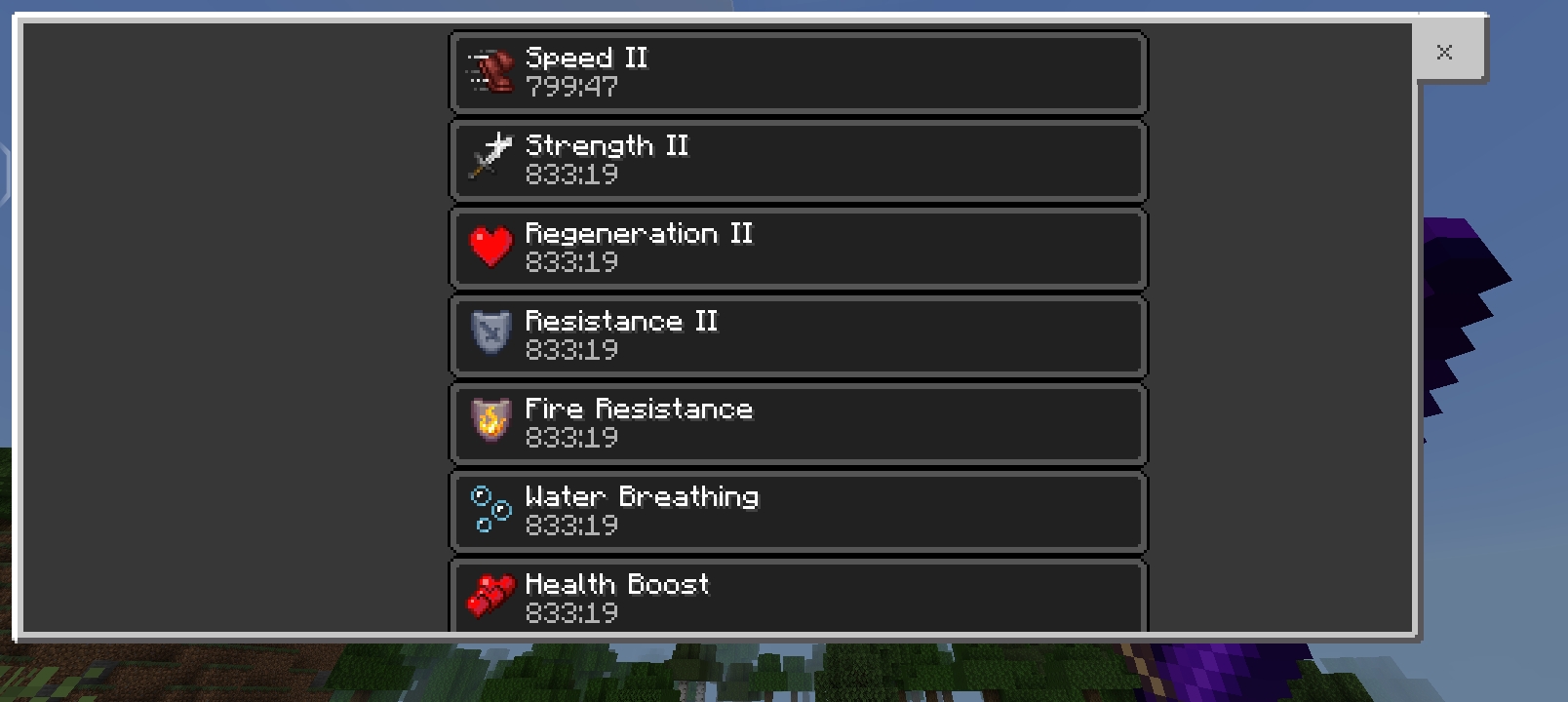
| 🌑 Void Rune | Purple | ALL effects combined — the ultimate rune |
Passive effects activate automatically when the rune is anywhere in your inventory. No need to hold or equip it.
⚡ Special Abilities
Every rune has a Special Ability that you trigger manually. Hold the rune in your main hand and tap the Place/Use button to unleash it.
🌀 Wind Rune — TRIPLE WIND CHARGE
[Hold + Use] → Launch 3 consecutive Wind Charges in rapid succession
- Fires 3 fast-moving wind charge projectiles — one every 0.4 seconds
- Each charge explodes on contact with a powerful blast (Power 4)
- Direct hit launches the enemy upward — sends them flying ~5 blocks into the air
- AoE knockback blasts all nearby enemies outward on impact
- Block scatter — up to 20 surrounding blocks rip free, fly into the air, then auto-place themselves where they land
- Custom glowing blue swirl projectile texture
- After the 3rd shot a 3-second cooldown begins — then activate again for the next burst
🌿 Earth Rune — SPIKE WAVE
[Hold + Use] → Summon 3 lines of 5 dripstone spikes rising from the ground
- Three parallel waves of pointed dripstone erupt from the earth ahead of you
- Each spike grows from base → middle → tip with a 0.4s animation delay
- Damages any mob standing on the spike positions
- Spikes disappear after 3 seconds
- Cooldown: 3 seconds
💧 Water Rune — ICE CUBE
[Hold + Use] → Drop a 4×4×4 powder snow cube from above onto enemies
- A massive cube of powder snow falls from the sky directly in front of you
- Mobs trapped inside are slowed, then frozen — after 7 seconds they take continuous damage
- The base layer visually drops with a falling animation, then the upper layers stack instantly
- Cube disappears after 10 seconds
- Cooldown: 3 seconds
🔥 Fire Rune — TRIPLE FIRE CHARGE
[Hold + Use] → Launch 3 consecutive Ghast-style fire charges in rapid succession
- Fires 3 large, slow-moving glowing fire balls — one every 0.4 seconds
- Each fireball explodes on contact with any block or entity
- Destroys blocks, starts fires, and deals massive AoE damage
- Can be deflected by hitting them back (like a real Ghast fireball!)
- After the 3rd shot a 3-second cooldown begins — then activate again for the next burst
✨ Light Rune — HEAL BURST
[Hold + Use] → Instantly restore ~8 hearts with a burst of healing
- Fires an instant healing pulse on yourself
- Visible healing particles confirm the effect
- Cooldown: 30 seconds
⚡ Thunder Rune — STORM STRIKE
[Hold + Use] → Call down lightning on every enemy within 100 blocks
- Instantly strikes every mob and enemy player in a 100-block radius simultaneously
- Each target takes a direct lightning bolt hit + 6 hearts (12 damage) of bonus damage
- Sets all targets on fire with full lightning sound and particle effects
- The action bar shows exactly how many enemies were struck
- Cooldown: 10 seconds
💀 Dark Rune — TRIPLE WITHER SKULL
[Hold + Use] → Launch 3 consecutive Wither Skulls in rapid succession
- Fires 3 dark void orb projectiles — one every 0.4 seconds
- Each skull explodes on contact dealing wither explosion damage
- Applies Wither II for 30 seconds to the direct hit target
- AoE Wither II applied to all entities within 4 blocks of block impacts
- Summons 1 Wither Skeleton at every impact point — 3 skulls = up to 3 skeletons
- Custom dark void orb projectile texture (grey-green core → deep purple-black)
- After the 3rd shot a 3-second cooldown begins — then activate again for the next burst
🌑 Void Rune / Void Sword — RANDOM ABILITY CYCLE
[Hold + Use] → Randomly pick one of the 7 elemental abilities and rapid-fire it for 10 seconds
- Picks a random ability (never repeats the same one twice in a row)
- The chosen ability fires repeatedly for the full 10-second window:
- 🔥 Fire Charge — 10 shots (every 1 second)
- 🌀 Wind Charge — 5 bursts (every 2 seconds, 3 shots per burst)
- 🌿 Earth Spikes — 5 waves (every 2 seconds)
- 💧 Ice Cube — 5 drops (every 2 seconds)
- ✨ Light Heal — 3 pulses (every ~3 seconds)
- ⚡ Thunder Storm — ~6 strikes (every 1.5 seconds)
- 💀 Wither Skulls — 5 bursts (every 2 seconds, 3 skulls per burst)
- After 10 seconds the cycle stops automatically
- Hold + Use again to trigger the next random ability
- The action bar shows which ability is active and how many shots remain
⚔️ Void Sword
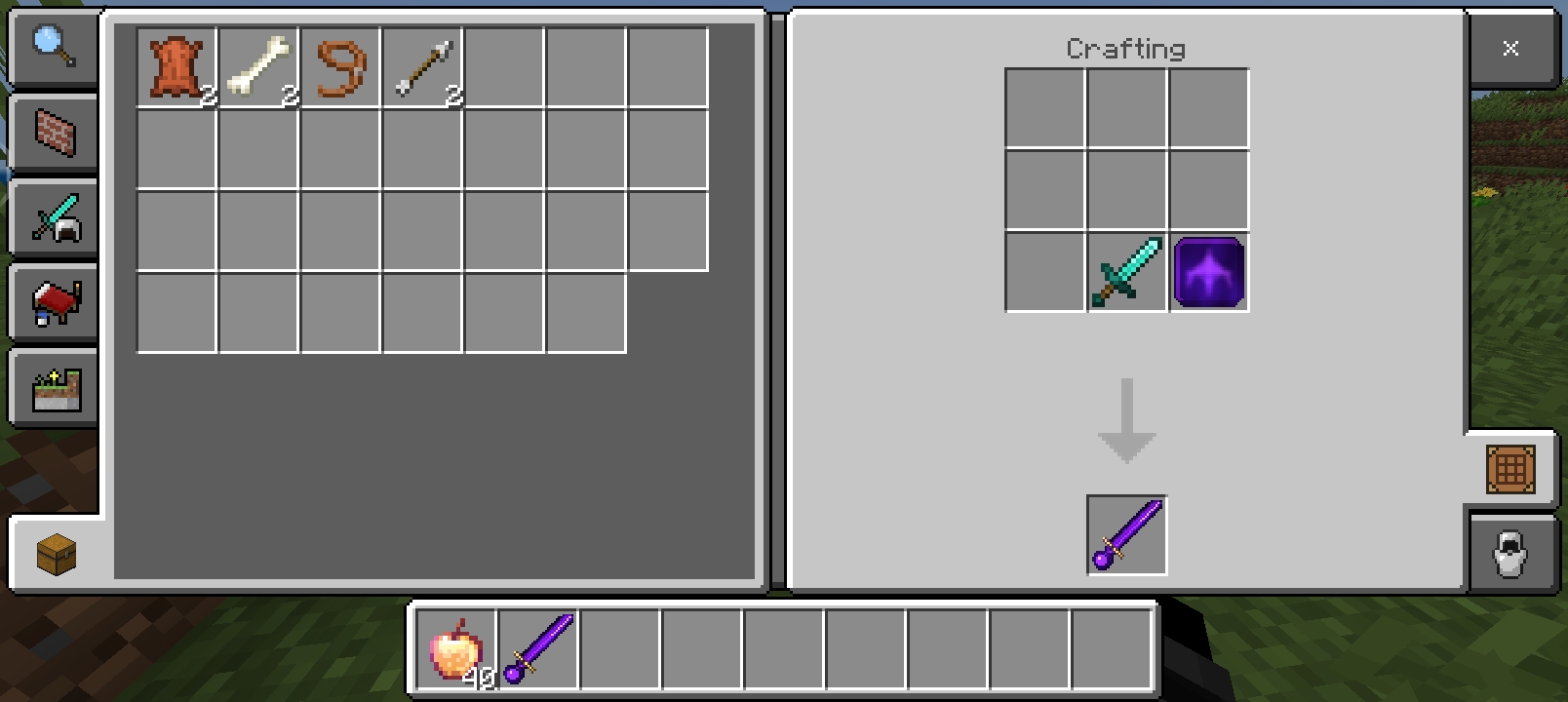
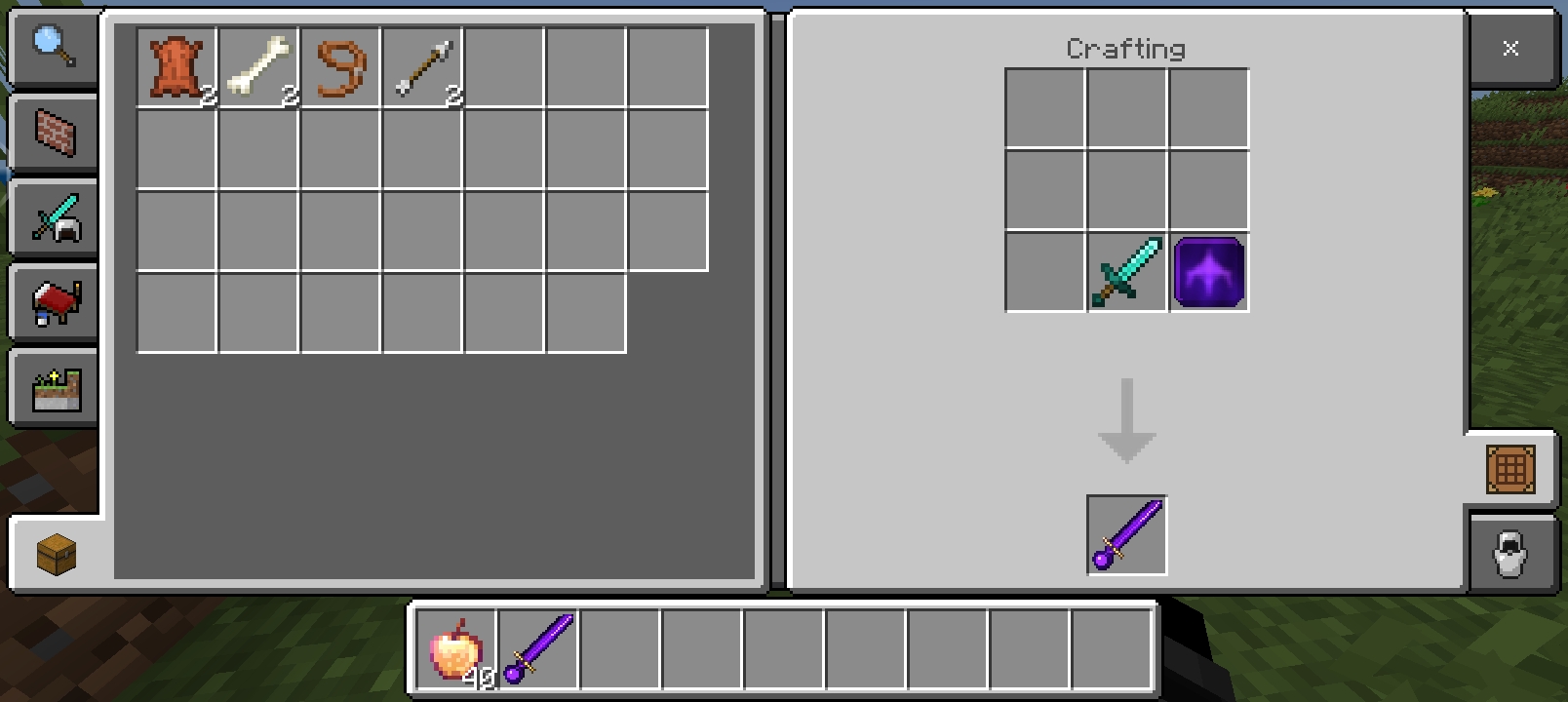
Fuse a Diamond Sword with a Void Rune at a crafting table to create the Void Sword — a glowing purple blade that grants all Void Rune effects and the full random ability cycle while held.
- Regeneration II
- Strength II
- Resistance II
- Water Breathing
- Fire Resistance
- +20 Hearts
- Speed II
- Night Vision
- [Hold + Use] → Random ability rapid-fire for 10 seconds
Passive effects only activate when held in your main hand.
📖 Crafting
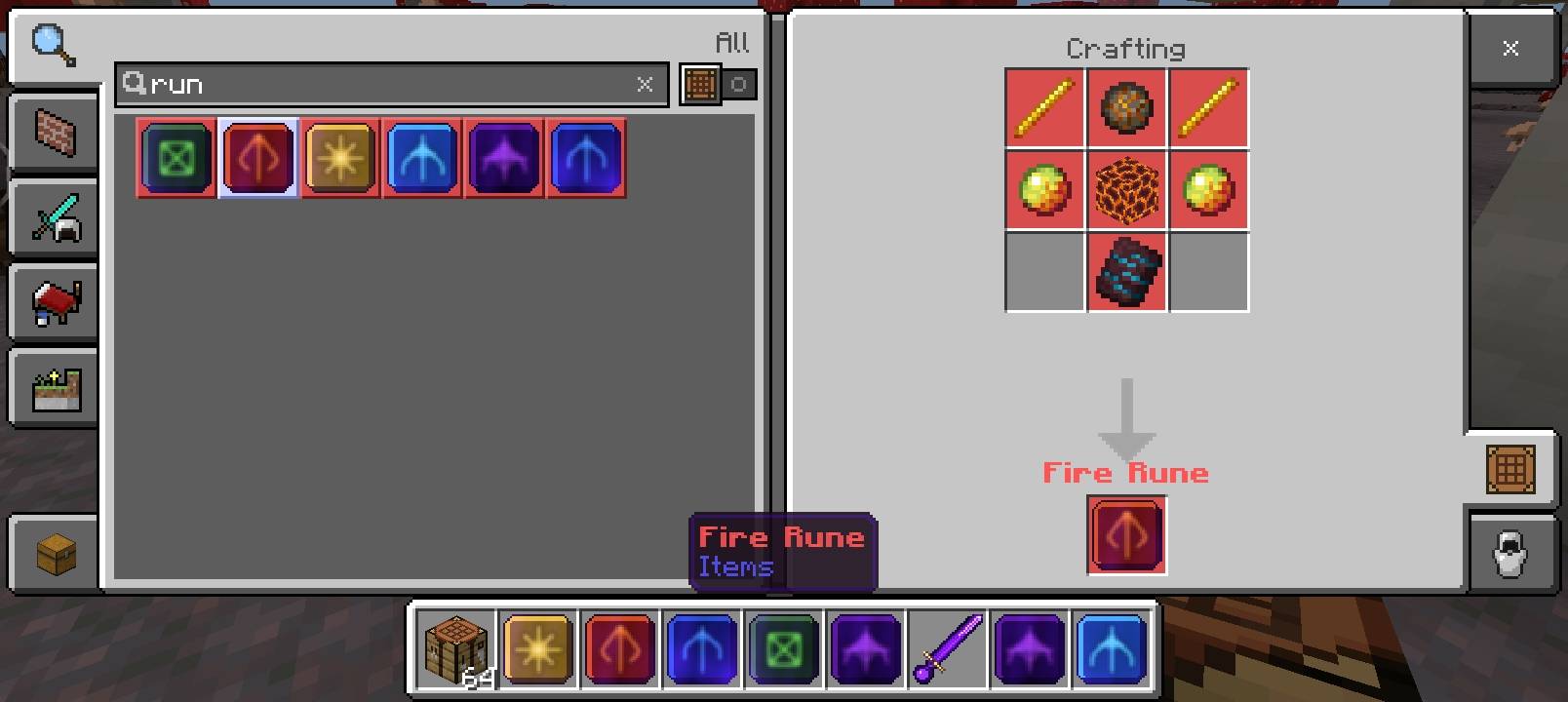
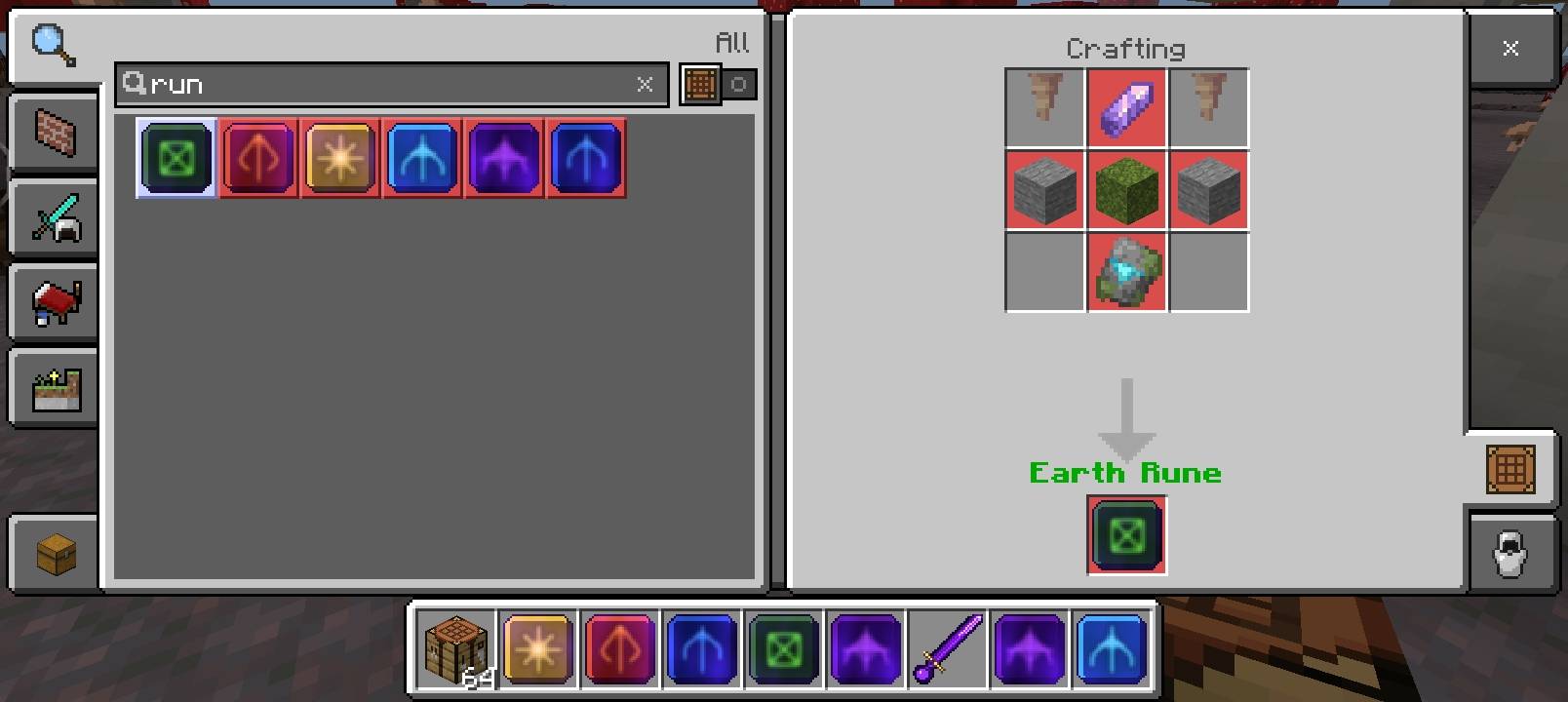
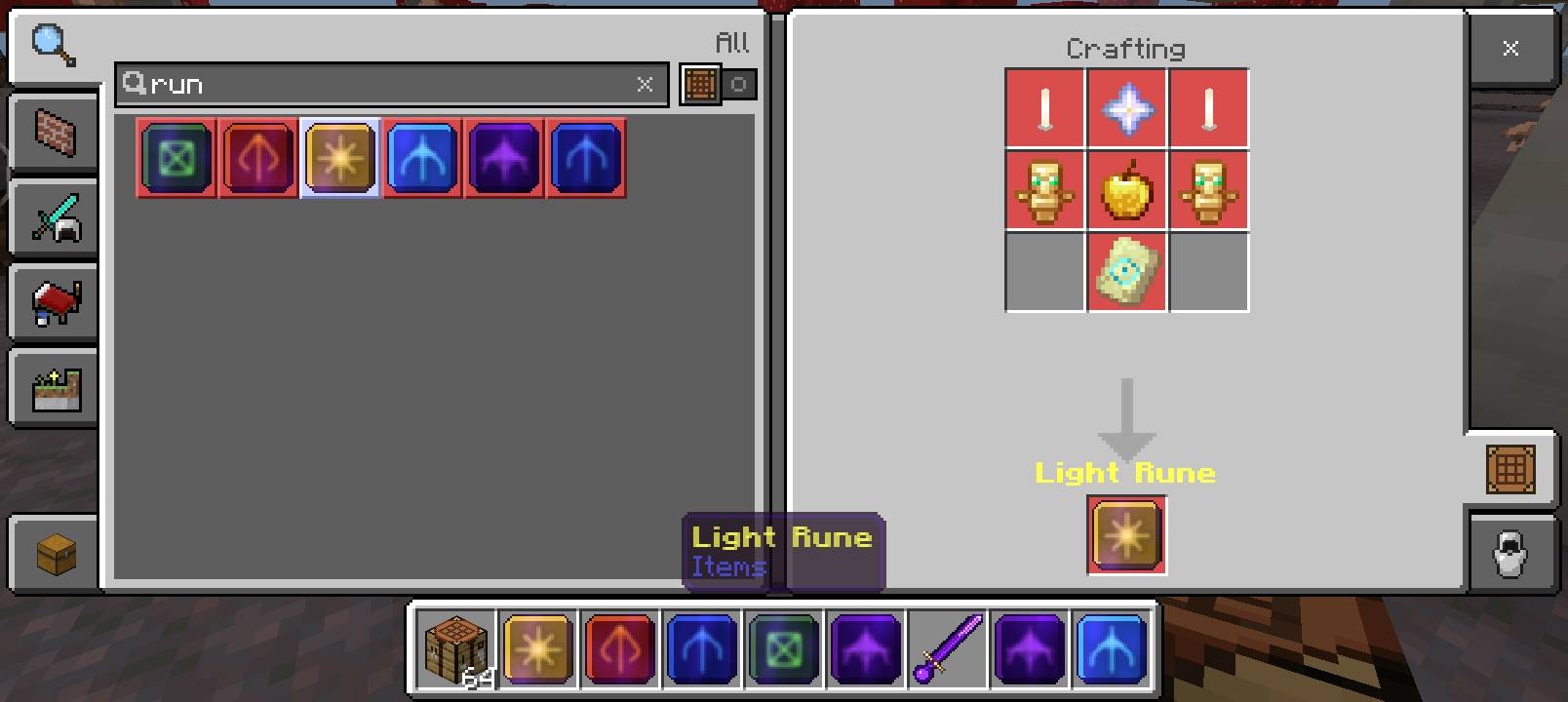
All elemental runes use a shaped 3×3 recipe at the Crafting Table.
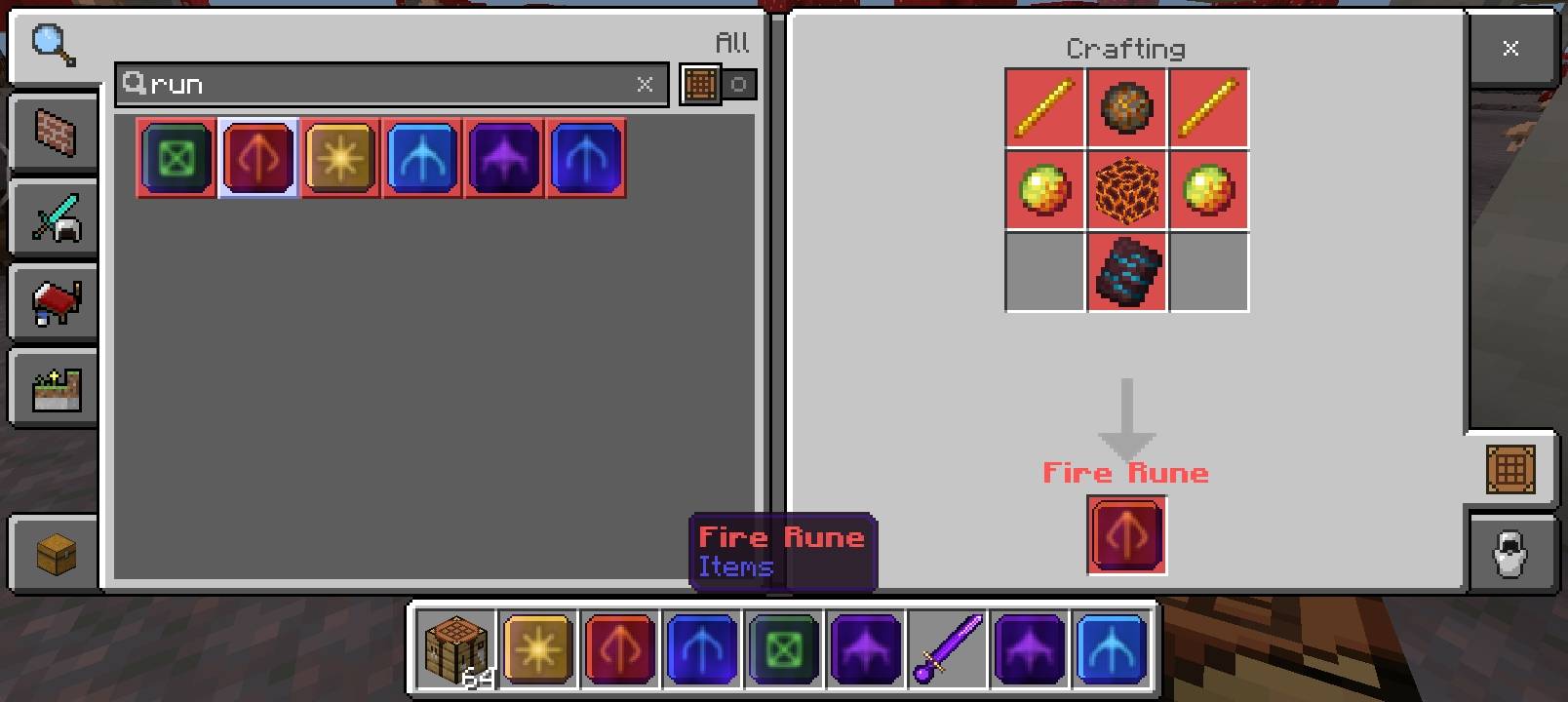
🔥 Fire Rune
[ Blaze Rod  ] [ Fire Charge ] [ Blaze Rod  ]
[ Magma Cream] [ Magma Block ] [ Magma Cream]
[    EMPTY   ] [  Rib Trim   ] [    EMPTY   ]
Ingredients: Blaze Rod ×2, Fire Charge, Magma Cream ×2, Magma Block, Rib Armor Trim
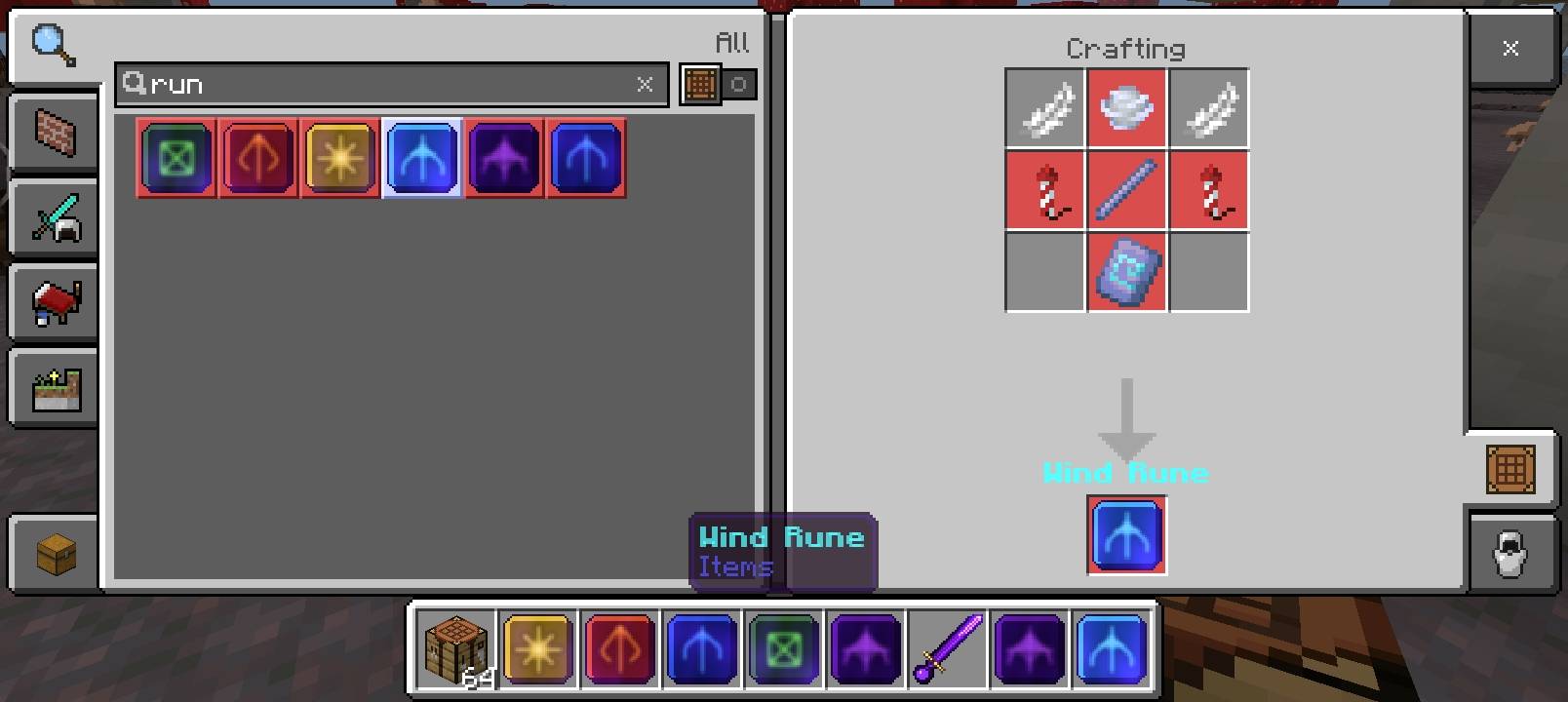
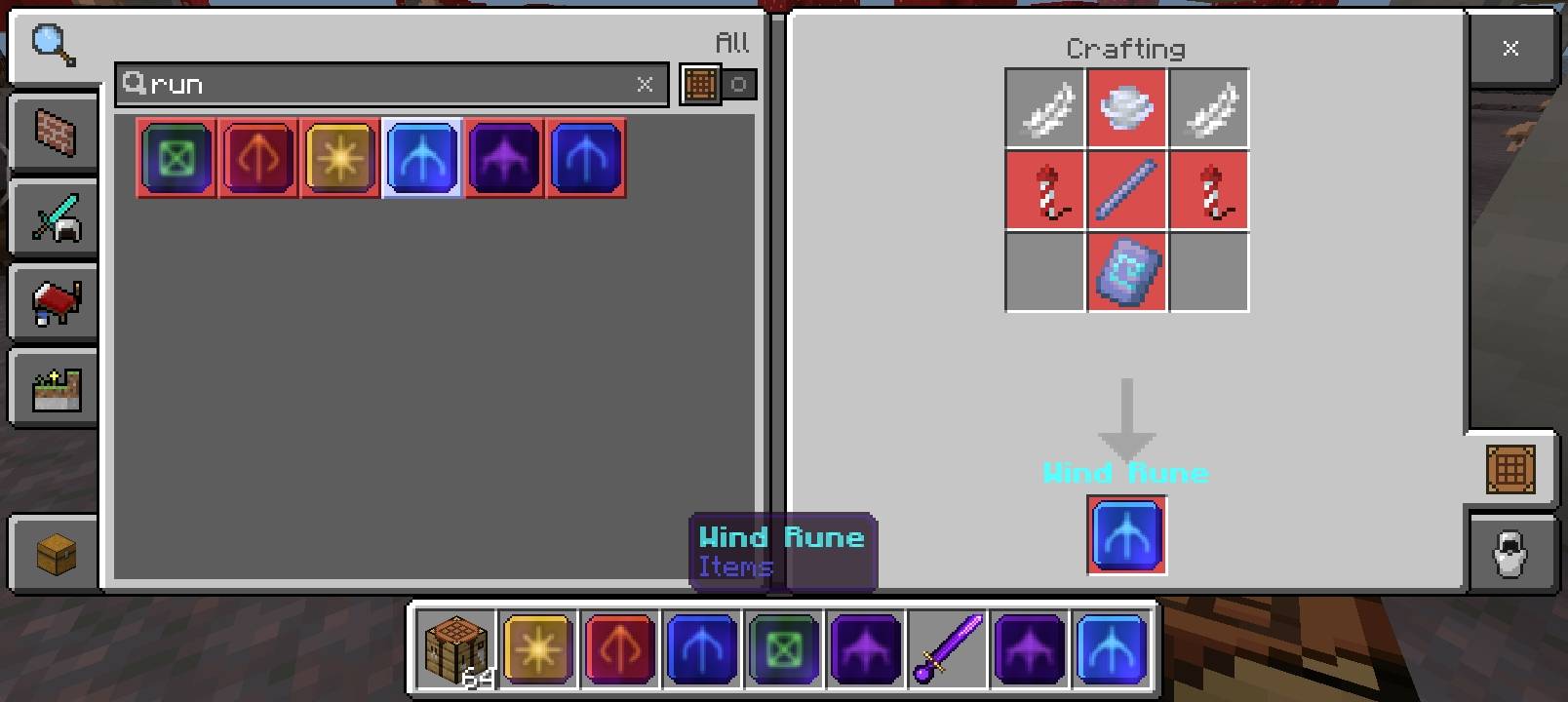
🌀 Wind Rune
[ Feather    ] [ Wind Charge ] [ Feather    ]
[ Firework   ] [ Breeze Rod  ] [ Firework   ]
[    EMPTY   ] [ Flow Trim   ] [    EMPTY   ]
Ingredients: Feather ×2, Wind Charge, Firework Rocket ×2, Breeze Rod, Flow Armor Trim
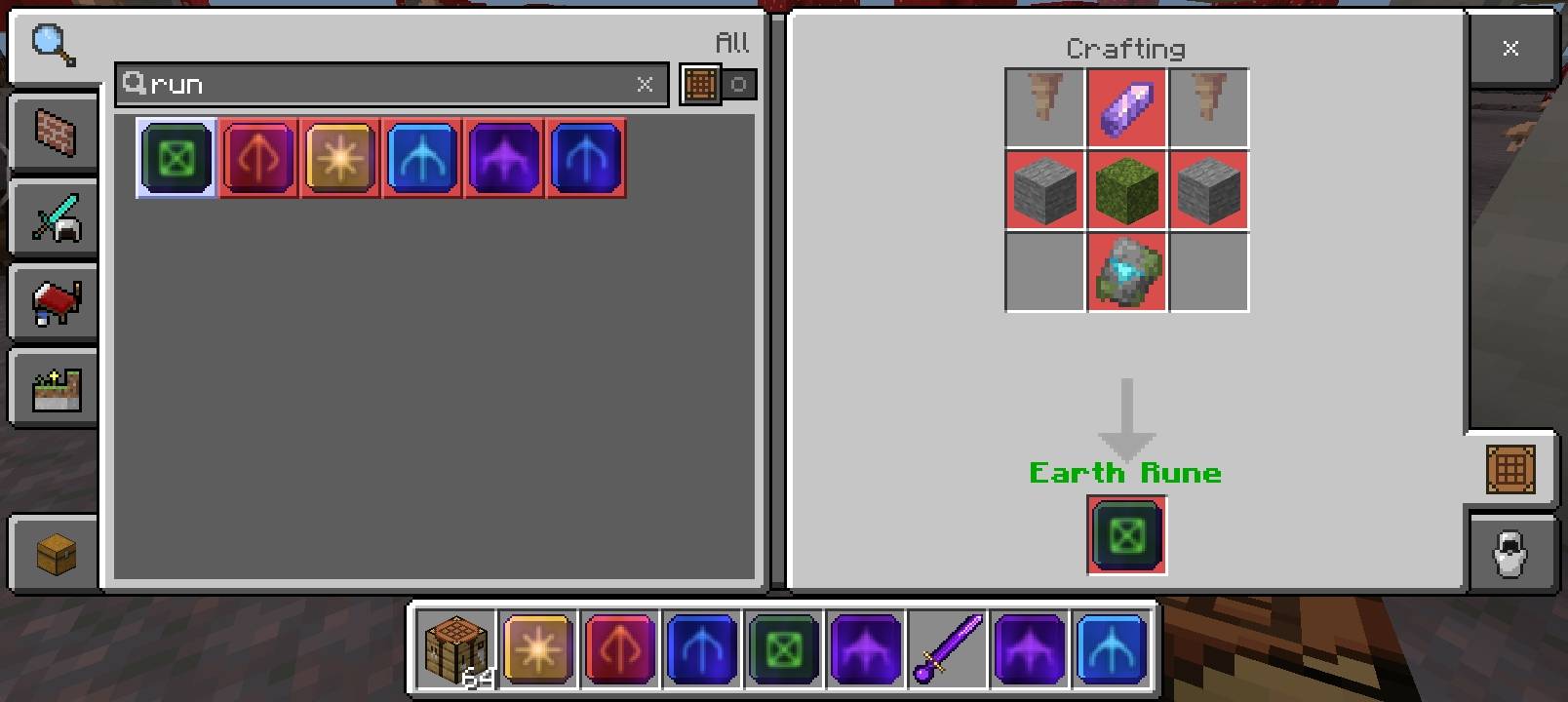
🌿 Earth Rune
[ Dripstone  ] [ Amethyst    ] [ Dripstone  ]
[ Stone      ] [ Moss Block  ] [ Stone      ]
[    EMPTY   ] [ Wild Trim   ] [    EMPTY   ]
Ingredients: Pointed Dripstone ×2, Amethyst Shard, Stone ×2, Moss Block, Wild Armor Trim
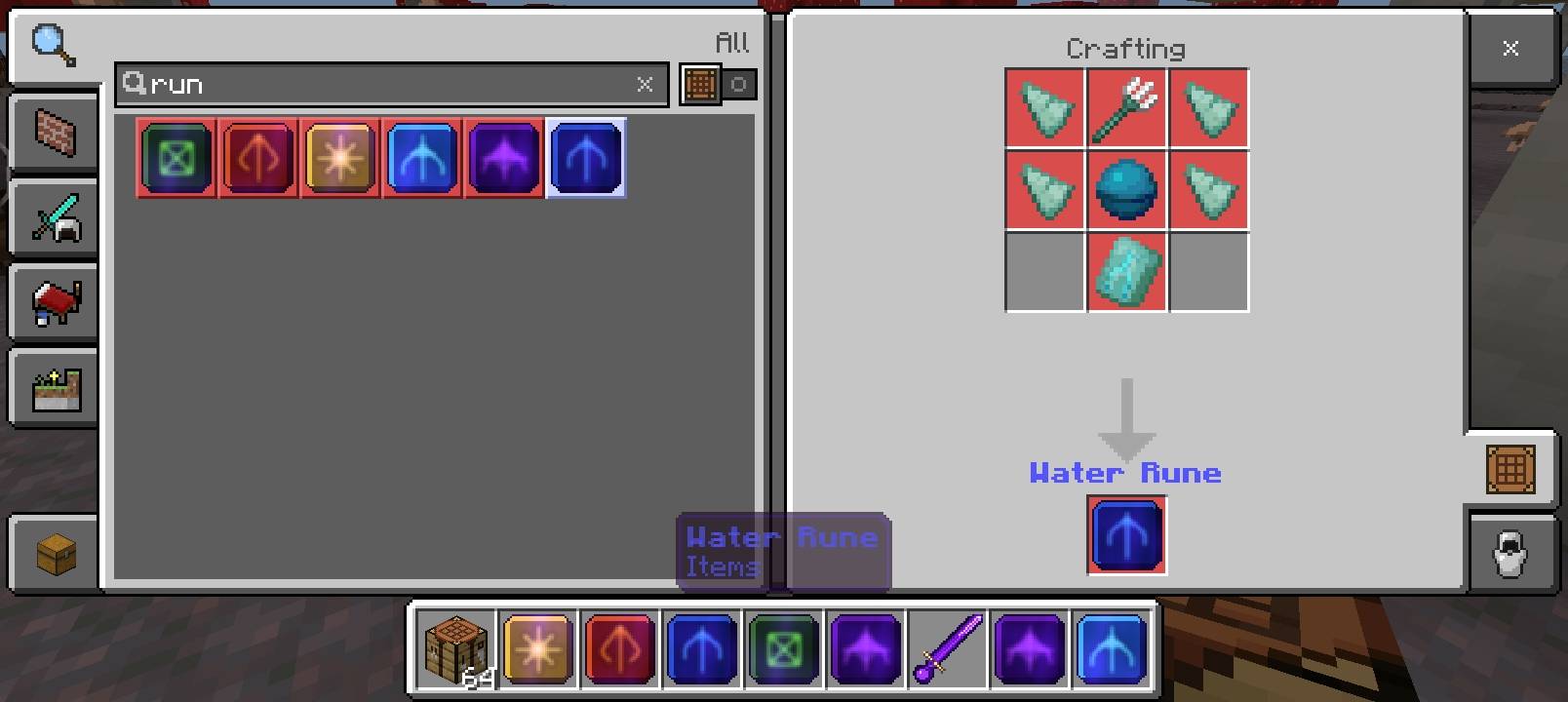
💧 Water Rune
[ Prismarine ] [ Trident     ] [ Prismarine ]
[ Prismarine ] [ Heart/Sea   ] [ Prismarine ]
[    EMPTY   ] [ Tide Trim   ] [    EMPTY   ]
Ingredients: Prismarine Shard ×4, Trident, Heart of the Sea, Tide Armor Trim
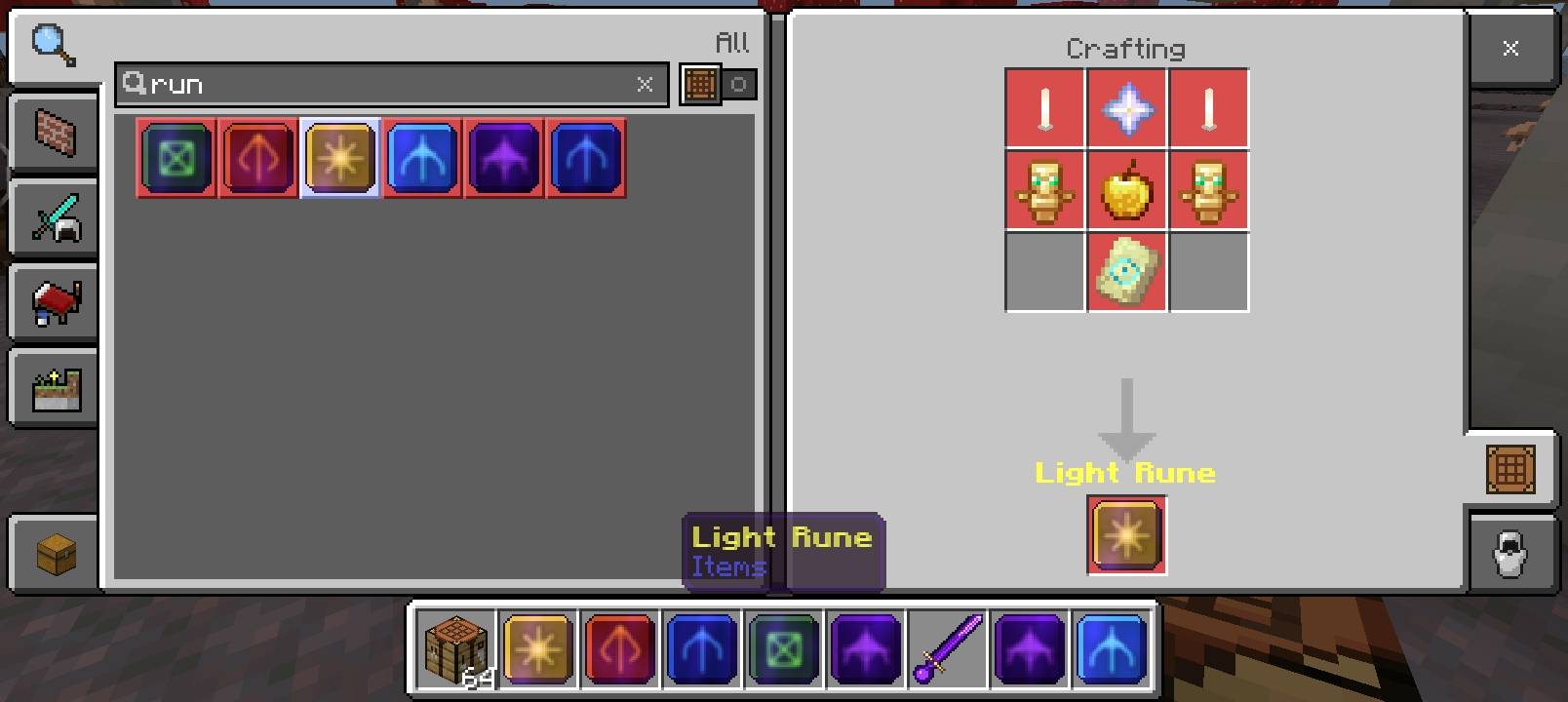
✨ Light Rune
[ End Rod    ] [ Nether Star ] [ End Rod    ]
[ Totem      ] [Golden Apple ] [ Totem      ]
[    EMPTY   ] [  Eye Trim   ] [    EMPTY   ]
Ingredients: End Rod ×2, Nether Star, Totem of Undying ×2, Golden Apple, Eye Armor Trim
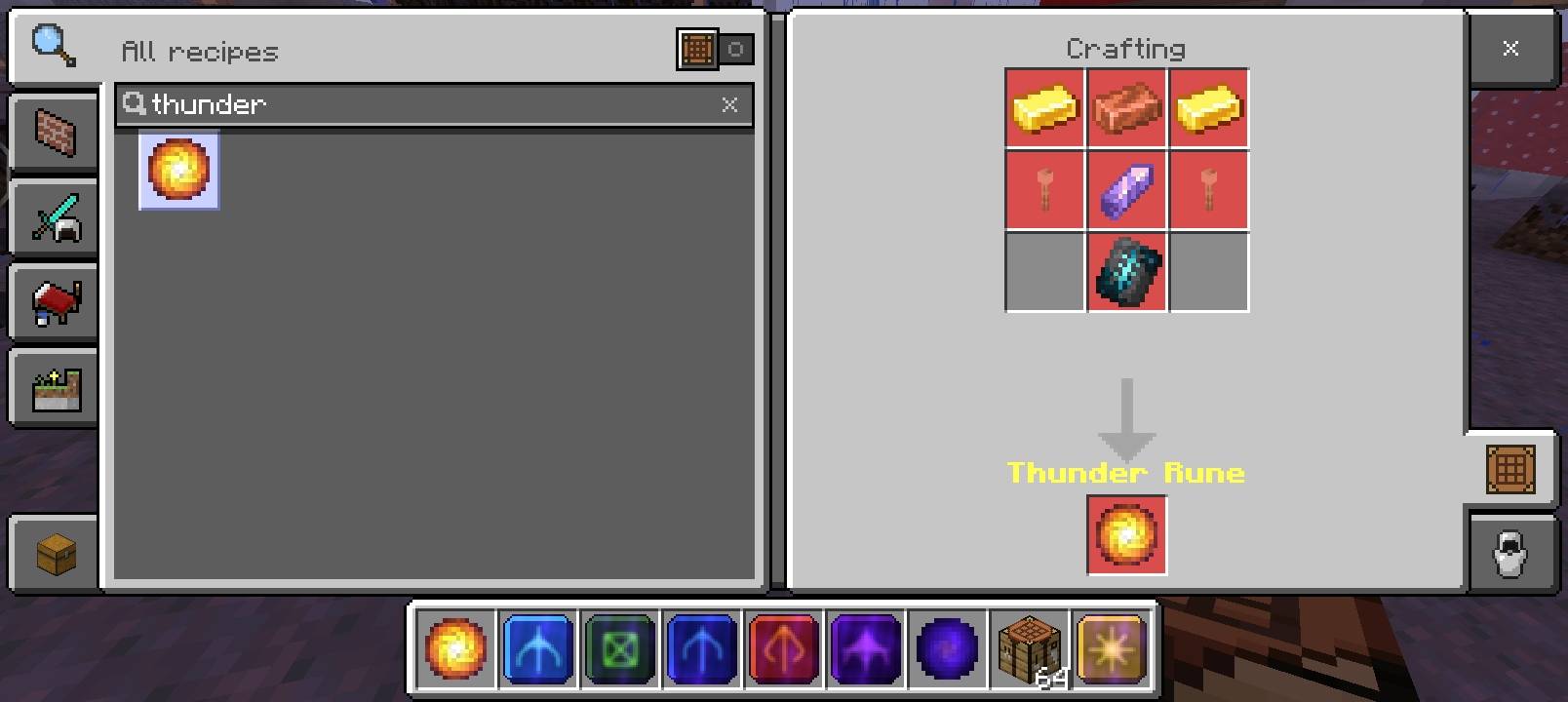
⚡ Thunder Rune
[ Gold Ingot ] [Copper Ingot ] [ Gold Ingot ]
[Lightn. Rod ] [ Amethyst    ] [Lightn. Rod ]
[    EMPTY   ] [Silence Trim ] [    EMPTY   ]
Ingredients: Gold Ingot ×2, Copper Ingot, Lightning Rod ×2, Amethyst Shard, Silence Armor Trim
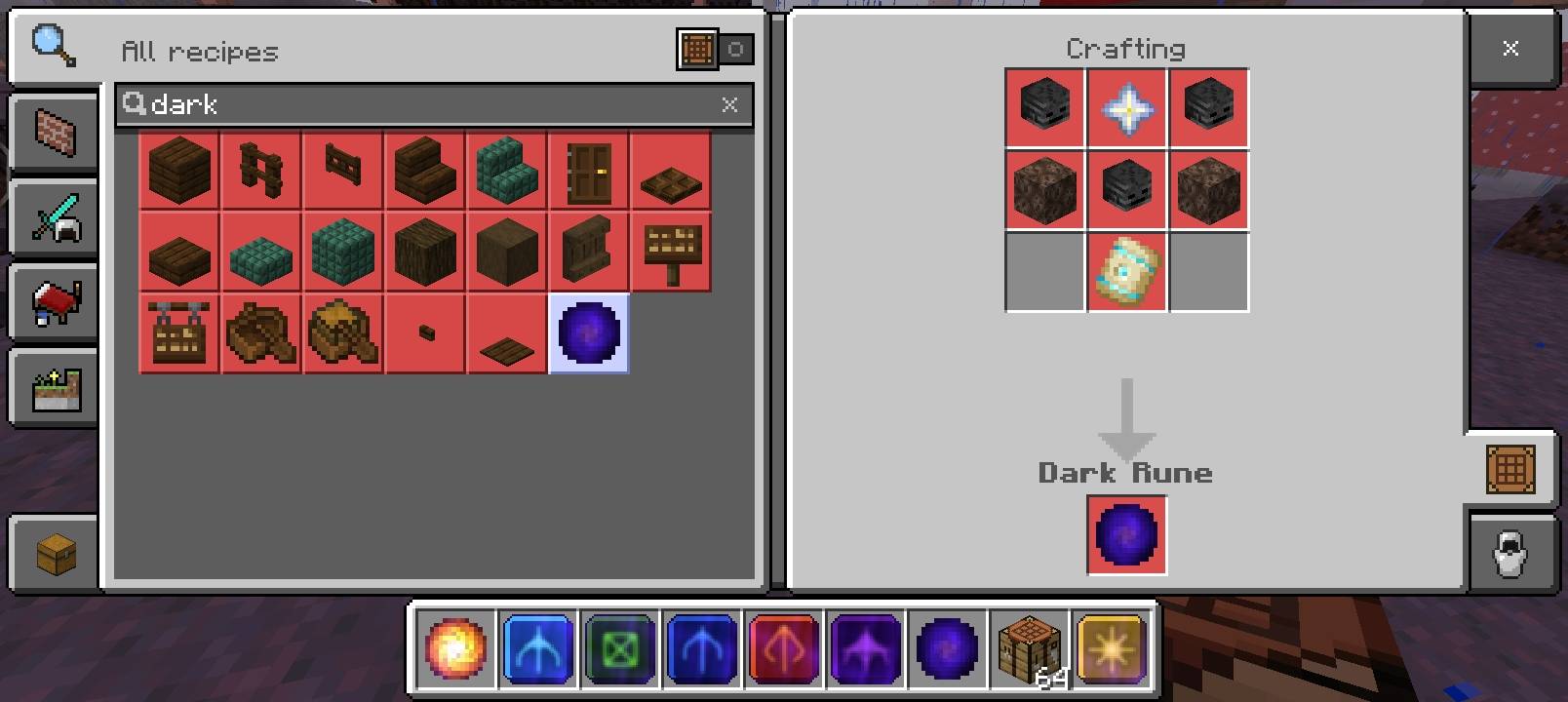
💀 Dark Rune
[Wither Skull] [ Nether Star ] [Wither Skull]
[ Soul Sand  ] [ Soul Sand   ] [ Soul Sand  ]
[    EMPTY   ] [  Dune Trim  ] [    EMPTY   ]
Ingredients: Wither Skeleton Skull ×2, Nether Star, Soul Sand ×2, Dune Armor Trim
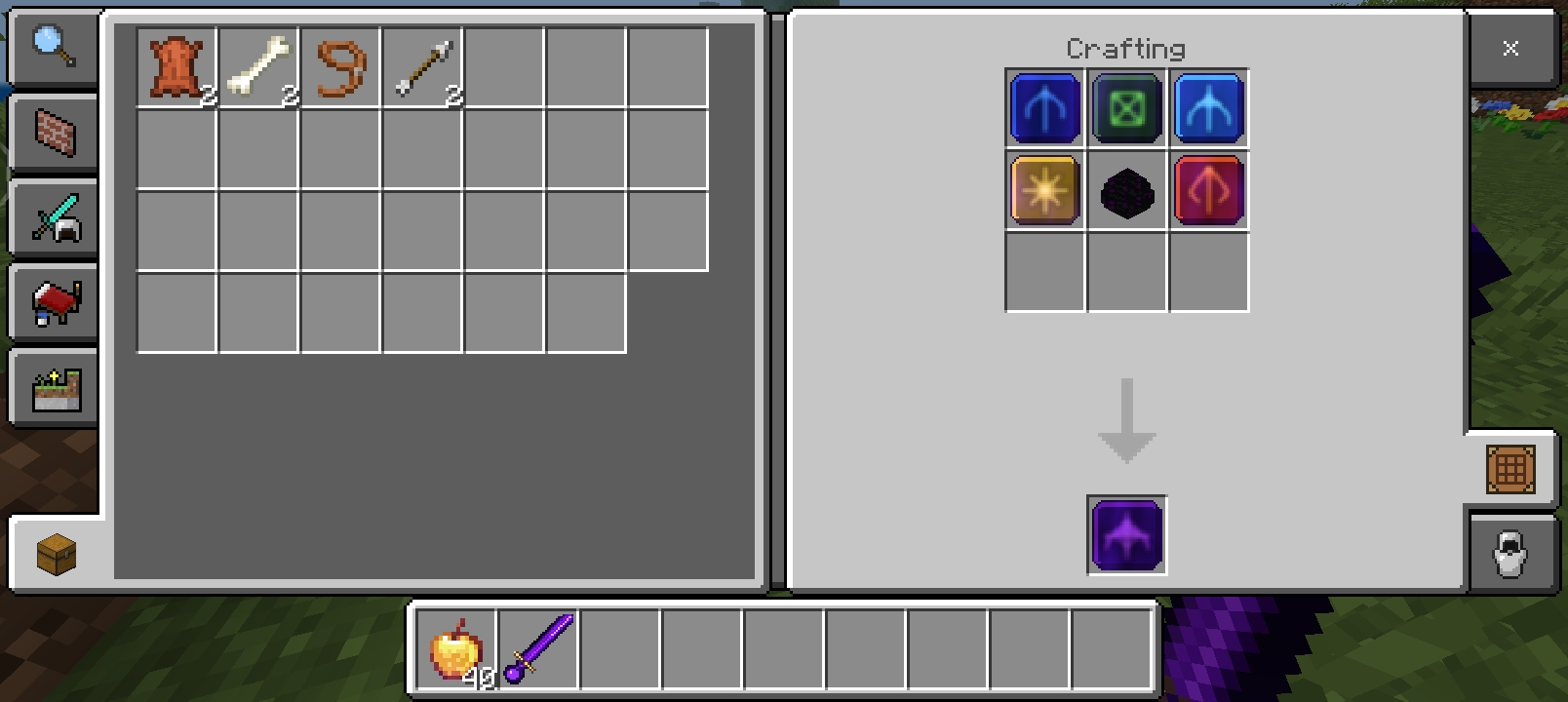
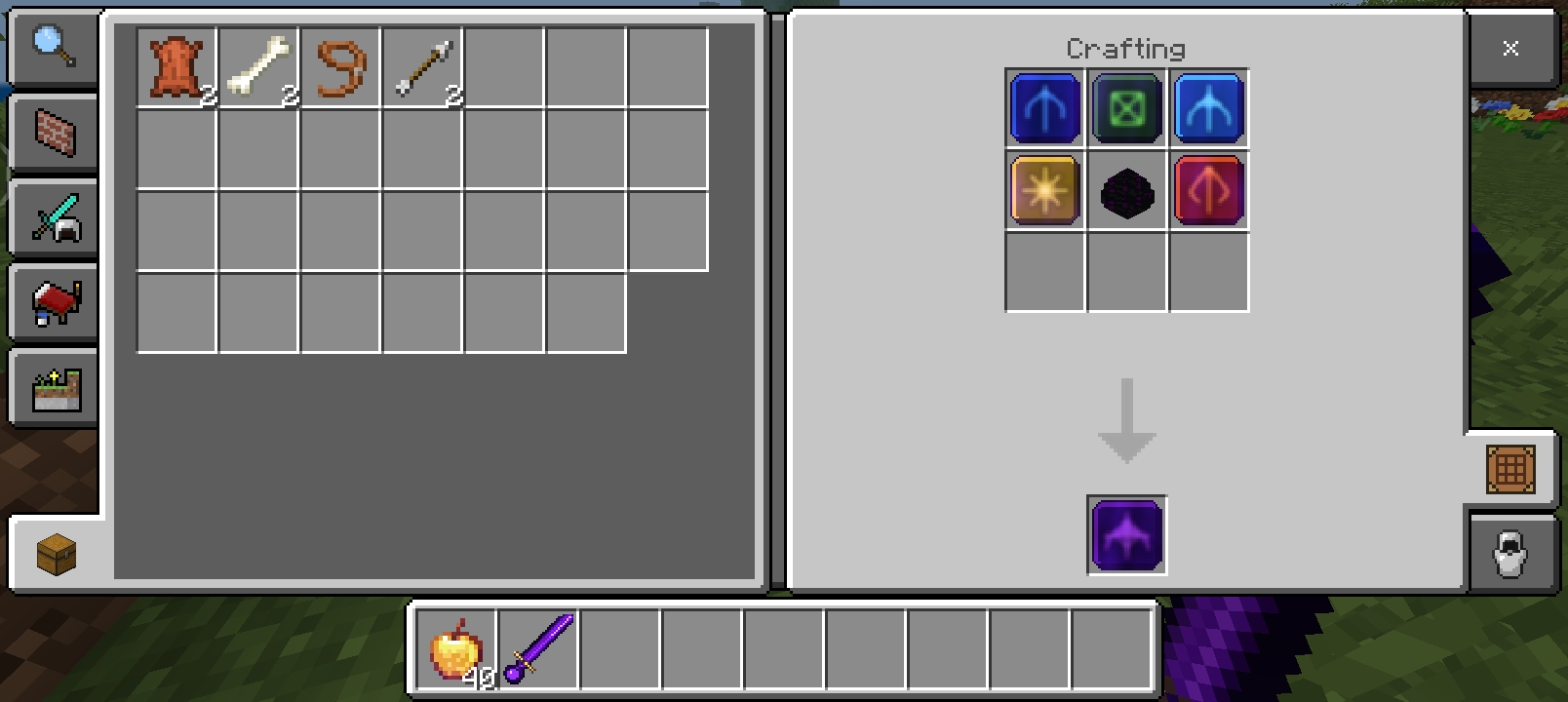
🌑 Void Rune (shapeless)
Combine all 7 elemental runes + a Dragon Egg anywhere in the crafting grid.
Wind + Earth + Water + Fire + Light + Thunder + Dark + Dragon Egg
→ Void Rune
⚔️ Void Sword (shapeless)
Diamond Sword + Void Rune → Void SwordAll recipes are visible in the in-game recipe book.
🖼️ Screenshots
💡 How To Use
- Obtain a rune (use
/give @s therune:<rune_name>) - Place it anywhere in your inventory — passive effects activate instantly
- Hold the rune in your main hand and tap the Place/Use button to activate the special ability
- Remove the rune from your inventory to lose the passive effect
Give commands:
/give @s therune:wind_rune
/give @s therune:earth_rune
/give @s therune:water_rune
/give @s therune:fire_rune
/give @s therune:light_rune
/give @s therune:thunder_rune
/give @s therune:dark_rune
/give @s therune:void_rune
/give @s therune:void_sword
📦 Installation
- Download the
.mcaddonfile - Open it — Minecraft will import it automatically
- Create a new world (or open an existing one)
- Enable both the Behavior Pack and Resource Pack
- Enable Holiday Creator Features in Experimental settings (required for custom items)
⚙️ Requirements
- Minecraft Bedrock Edition 1.21.0 or higher
- Works on: Android, iOS, Windows 10/11, Console
- Multiplayer compatible ✅
- Enable Holiday Creator Features in world Experimental settings
❓ FAQ
Q: Do passive effects stack with each other? A: Yes! Carry multiple runes and all their passive effects apply at once.
Q: Does the Void Rune stack with individual runes? A: The Void Rune already includes all effects, so carrying both won't give double effects — duplicates are ignored.
Q: Can I activate the special ability without holding the rune? A: No — you must hold the rune in your main hand and tap Use/Place. Passive buffs still work from inventory without holding.
Q: Can I use this on a server? A: Yes, apply the packs to your server and all players can use the runes.
Q: Effects stopped working after I died — is that a bug? A: No — just re-open your inventory. The script re-checks on respawn automatically.
Q: The Void cycle started but I don't want it anymore — can I cancel it? A: The cycle runs for 10 seconds and stops automatically. Just wait it out!
📋 Changelog
v1.2.2 (2026-04-01)
New: Thunder Rune
- Added ⚡ Thunder Rune — passive Speed II (move faster permanently)
- Ability: STORM STRIKE — strikes every mob and enemy player within 100 blocks with direct lightning simultaneously
- Each struck target takes 6 hearts (12 damage) bonus damage on top of vanilla lightning
- Sets all targets on fire — full lightning sound and particle effects
- Action bar shows live count of enemies struck (e.g. "STORM! 5 struck")
- 10-second cooldown
New: Dark Rune
- Added 💀 Dark Rune — passive Night Vision (see clearly in complete darkness)
- Ability: TRIPLE WITHER SKULL — fires 3 custom dark void orb projectiles in rapid succession (0.4s apart)
- Each skull explodes on contact dealing wither blast damage
- Direct hit: applies Wither II for 30 seconds to the target
- Block impact: applies Wither II for 30 seconds to all entities within 4 blocks
- Summons 1 Wither Skeleton at every impact point — 3 skulls = up to 3 skeletons spawned
- Custom dark void orb projectile texture (grey-green core → dark violet → near-black edge with 3-arm spiral)
- 3-second cooldown after 3rd skull
Void Rune / Void Sword Updates
- Recipe now requires all 7 elemental runes + Dragon Egg (was 5 runes)
- Random ability cycle now includes Thunder Storm and Wither Skulls (7 possible abilities)
- Passive effects expanded: now also grants Speed II and Night Vision
v1.2.1 (2026-03-29)
Wind Rune Rework
- Replaced Dash ability with TRIPLE WIND CHARGE (3-burst like Fire Rune)
- Each Wind Charge: Power 4 explosion on impact, lifts enemies ~5 blocks into the air, AoE knockback in 4-block radius
- Block scatter system: each impact tears up to 20 surrounding blocks free, launches them into the air with realistic physics, then auto-places each block exactly where it lands
- Custom Wind Charge projectile — glowing blue swirl orb (white core → pale cyan → sky blue → deep blue edge)
- Void cycle Wind slot updated to shoot Wind Charges
v1.2.0 (2026-03-19)
Special Abilities Added
- Every rune now has a [Hold + Use] special ability
- 🌀 Wind: 10-block horizontal dash that damages enemies in the path
- 🌿 Earth: 3×5 dripstone spike wave with base→middle→tip growth animation
- 💧 Water: 4×4×4 powder snow cube drops from the sky, freezes and damages trapped mobs
- 🔥 Fire: 3-burst Ghast-style fire charge — explodes, destroys blocks, deflectable
- ✨ Light: Instant heal burst (~8 hearts)
- 🌑 Void / Void Sword: Manual random ability cycle — rapid-fires one ability for 10 seconds
- Custom fire charge entity with glowing ball texture and 3-panel sphere geometry
- Action bar shows ability name, shot count, and cooldown timer for all abilities
v1.0.0 (2026-03-19)
Initial Release
- 6 passive elemental runes: Wind, Earth, Water, Fire, Light, Void
- Passive effects apply automatically from anywhere in the inventory
- Void Rune: combines all 5 elements + Dragon Egg, grants all passive effects
- Void Sword: Diamond Sword + Void Rune, same effects while held in main hand
- Custom textures with enchantment glint effect for all runes
- Fully shaped crafting recipes visible in the recipe book
- Multiplayer compatible
Made with ❤️ for the Minecraft Bedrock community. Feel free to use in modpacks, servers, and videos — just credit Shadow MahuSekai!
- Edition: Minecraft Bedrock
- File type: .mcpack or .mcaddon
- Minecraft versions listed: 1.21, 26.0, 1.21.2
- How to install: Download the .mcpack or .mcaddon file. → Open it — Minecraft imports it. → In your world: Behavior Packs → Available → Activate, then the same under Resource Packs.
- Where to get it: Opens on CurseForge — not every file is mirrored on our own servers.
Install steps are the general flow for this file type — How to install Minecraft Bedrock addons & mods walks through it step by step.
- Pack type: .mcaddon — behaviour and resource pack in one file
- Manifest requires Minecraft 1.21.0 or newer
- Complete pack — everything it depends on is inside the file
- Download size: 52 KB
- Download link checked 16 Sept 2026 — working
These come from our own check of the pack file, not from the source page.