
Overly Complicated Note Blocks
I don't know my version
Overly Complicated Note Blocks!
Overly Complicated Note Blocks is a small addon for Minecraft Bedrock that adds new music related blocks to make music with!
Advanced Note Block
Advanced Note Blocks function similarly to the vanilla counterpart. However, it's properties can be adjusted within a GUI!

Insturment, Note, and Octave can all be adjusted within the block.
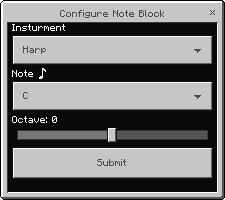
To play a note, simply interact with the block.
- To edit properties, sneak and interact with an empty hand
These blocks do not work with redstone alone, due to possible complications with music systems
Coda
The Coda is a block that can be used to play a stack of note blocks.

On it's own, the Coda can be used to power Advanced Note Block(s) with redstone
Vanilla Note Blocks cannot be used with the coda
However, it has other uses among other blocks.
💬 IMPORTANT
IN OLDER VERSIONS Coda's need to be DIRECTLY powered with redstone to activate. So some things may not work as expected. This has been resolved in v1.1.0
💡 TIP
For technical users, it is important to note that Coda's will output two block updates when activated.
Rester
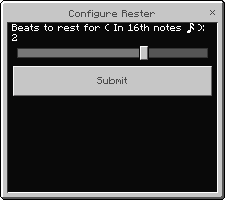
The rester allows for a breif pause of varying length between notes on a Coda stack. Creating subdivisions within a beat.

All Note Blocks above it will be delayed by the set amount of time.
Metronome
The Metronome is the most important block for making music sequences.

The metronome can be configured to set a BPM for a sequence (Between 60-200 BMP) in 4/4 time.
⚠️ WARNING
BPM runs on in-game-ticks, if there is high lag in the world, then songs will be slowed down.
Once the metronome is activated by Redstone or a player, All lines of adjacent Coda blocks will play to the set BPM.
Rester Blocks will also be timed correctly
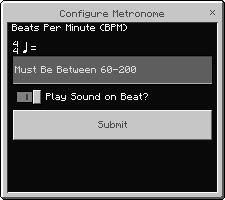
If sound is active, the Metronome will make clicks on a beat, just like a real metronome.
The Sequenced Redstone Emitter will emmit a 5-tick pulse of redstone when set of with a song. It should be placed like a regular note block

This can be extremely helpful for special effects or redirecting song lines.

- Edition: Minecraft Bedrock
- File type: .mcpack or .mcaddon
- Minecraft versions listed: 26.0.02, 26.0, 26.3
- How to install: Download the .mcpack or .mcaddon file. → Open it — Minecraft imports it. → In your world: Behavior Packs → Available → Activate, then the same under Resource Packs.
- Where to get it: Opens on CurseForge — not every file is mirrored on our own servers.
Install steps are the general flow for this file type — How to install Minecraft Bedrock addons & mods walks through it step by step.
- Pack type: .mcaddon — behaviour and resource pack in one file
- Manifest requires Minecraft 1.21.0 or newer
- Complete pack — everything it depends on is inside the file
- Download size: 81 KB
- Download link checked 15 Sept 2026 — working
These come from our own check of the pack file, not from the source page.