FunTools Addon - GUI
It is an admin tools addon giving you access to a variety of powerful utilities—all through GUI. Whether you're handling a server, managing a chaotic…
I don't know my version
🪄 FunTools Addon
For Minecraft Bedrock & MCPE | Made by GamerFile

📌 Overview
This is an admin tools addon that gives you access to a variety of powerful utilities—all through a simple stick and intuitive in-game menu. Whether you're handling a server, managing a chaotic multiplayer world, or just want to have fun, these tools are built to give you instant control with ease.
More tools will be added on demand or based on feedback. So feel free to suggest what you’d like to see next!
🔧 How to Use
-
Get a stick (any stick).
-
Rename it to
"Tools"using an anvil. -
Sneak + Tap (place button) while holding the stick to open the menu.
-
Alternatively, use any of the following commands to access the tools menu (works even with cheats off):
!tm,!toolm,!menu,!tool,!tmenu,!toolmenu
Why so many commands? I don’t know either, lol.
⚠️ You must have Beta APIs enabled in your world settings.
⚠️ Works only on version 1.21.90 and above.

🛠️ Tool List & Features
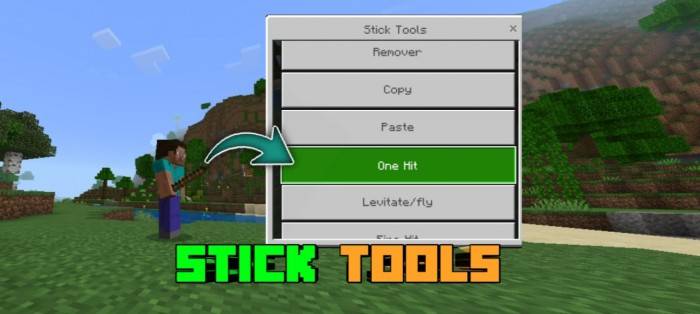
Each tool is selected from the menu. Here’s what they do:

1️⃣ Remover
Tap any block to instantly remove it.
📝 Use this while standing—not crouched, or it’ll open the menu.
📷 GIF/Screenshot: 
2️⃣ Copy
Tap a block to copy it. You can paste it later using the Paste tool.
📷 GIF/Screenshot: 
3️⃣ Paste
Paste the block you previously copied. Just tap the ground or use the place button.
📷 GIF/Screenshot:
4️⃣ One Hit Kill
Hit any mob—including the Ender Dragon—and destroy it in one shot.
📷 GIF/Screenshot: 

5️⃣ Levitate / Fly
Launch entities into the air when you hit them.
📷 GIF/Screenshot: 
6️⃣ Fire Hit
Set mobs or players on fire with a single hit.
📷 GIF/Screenshot: 
7️⃣ Tap TP
Teleport instantly to wherever you tap (or the block you interact with).
📷 GIF/Screenshot: <video poster="" controls="controls" width="480" height="270"> <source src="" rel="noopener nofollow" target="_blank">https://files.catbox.moe/uz66ko.mp4" type="video/mp4"></video>
8️⃣ Use Command
Brings up a custom UI where you can enter commands without using /.
-
Toggle between player run and console run.
-
Also accessible using
!commui(cheats off compatible).
📷 GIF/Screenshot: 
9️⃣ Change Time
Pick from options like Day, Night, Noon, Midnight, Sunrise, and Sunset.
📷 GIF/Screenshot: 
🔟 Change Weather
Switch between Clear, Rain, and Thunder instantly.
📷 GIF/Screenshot: 
🔁 Change Gamemode
Swap your own gamemode (Creative, Survival, Adventure, Spectator).
Future update: Option to change other players' gamemodes.
📷 GIF/Screenshot: 
📝 Notes
-
You must be standing to use tools (sneaking opens the menu).
-
Tools only work if you're holding a stick named "Tools".
-
Enable Beta APIs in Experiments.
-
Supports Minecraft 1.21.90+ only.
✉️ Feedback & Bugs
Found a bug? Have a suggestion for a new tool?
Report to me/suggest me via comments.
🧾 Terms of Use
-
❌ You are not allowed to reupload this addon to other sites.
-
✅ You may modify for personal use only.
-
❌ You may not steal code or claim this as your own.
-
🎥 If you're a content creator, please:
-
Credit GamerFile
-
Link back to the official page
-
Failure to follow these may result in copyright actions.
🧠 Credits
Made by GamerFile.
✅ Final Words
That’s it. Download, have fun, and control the world with a stick.
More features coming soon based on what you ask for.
- Edition: Minecraft Bedrock
- File type: .mcpack or .mcaddon
- Minecraft versions listed: 1.21.100, 1.21.90
- How to install: Download the .mcpack or .mcaddon file. → Open it — Minecraft imports it. → In your world: Behavior Packs → Available → Activate, then the same under Resource Packs.
- Where to get it: Opens on CurseForge — not every file is mirrored on our own servers.
Install steps are the general flow for this file type — How to install Minecraft Bedrock addons & mods walks through it step by step.
- Save it as FunToolsV2[AS].mcaddon before opening — it downloads as .mcpack, but it is a .mcaddon pack
- Manifest requires Minecraft 1.19.30 or newer
- Needs Beta APIs switched on in the world settings
- Complete pack — everything it depends on is inside the file
- Download size: 242 KB
- Download link checked 15 Sept 2026 — working
These come from our own check of the pack file, not from the source page.