Item Command Storage
Bedrock add-on listed for Minecraft 1.21 (behavior + resource pack). File opened and checked on 9 Oct 2026; installs from the MC Bedrock Mods app on Android.
Turn your items into command storage. Save different commands on different items and activate them with a click.
⬇ Download on CurseForge
Overview
The Item Command Storage Add-on lets you bind Minecraft commands directly to items. Each item can store its own unique command, which you can easily activate by right-clicking. This feature opens up countless creative and gameplay possibilities, whether you want to build custom tools, shortcuts, or interactive adventure maps.
Features
- Per-Item Commands – Save a different command on each item; they will not overwrite each other.
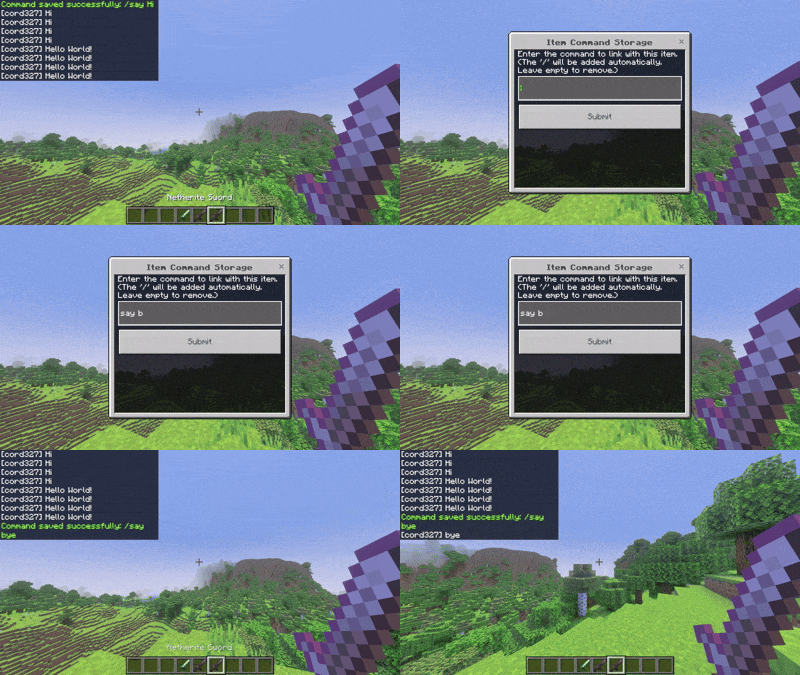
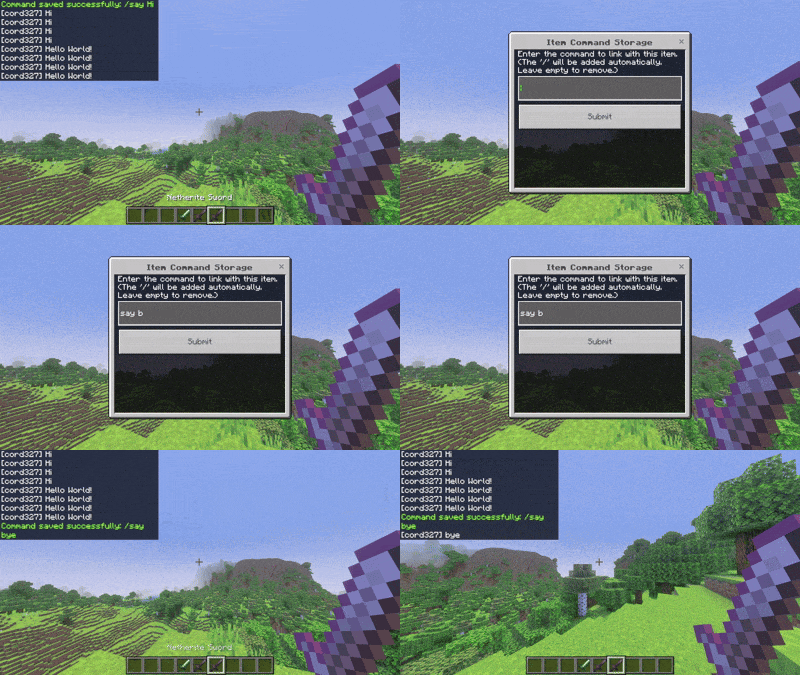
- Easy Setup – Sneak + right-click an item to open a simple form where you can enter or remove commands.
- Quick Execution – Right-click the item to instantly run its stored command.
- Visual Feedback – Commands are shown in the item’s lore, so you always know what is saved.
- Stack-Safe – Each command-bound item is uniquely identified to prevent stacking issues.
- Multi-Language Support – Comes with translations (English, Korean, Spanish, Japanese) and may continue to be updated in the future.
🎮 How to Use
-
Sneak + Right-Click an item → Open the command input menu.
-
Enter a command (without the leading
/). [ Example:say Hello World! ] -
The command is stored in the item’s lore.
-
Right-Click the item to execute the command.
-
Leave the input blank to remove a stored command.
[ In-game screenshot ]
- Edition: Minecraft Bedrock
- File type: .mcpack or .mcaddon
- Minecraft versions listed: 1.21.81, 1.21.73, 1.21.90
- How to install: Download the .mcpack or .mcaddon file. → Open it — Minecraft imports it. → In your world: Behavior Packs → Available → Activate, then the same under Resource Packs.
- Where to get it: Opens on CurseForge — not every file is mirrored on our own servers.
Install steps are the general flow for this file type — How to install Minecraft Bedrock addons & mods walks through it step by step.
- Pack type: .mcaddon — behaviour and resource pack in one file
- Manifest requires Minecraft 1.21.70 or newer
- Complete pack — everything it depends on is inside the file
- Download size: 2.7 MB
- Download link checked 6 Oct 2026 — working
These come from our own check of the pack file, not from the source page.