Death Location Tracker
Bedrock add-on listed for Minecraft 1.21 (behavior pack only). File opened and checked on 29 Sep 2026; installs from the MC Bedrock Mods app on Android.
This addon instantly sends your exact death coordinates to the chat when you die. Never lose your items again!
⬇ Download on CurseForge
Death Location Tracker
The simplest, most essential quality-of-life addon for Minecraft Bedrock Edition. When you die, the Death Location Tracker instantly sends your exact coordinates to the chat.
Installation & Compatibility
- Download the BP and add it to your Minecraft world.
- No experiments required for this addon.
- Works on the latest stable Minecraft versions (not beta or preview).
- Does not use
player.json, so it’s compatible with most other addons and keeps achievements enabled.
Achievement-Friendly & No player.json!
This addon solves the classic problem of lost items by providing an immediate, undeniable roadmap back to your valuables.
Death Location Tracker
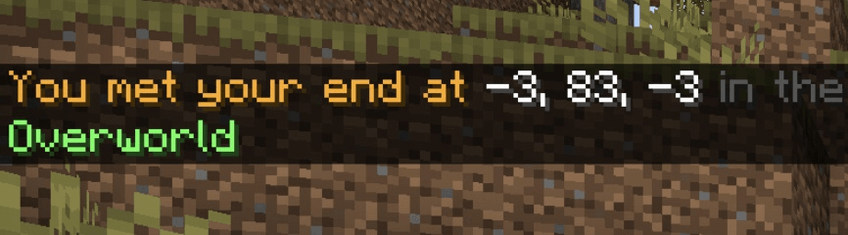
[How It Works]
- Meet Your End – You are killed by a mob, fall from a great height, or die while exploring.
- Instant Private Message – The moment your character respawns, the addon privately triggers.
- Coordinates for You – The exact X, Y, and Z coordinates of your death location are displayed immediately in your chat window only.
- Loot Retrieved! – Use the displayed coordinates to easily navigate back and pick up your dropped items without alerting other players on the server.
Installation & Compatibility
- Download and apply the Behavior Pack (BP) to your world.
- No experiments or setup required for this addon.
- Works with all stable Minecraft Bedrock versions.
- Designed to be highly compatible with other addons.
❗License❗
You’re welcome to:
- Use this addon in your personal worlds (singleplayer or multiplayer).
- Share the official CurseForge link with others.
- Include this addon in a Bedrock behavior/resource pack collection as long as you give proper credit and link back here.
You're not allowed to:
- Reupload or post this addon on any other website without permission.
- Claim this addon as your own creation.
- Modify and share the files without giving credit to the original author.
Full License: CC BY-NC-SA 4.0
- Edition: Minecraft Bedrock
- File type: .mcpack or .mcaddon
- Minecraft versions listed: 1.21.90, 1.21.100, 1.21.111
- How to install: Download the .mcpack or .mcaddon file. → Open it — Minecraft imports it. → In your world: Behavior Packs → Available → Activate, then the same under Resource Packs.
- Where to get it: Opens on CurseForge — not every file is mirrored on our own servers.
Install steps are the general flow for this file type — How to install Minecraft Bedrock addons & mods walks through it step by step.
- Pack type: .mcaddon — behaviour and resource pack in one file
- Manifest requires Minecraft 1.21.80 or newer
- Complete pack — everything it depends on is inside the file
- Download size: 1004 KB
- Download link checked 6 Oct 2026 — working
These come from our own check of the pack file, not from the source page.