Improved Zoom – Player Controlled Zoom System
Customize your zoom with adjustable levels and night vision, activated by a simple triple crouch and controlled through an in-game menu.
⬇ Download on CurseForge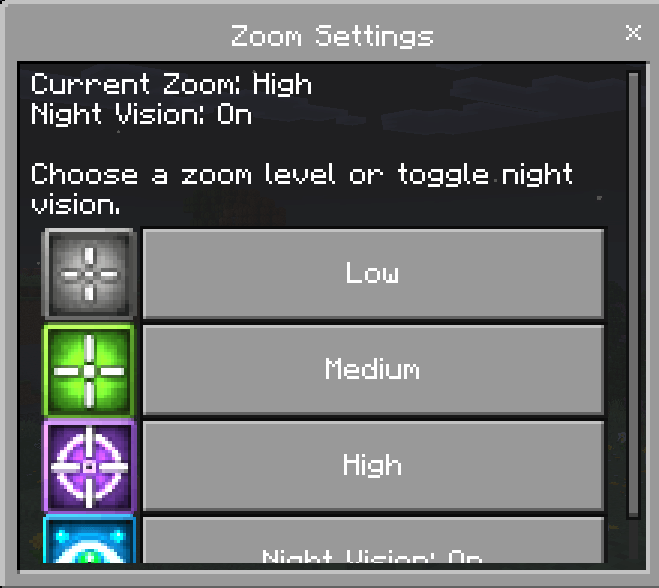
# Improved Zoom
Improved Zoom is a lightweight and customizable Minecraft Bedrock addon that gives every player control over their own zoom experience.
Players can choose their preferred zoom strength, enable or disable night vision, turn zoom functionality on or off, and update their settings directly through an in-game menu.
The zoom activates using a simple triple-crouch action and automatically stops when the player stands up.
> **Achievement Compatibility Notice**
>
> Following a recent Minecraft Bedrock update, activating custom behavior packs may cause Minecraft to display **“Achievements disabled.”**
>
> Improved Zoom uses stable Script APIs and does not require experimental Beta APIs. However, Minecraft controls achievement eligibility, and there is currently no supported manifest option that can force achievements to remain enabled.
>
> Until Mojang changes this behavior, Improved Zoom should be considered **not achievement-compatible on affected Minecraft versions**.
# Features
* Easy triple-crouch zoom activation
* Three selectable zoom strengths
* Optional night vision
* Zoom On/Off setting
* Instant setting updates while zoomed
* Individual settings for every player
* Automatically saves player preferences
* Automatically provides the Zoom Settings item
* Zoom Settings item supports keep on death
* Craftable replacement item
* Custom menu and item icons
* Lightweight and easy to use
* Does not require experimental Beta APIs
# Activating Zoom
To activate zoom:
1. Crouch three times at a steady pace.
2. Hold the third crouch.
3. Remain crouched to continue zooming.
4. Stand up to stop zooming immediately.
The zoom effect is applied while the player remains crouched and clears automatically when the player stands up.
## Zoom Tip
Triple-crouch at a steady pace and hold the third crouch.
If you crouch too quickly, Minecraft may not detect the complete activation sequence, causing the zoom to activate only partially or not at all. Stand up to cancel the zoom and try again.
# Zoom Settings Menu
Every player has access to personal zoom settings.
To open the menu:
1. Hold the Zoom Settings item.
2. Use the item while crouching or standing.
3. Select the setting you want to change.
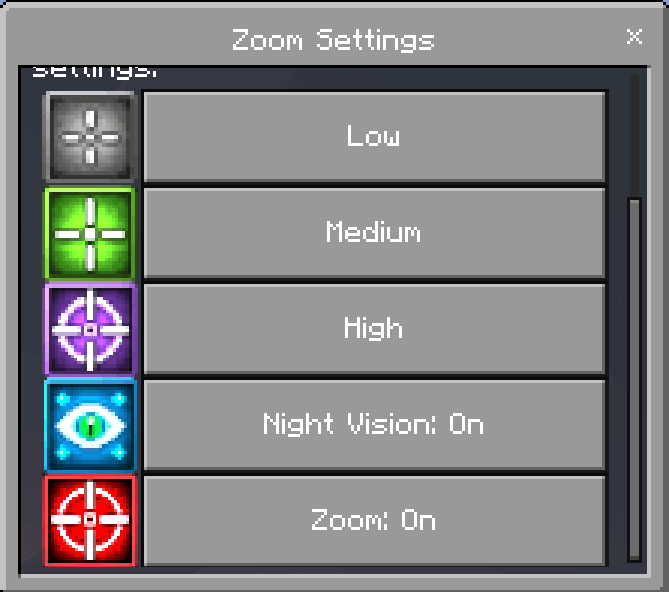
The menu lets players:
* Turn zoom on or off
* Select Low zoom
* Select Medium zoom
* Select High zoom
* Turn Night Vision on or off
# Live Setting Updates
Zoom settings can be changed while the player is actively zooming.
Changes to the zoom level or Night Vision setting are applied immediately. Players do not need to stand up, restart zoom, or reopen the menu to apply their new settings.
# Individual Player Settings
Each player has their own saved configuration.
Saved settings include:
* Zoom enabled or disabled
* Selected zoom strength
* Night Vision enabled or disabled
Settings are stored automatically using dynamic properties and remain available when the player leaves and rejoins the world.
# Zoom Settings Item
Players automatically receive the Zoom Settings item when they join the world.
The item supports keep on death, helping prevent it from being lost when a player dies.
If the item is lost, players can craft a replacement.
# Crafting Recipe
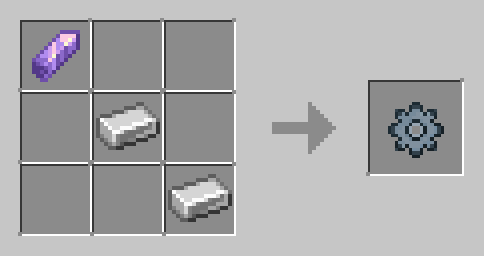
Required materials:
* 1 Amethyst Shard
* 2 Iron Ingots
# Installation
1. Download Improved Zoom.
2. Import the Behavior Pack into Minecraft Bedrock Edition.
3. Import the Resource Pack.
4. Activate both packs on your world.
5. Ensure both packs are the same version.
6. Keep experimental Beta features turned off.
7. Join the world.
8. The Zoom Settings item will be provided automatically.
The Resource Pack is required for the complete custom-icon and item-texture experience.
# How to Update
1. Back up your world.
2. Remove the old Improved Zoom Behavior Pack.
3. Remove the old Improved Zoom Resource Pack.
4. Import the new versions.
5. Reactivate both updated packs on your world.
6. Join the world and test the zoom controls and settings.
Existing player settings should remain available as long as the addon’s dynamic-property keys have not been changed.
# Important Notes
* Triple-crouch at a steady pace for the most reliable activation.
* Hold the third crouch to remain zoomed.
* Stand up to cancel zoom immediately.
* Each player controls their own settings.
* Turning Zoom off prevents triple-crouch activation.
* Night Vision can be used independently with any zoom strength.
* Keep the Behavior Pack and Resource Pack on the same version.
* Always back up your world before updating.
* Minecraft controls achievement eligibility; the addon cannot override it.
# Compatibility
Improved Zoom is designed for:
* Minecraft Bedrock Edition
* Single-player worlds
* Multiplayer worlds
* Minecraft Realms
* Bedrock Dedicated Servers
* New worlds
* Existing worlds
* Survival and adventure gameplay
# Version 1.0.2 — Zoom Toggle Update
## Zoom On/Off Setting
* Added a Zoom On/Off option to the Zoom Settings menu.
* The new option appears below the Night Vision setting.
* Zoom status is saved separately for every player using dynamic properties.
## When Zoom Is Off
* Triple-crouch no longer activates zoom.
* Any active zoom effect is immediately removed.
## When Zoom Is On
* Triple-crouch activation resumes normally.
* The player’s selected zoom strength and Night Vision preference remain available.
## Interface Improvements
* Added a new red-and-white icon for the Zoom toggle.
* Improved control and flexibility throughout the zoom system.
# Version 1.0.1
## Menu Improvements
* Updated the Zoom Settings menu so it can be opened while crouching or standing.
* Removed the previous crouch-only restriction for opening the menu.
## Resource Pack
* Added the Improved Zoom Resource Pack.
* Added custom 32×32 menu icons for:
* Low Zoom
* Medium Zoom
* High Zoom
* Night Vision
* Integrated the icons into the Zoom Settings menu.
* Added a custom texture for the Zoom Settings item.
* Improved the appearance and readability of the settings interface.
- Edition: Minecraft Bedrock
- File type: .mcpack or .mcaddon
- Minecraft versions listed: 26.0.02, 26.0, 26.3
- How to install: Download the .mcpack or .mcaddon file. → Open it — Minecraft imports it. → In your world: Behavior Packs → Available → Activate, then the same under Resource Packs.
- Where to get it: Opens on CurseForge — not every file is mirrored on our own servers.
Install steps are the general flow for this file type — How to install Minecraft Bedrock addons & mods walks through it step by step.
Improved Zoom – Player Controlled Zoom System is a free Minecraft Bedrock addon. Compatible with Minecraft 26.0.02, 26.0, 26.3, 26.10 and newer. Downloaded 5,386 times (via CurseForge). Download it and open it directly in the game.