Chat Ranks addon
Adds chat ranks, name and chat colors based on player tags. Prevents muted players from chatting and limits spam for non-staff. Messages with a set prefix…
I don't know my version
Minecraft Bedrock ChatRanks Addon
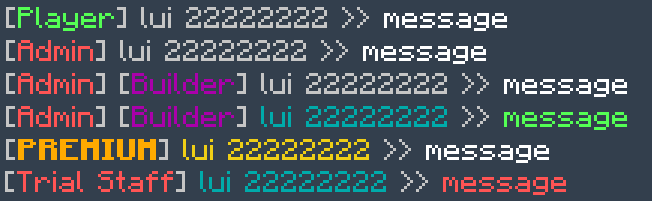
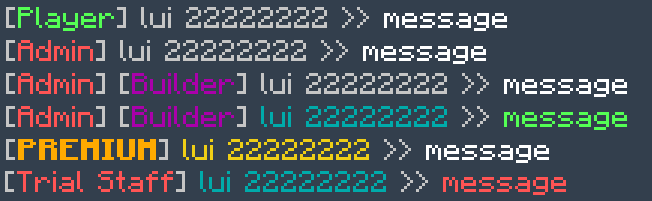
This addon customizes the in-game chat by displaying player ranks and colors based on their tags. Players can have rank tags (e.g., rank:Admin or rank:§cAdmin), name color tags (e.g., color:§c), and chat text color tags (e.g., chatcolor:§e), which are reflected in their chat messages for clear identification and style.
The addon also implements moderation features: players tagged with mute cannot send messages, ensuring muted users are silenced. To prevent spam, it tracks how many messages each player sends within a cooldown period and blocks additional messages if they exceed a defined threshold—except for staff members who are exempt.
Messages starting with a customizable prefix (default "replace_me") are ignored by the addon, allowing other addons or commands to handle those messages without interference.
Overall, this addon enhances player communication by providing visible ranks, personalized colors, and chat moderation to create a more organized and enjoyable chat experience.
Players can have multiple rank: tags (e.g., rank:§cAdmin, rank:§5Builder), which appear in chat in the order they’re assigned, allowing for flexible role representation.
- Edition: Minecraft Bedrock
- File type: .mcpack or .mcaddon
- Minecraft versions listed: 26.0.02, 26.0, 1.21.30
- How to install: Download the .mcpack or .mcaddon file. → Open it — Minecraft imports it. → In your world: Behavior Packs → Available → Activate, then the same under Resource Packs.
- Where to get it: Opens on CurseForge — not every file is mirrored on our own servers.
Install steps are the general flow for this file type — How to install Minecraft Bedrock addons & mods walks through it step by step.
- Pack type: .mcpack — a single pack
- Manifest requires Minecraft 1.20.60 or newer
- Needs Beta APIs switched on in the world settings
- Complete pack — everything it depends on is inside the file
- Download size: 312 KB
- Download link checked 25 Aug 2026 — working
These come from our own check of the pack file, not from the source page.