
Stop camera
Bedrock add-on listed for Minecraft 1.20–1.21 (behavior pack only). Needs Beta APIs. File opened and checked on 20 Sep 2026; installs from the MC Bedrock Mods app on Android.
Have you ever seen YouTubers leaving the camera still and moving the character? The stop camera addon allows you to do this in the Bedrock version
⬇ Download on CurseForgeThe time controls addon allows you to keep your camera still while moving your character, which can be very useful for recording videos.
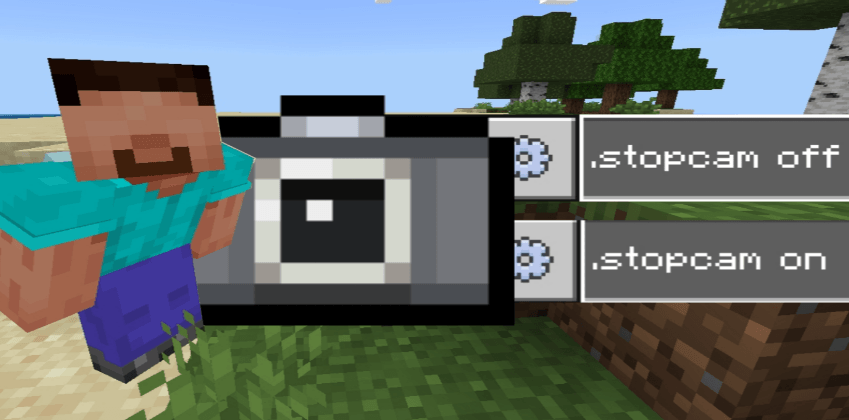
Commands (it is not necessary to be an operator):
.stopcamera on (leave your camera still by moving only the character)
.stopcamera off (return your camera to normal)
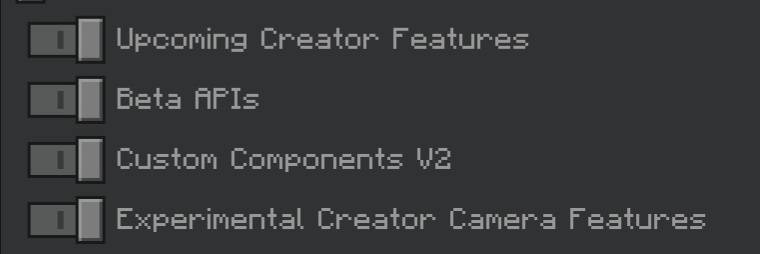
remember to activate the experiments
- Edition: Minecraft Bedrock
- File type: .mcpack or .mcaddon
- Minecraft versions listed: 1.21.81, 1.21.82, 1.21.80
- How to install: Download the .mcpack or .mcaddon file. → Open it — Minecraft imports it. → In your world: Behavior Packs → Available → Activate, then the same under Resource Packs.
- Where to get it: Opens on CurseForge — not every file is mirrored on our own servers.
Install steps are the general flow for this file type — How to install Minecraft Bedrock addons & mods walks through it step by step.
- Pack type: .mcpack — a single pack
- Manifest requires Minecraft 1.20.60 or newer
- Needs Beta APIs switched on in the world settings
- Download size: 2 KB
- Download link checked 6 Oct 2026 — working
These come from our own check of the pack file, not from the source page.