![Apex Suite [Achievement-Friendly]](https://files.mcmodshub.com/img/curseforge/68790.png)
Apex Suite [Achievement-Friendly]
Bedrock add-on listed for Minecraft 1.21–26.x (behavior + resource pack). File opened and checked on 11 Oct 2026; installs from the MC Bedrock Mods app on Android.
The ultimate Bedrock utility suite! Auto-Farm, Pet Teleport, VeinMiner, Ore X-Ray, Auto-Smelt, and 20+ tools. 100% Achievements-Friendly & No Cheats…
⬇ Download![Apex Suite [Achievement-Friendly] — screenshot 1](https://files.mcmodshub.com/img/curseforge/68790_s2792430.jpg)
![Apex Suite [Achievement-Friendly] — screenshot 2](https://files.mcmodshub.com/img/curseforge/68790_s2792431.gif)
![Apex Suite [Achievement-Friendly] — screenshot 3](https://files.mcmodshub.com/img/curseforge/68790_s2792432.jpg)
![Apex Suite [Achievement-Friendly] — screenshot 4](https://files.mcmodshub.com/img/curseforge/68790_s2792433.jpg)
![Apex Suite [Achievement-Friendly] — screenshot 5](https://files.mcmodshub.com/img/curseforge/68790_s2792434.jpg)
![Apex Suite [Achievement-Friendly] — screenshot 6](https://files.mcmodshub.com/img/curseforge/68790_s2792435.png)
![Apex Suite [Achievement-Friendly] — screenshot 7](https://files.mcmodshub.com/img/curseforge/68790_s2792436.png)
![Apex Suite [Achievement-Friendly] — screenshot 8](https://files.mcmodshub.com/img/curseforge/68790_s2792437.png)
Apex Suite [Achievement-Friendly]
Developed by Charles — Slogan: "Let chaos reign safely"
Welcome to Apex Suite, the utility, survival, and creative companion addon designed specifically for Minecraft Bedrock Edition. Whether you are looking to streamline your survival gameplay, safely explore deep caves, or build complex maps, Apex Suite provides a completely modular toolkit to customize your world.
🌟 MASSIVE v2.0 UPDATE:
- Complete UI Overhaul: A sleek, modern, and clean interface with dynamic sliders to control your passive buffs!
- Quantum Tether: Wirelessly link your pets and mobs. When using the Void Walker, they teleport across dimensions with you!
- Auto-Harvest: Automatically harvests mature crops in a 15-block radius and replants them instantly.
- Auto-Smelt & Log to Charcoal: Ores automatically smelt into ingots as you mine them, and logs convert to charcoal without a furnace!
- Auto-Feed & Auto-Torch: Automatically eats food when your hunger drops, and places torches in the dark as you walk.
- Auto-Trash: Set up custom filters to instantly delete unwanted junk from your inventory!
Best of all, this addon is built to integrate cleanly with your standard gameplay:
• No Cheats Required – Use these features without having to toggle active cheats in your world settings.
• Achievement Friendly – Keep earning your achievements while playing, without any issue.
• Mobile & PC Compatible – Light, highly optimized, and thoroughly tested on 4GB/6GB RAM mobile devices.
• Modular Toggle System – Turn individual features on or off at any time using the in-game guide.
VERSION 1.0 SHOWCASE
VERSION 2.0 SHOWCASE
Useful for builders, map makers, casual survivalists, or
players who want to feel like a god!
While the Apex Suite is designed to be fully compatible with survival mode, many of its core utilities serve as incredibly powerful tools for creative builders and map designers:
• The ultimate "Undo" Button: The Recall State module lets you instantly revert accidental explosions, block placement mistakes, or broken redstone setups within 2 minutes.
• In-Game WorldEdit: Use the Structure Wand to copy and paste up to 30,000 blocks with live green particle previews, allowing you to rotate structures, keep chest inventories intact, or safely cancel a placement.
• Rapid Inspection: Utilize the safe Spectator and Void Walker systems to fly through your build layers and quickly teleport between different build sites across your world.
🛠️ Complete Feature Breakdown (15+ Modules!)
Your in-game Apex Guide item will walk you through the details, but here is a full summary of the twelve modular features included in this suite:
Resource Gathering & Exploration
- 1. Tree Capacitor: Sneak while using an axe to instantly chop down entire connected trees.
- 2. VeinMiner: Sneak while mining ores to break the entire connected vein at once.
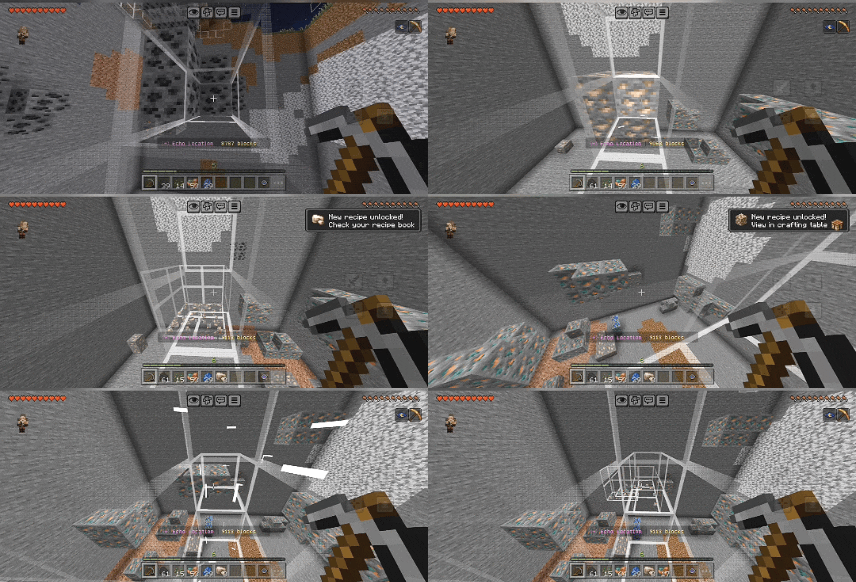
- 3. Echo Location (Ore X-Ray): Trigger a moving scanning field around your character to visually highlight and reveal nearby hidden ores. (Unlike traditional X-Ray resource packs, this is 100% in-game and script-based—toggle it on or off instantly with the EYE without ever needing to exit your world!)
- 4. Item Magnet: Automatically pull nearby dropped items and experience (XP) orbs directly toward you.
- 5. Auto-Harvest [NEW]: Harvests and replants fully grown crops in a 15-block radius.
- 6. Auto-Smelt [NEW]: Bypasses the furnace and drops ingots straight from the ore block!
Combat & Survival Defenses
- 7. Execution Aura: Automatically eliminates nearby hostile mobs when they venture too close to you.
- 8. Auto Heal & Auto Feed [NEW]: Safely monitors your health and hunger, automatically healing or feeding you so you never have to stop mid-adventure!
- 9. Augments Menu [UPDATED]: Gain powerful survival enhancements (Speed, Strength, Night Vision). Now fully customizable with new UI sliders!
- 10. Auto-Torch [NEW]: Keeps your path mob-free by automatically placing torches in low-light areas as you walk.
- 11. Auto-Trash [NEW]: Custom filter system to instantly delete unwanted junk (like rotten flesh or dirt).
![Apex Suite [Achievement-Friendly] — Minecraft Bedrock addon, screenshot 1](https://media.forgecdn.net/attachments/description/1552582/description_f0406951-7585-469a-bfdb-7656bcdb0f5c.gif)
Dimensional Movement & Navigation
- 12. Elytra Fly: Grants a temporary Elytra with unlimited flight. This managed system handles your flight automatically without requiring any firework boosts.
- 13. Spectator: Temporarily enter spectator mode for 30 seconds to scout out caves or structures before being safely returned to your original location. (WARNING: Do not use this feature in Hardcore worlds. Because Hardcore natively forces spectator mode upon death, manually entering it can result in permanent death.)
- 14. Void Walker & Quantum Tether [NEW]: Save custom coordinate locations and teleport back to them at any time. Now featuring Quantum Tether: Link your pets/mobs to you, and they will teleport across dimensions with you instantly!
Advanced World Manipulation
• 15. Structure Wand: Hold the Eye and punch blocks to set Position 1 & 2 (supporting up to 30,000 blocks) with dynamic green particles. You can sneak and punch to preview the area, rotate, preserve inventories, and hit the same spot again to confirm (or stand up to cancel).
• 16. Recall State: Made an accidental mistake? Instantly restore recently broken terrain, accidental creeper/TNT explosions, or broken redstone activity as long as it occurred within the last 2 minutes.
How to Use
Once the addon is active in your world, use (right-click/long-press) the EYE. This acts as your central console, allowing you to selectively toggle each of the twelve modules on or off. Customize your world to be as challenging—or as convenient—as you want.
Compatibility Notes
This addon was developed and optimized on Android. It has been tested on mobile devices with 4GB and 6GB of RAM, ensuring that the background scripts run efficiently without causing micro-stutters or lag. It is safe for survival realms, local worlds, and local multiplayer sessions.
- Edition: Minecraft Bedrock
- File type: .mcpack or .mcaddon
- Minecraft versions listed: 1.21.124, 1.21.130, 1.21.131
- How to install: Download the .mcpack or .mcaddon file. → Open it — Minecraft imports it. → In your world: Behavior Packs → Available → Activate, then the same under Resource Packs.
- Where to get it: In MCModsHub, or directly above on this page.
Install steps are the general flow for this file type — How to install Minecraft Bedrock addons & mods walks through it step by step.
- Pack type: .mcaddon — behaviour and resource pack in one file
- Complete pack — everything it depends on is inside the file
- Download size: 272 KB
- Download link checked 6 Oct 2026 — working
These come from our own check of the pack file, not from the source page.