HomesUI
Bedrock add-on listed for Minecraft 1.20–1.21 (behavior + resource pack). Installs from the MC Bedrock Mods app on Android.
Save location points (Homes) in your survival world. Go anywhere anytime and request TP from a friend in your realm or server. Guarda puntos (Casas) en tu…
⬇ Download on CurseForge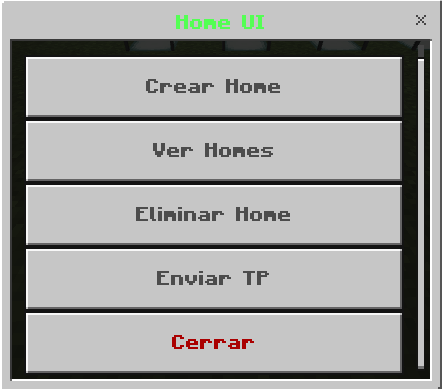
HomesUI
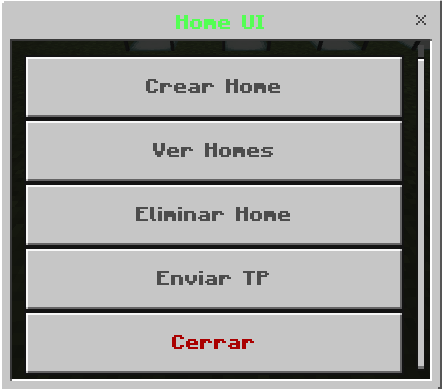
The HomesUI addon allows you to manage your homes in a simple and visual way in Minecraft Bedrock thanks to an intuitive interface.
✨ Main Features:
- 🏠 Create Homes: Save the location of your home or any place by typing a name, and it will be stored with its coordinates.
- 📋 Home List: Easily view all your saved homes from a visual menu.
- ❌ Delete Homes: Delete any home you no longer need.
- 📤 Transport Requests: Send a teleport request to another player to travel to their location.
- ✅ Transport Acceptance: The player receives the request and can decide whether to accept or reject the teleport.
This addon is ideal for multiplayer servers or worlds where organizing homes and quick teleports make the gaming experience more convenient.
HomesUI
El addon HomesUI te permite gestionar tus hogares de una forma sencilla y visual en Minecraft Bedrock gracias a una interfaz intuitiva.
✨ Características principales:
- 🏠 Crear Homes : Guarda la ubicación de tu casa o cualquier lugar escribiendo un nombre y se almacenará con sus coordenadas.
- 📋 Lista de Viviendas : Consulta fácilmente todos tus hogares guardados desde un menú visual.
- ❌ Eliminar Homes : Borra cualquier hogar que ya no necesites.
- 📤 Solicitudes de TP : Envía una solicitud de teletransporte a otro jugador para viajar hasta su ubicación.
- ✅ Aceptación de TP : El jugador recibe la solicitud y puede decidir si acepta o rechaza el teletransporte.
Este complemento es ideal para servidores o mundos multijugador donde la organización de hogares y los teletransportes rápidos hacen más cómoda la experiencia de juego.
- Edition: Minecraft Bedrock
- File type: .mcpack or .mcaddon
- Minecraft versions listed: 1.21.101, 1.21.111
- How to install: Download the .mcpack or .mcaddon file. → Open it — Minecraft imports it. → In your world: Behavior Packs → Available → Activate, then the same under Resource Packs.
- Where to get it: Opens on CurseForge — not every file is mirrored on our own servers.
Install steps are the general flow for this file type — How to install Minecraft Bedrock addons & mods walks through it step by step.
- Pack type: .mcaddon
- Manifest requires Minecraft 1.20.10 or newer
- Ships one half — this pack asks for another pack that is not included
- Download size: 2.4 MB
- Download link checked 6 Oct 2026 — working
These come from our own check of the pack file, not from the source page.