K System Bank
Bedrock add-on listed for Minecraft 1.21 (behavior pack only). Needs Beta APIs. File opened and checked on 30 Sep 2026; installs from the MC Bedrock Mods app on Android.
Powerful and easy-to-use banking system for Minecraft Bedrock. Manage your money, transfer funds to other players, view your history, enjoy sounds, admin…
⬇ Download on CurseForgeK System Bank for Minecraft Bedrock
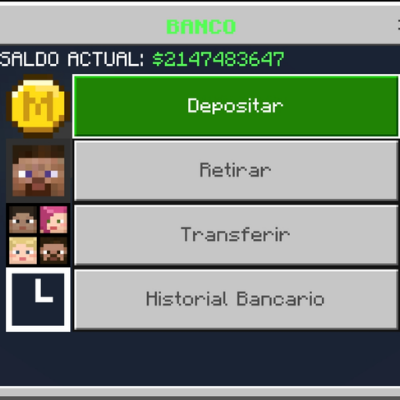
KenBank adds a complete banking system to Minecraft Bedrock, perfect for survival worlds and multiplayer servers that want a simple and organized economy.
Players can safely store their money, withdraw it, transfer it to other players and check their transaction history using easy in-game menus.
What can you do with KenBank?
Bank features
- Deposit money into your bank account
- Withdraw money when needed
- Transfer money to other players
- Money is divided into:
- Cash (Dinero)
- Bank Account (Cuenta Bancaria)
Easy to use menu
- Everything is handled through a simple menu
- No long or complicated commands
- Main command:
/ken:banco
Languages
Available languages:
- Spanish
- English
Change your language anytime with:
/ken:idioma
Transaction history
- The bank saves a history of your actions:
- Deposits
- Withdrawals
- Transfers sent
- Transfers received
- You can view your history directly from the bank menu
Fees
- Some operations may have fees:
- Deposit
- Withdraw
- Transfer
- The final amount is always shown clearly
Bank bonuses
- Players with large bank balances can receive automatic bonuses
- Bonuses are given after a certain time
- You will receive a message when you get a bonus
For servers
- Admins can see important operation logs
- Helps keep the server economy under control
- Lightweight and safe for multiplayer worlds
How to use
1. Install the addon in your world
2. Enable required experiments
3. Join the world
4. Use the command:
/ken:banco
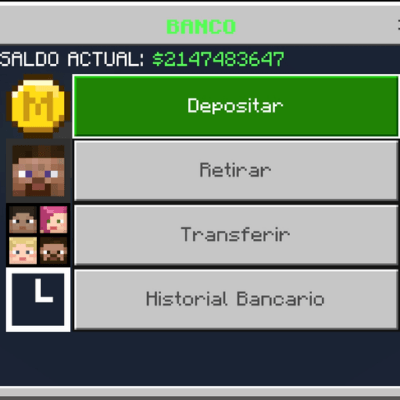
That’s it. Your bank is ready to use.
Credits
Created by KenFortressR
Notes
- Do not remove the addon once players are using the bank
- Recommended for survival, roleplay and multiplayer servers
- Edition: Minecraft Bedrock
- File type: .mcpack or .mcaddon
- Minecraft version listed: 1.21.130
- How to install: Download the .mcpack or .mcaddon file. → Open it — Minecraft imports it. → In your world: Behavior Packs → Available → Activate, then the same under Resource Packs.
- Where to get it: Opens on CurseForge — not every file is mirrored on our own servers.
Install steps are the general flow for this file type — How to install Minecraft Bedrock addons & mods walks through it step by step.
- Pack type: .mcpack — a single pack
- Manifest requires Minecraft 1.21.80 or newer
- Needs Beta APIs switched on in the world settings
- Complete pack — everything it depends on is inside the file
- Download size: 98 KB
- Download link checked 6 Oct 2026 — working
These come from our own check of the pack file, not from the source page.