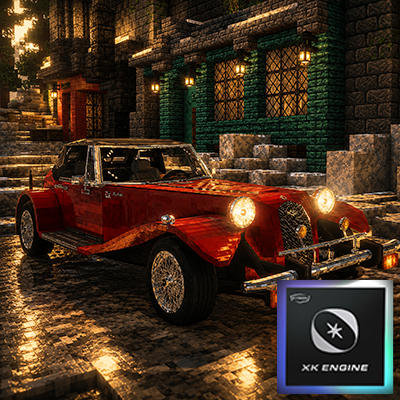
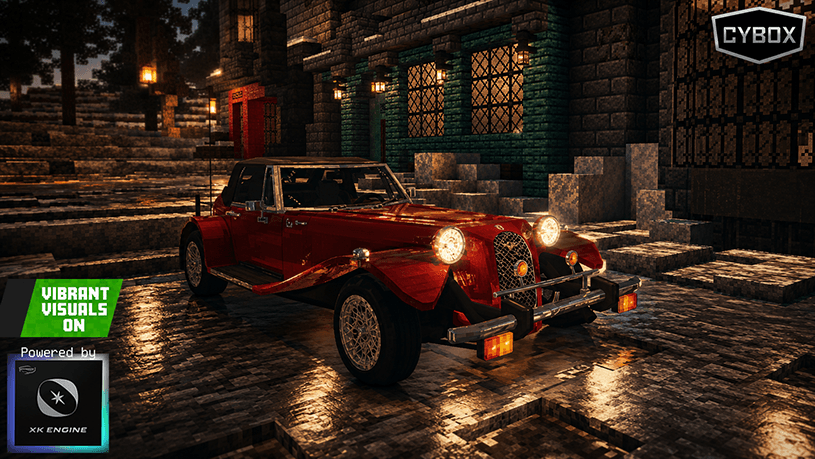
Hello, this is a vehicle add-on that incorporates a nearly finished version of the XK Engine, which was under development as the successor to the fLUX Engine. While the engine is almost fully functional, it is not yet complete, and development has been discontinued. We are releasing it in its current state based on its current functionality. There are no plans for future updates.
The instructions below are from the fLUX Engine era. While they are still largely compatible, some features have changed, and the Discord invite link no longer works.
 What is Kallista?
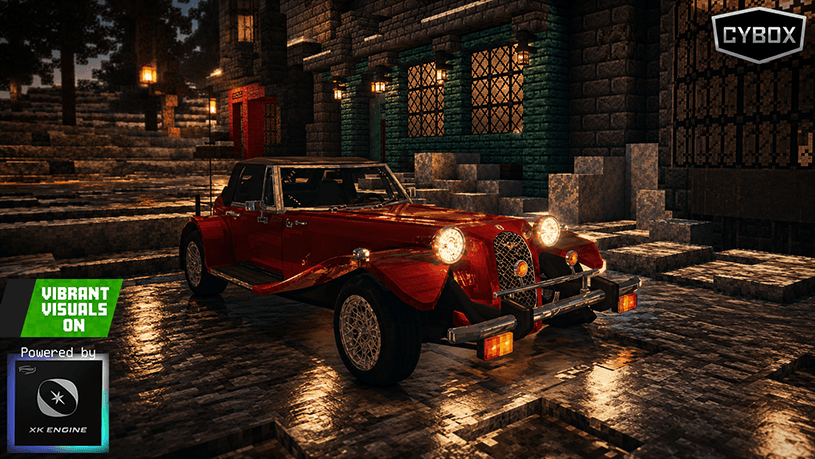
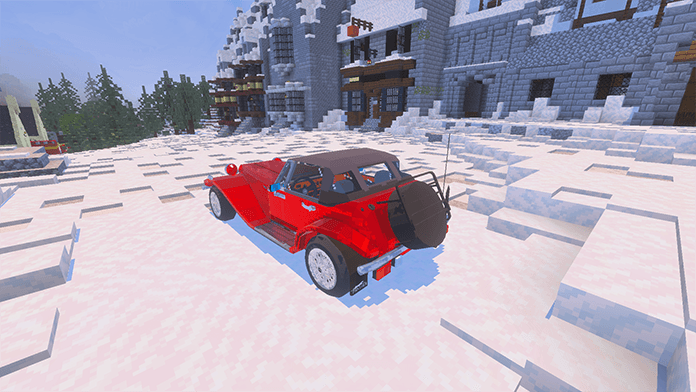
Kallista is a classic roadster made by Panther Westwinds, England. The company launched the car under the name Lima in 1976, highlighting its classic car design. A Korean businessman who saw this was impressed by Lima and acquired the Panther company. He later changed Lima's name to Kallista, which means "small and beautiful" in Greek. Since then, panther have been sold again to Ssangyong Motor in Korea, and in 1994, pandas moved their production facilities to Korea to make and sell handmade cars, but it was stopped due to sluggish sales. The reason for the sluggish car sales was that consumers were reluctant to buy it because of the prejudice that it was used for high prices and luxury goods at the time. But now, this car is regarded as a rare classic roadster in Korea. I saw this and recreated this car in Minecraft.
Making flim
How does it work?
What is fLux Engine?
fLux Engine is a fundamental add-on that transforms a basic vehicle add-on—once limited to boarding and movement—into a fully immersive driving experience with realistic features.
🚘 Vehicle System Overview
🚙 Vehicle Boarding & Ignition System
- 🏁 Boarding a Vehicle
- Interact with the vehicle and press the board button to enter.
- You must hold the car key item after boarding.
- 🔑 Ignition System
- Vehicles can be started and turned off.
- 🚷 You cannot exit the vehicle while the engine is running.
- ✅ Turning off the engine allows you to exit the vehicle.
- 🎗️ Seatbelt System
- After boarding, interacting with the car key opens a UI with ignition and seatbelt options.
- ⚠️ Seatbelt usage is optional
- ❌ You can start the engine without wearing it.
- ✔️ If worn, it reduces external damage from attacks.
⚙️ Automatic Transmission Controls
- 🅿️ P (Park) The vehicle moves at a limited speed.
- 🔁 R (Reverse) The vehicle moves backward.
- ⚖️ N (Neutral) Allows pushing the vehicle.
- 🚗 D (Drive) Enables normal-speed driving; speed adjustments available in the main UI.
⏩ Speed Control & Fuel Management System
- 🚦 Vehicles can adjust speed in 5 stages, from 30 to 220.
- 🔄 Gradual acceleration—RPM increases slowly before reaching the set speed.
- ⛽ The higher the speed, the more fuel is consumed.
- 💤 When idle, fuel consumption is minimal, but the engine still uses a small amount.
- ⚡ High-speed driving depletes fuel quickly, so efficient speed control is essential.
🛢️ Engine Oil System
- ⚙️ Vehicles have an engine oil condition, requiring regular maintenance.
- 🚨 If engine oil level reaches 0%, fuel consumption increases drastically.
- 🏪 Engine oil must be refilled at a charge item on gas station.
- ❗ Poor engine oil condition reduces vehicle performance and fuel efficiency.
- 🔧 Routine engine oil maintenance is necessary for safe driving.
💡 Vehicle Functions & UI
- 💡 Lighting Features
- Headlights, high beams, fog lights, reverse lights
- 🚦 Left/right turn signals & hazard lights
- 🪟 Window Control for Each Seat
- 👥 Toggle Passenger Boarding On/Off
- 🎨 Enable/Disable Vehicle Customization Mode
- 📢 Honk the Horn
- 🔧 Exclusive Features for Certain Vehicles
🔑 Vehicle Key System
- 🚘 When spawning a vehicle, a unique key for that specific vehicle is automatically provided.
- 🔐 Keys cannot be used on other vehicles, even of the same model.
- 🗝️ Backup Key Available—Each vehicle receives two keys (one main, one spare) in case of loss.
- 🚗 Keys must be held to interact with the vehicle for boarding.
🔧 Vehicle Repair System
- If a vehicle's HP decreases, you can restore its health by using Iron Ingots, Gold Ingots, Emeralds, Diamonds, or Netherite Ingots on the vehicle.
💡 Vehicle Spawning & Crafting
- 🛠️ Creative Mode—Vehicles can be instantly spawned using vehicle spawn eggs.
- 🏗️ Survival Mode—Vehicles must be crafted using unique recipes
📦 Trunk System
- 🚪 Selecting the open trunk option reveals the vehicle's rear trunk compartment.
- 📦 Interacting with the trunk displays a dedicated inventory UI.
- 🎒 Items can be stored inside the trunk for later use.
🎵 Vehicle Music System
- 🎶 All vehicles can play Minecraft's default disc music.
- 📀 Two types of music playback
- 🎼 Built-in Music Vehicles—Some vehicles have music stored internally, allowing immediate playback.
- 💿 Disc Music Vehicles—Requires collecting a music disc and inserting it while the engine is running, similar to a CD player.
🎨 Vehicle Customization Mode
- 🎨 Paint spray items No.1 to No.12 can be obtained at gas stations.
- 🌈 Activating customization mode displays rainbow-colored particles near the vehicle's front.
- 🖌️ Interacting with the vehicle while holding a paint spray item changes its color.
- 🚗 Each vehicle has different preset color options, allowing unique customization.
⚠️ Collision & Damage System
- 🚗💥 Vehicles deal speed-based damage when colliding with monster entities.
- ⚡ The faster the speed, the greater the impact damage.
- ⏬ Upon collision, vehicle speed temporarily decreases, while the monster takes severe damage.
🏎️ Exclusive Features for Convertibles & Sports Cars
🌞 Convertible Roof System
- 🏎️ Convertible vehicles allow opening and closing their roof.
- 🎛️ The main UI provides roof control options.
⚡ DashBoost System (Exclusive to Sports Cars)
- 🏎️ DashBoost is a unique ability available exclusively for certain designated sports cars.
- 🏇 It functions similarly to the camel's Dash ability but is faster and lasts far away.
- ⛽ Consumes additional fuel when activated.
- ⏳ Has a cooldown period, requiring strategic use.
- 🚀 Only activates in the main UI when the vehicle reaches its maximum speed.
🏪 Gas Station System
⛽ Gas Station Spawn & Management
- 🎯 Gas stations can be spawned using a dedicated spawn egg or crafted via Survival Mode recipes.
- 🏆 The player who spawns the gas station becomes its owner.
- 🔑 Owners receive two gas station management keys (one main, one spare).
📋 Gas Station Menu
- 🛢️ Displays current available fuel amount.
- 🔄 Fuel token generation – Allows other players to refuel using generated tokens.
- 🏎️ Fuel, engine oil, and paint distribution.
- 🔧 Owners can distribute fuel and engine oil for vehicle maintenance.
- 🎨 Paint sprays are available for vehicle customization mode.
🔑 Token-Based Refueling System
- 🏷️ Token Generation
- Gas station owners generate tokens for vehicle refueling.
- Tokens are used when players request refueling.
- ⛽ Refueling Process
- The gas station owner provides a fuel token.
- The player holds the token and interacts with the gas station.
- 📡 The gas station automatically detects nearby vehicles and lists them.
- 🚗 The player selects their vehicle from the list.
- ⏳ After 5–10 seconds, the vehicle is refueled.
🔋 Gas Station Fuel Refill System
- 🏗️ Owners can replenish the gas station’s fuel using coal items.
- 🔄 Interacting with the gas station while holding coal automatically refills the fuel supply.
- 💎 1 coal adds 1,000 liters of fuel instantly.
- ⚙️ Maintaining a sufficient coal stock ensures stable fuel availability.
⚠️ Gas Station Safety Guidelines
- 🔥 Never bring fire or explosives near the gas station.
- 🚨 Hazardous risks
- 💥 Direct fire, Creeper explosions, or lightning strikes can cause an explosion.
- ⛽ A gas station with stored fuel will detonate if exposed to such dangers.
- 🛠️ Proper management is required to ensure safe gas station operations.
- 🏗️ Just like real-world gas stations, players should build a roof structure over the gas station entity for added protection.
- 🌧️ A roof can shield the gas station from environmental hazards like rain or lightning.
- 🚗 Having a covered gas station makes it look more realistic and secure.
- 🔍 Owners should eliminate potential fire and explosion hazards to prevent accidents.
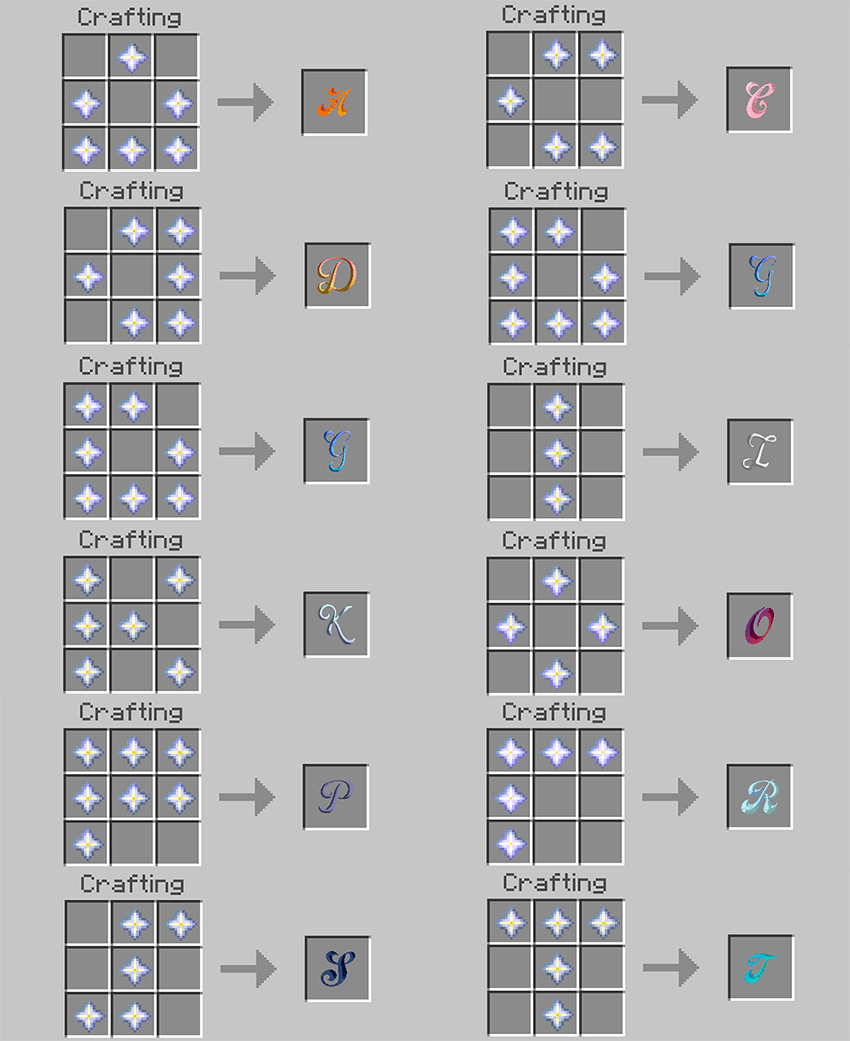
🚗 Vehicle Crafting Recipe Guide
- In Survival Mode, vehicles can be crafted manually.
- Each vehicle requires specific materials, which must be combined according to the crafting image provided below.
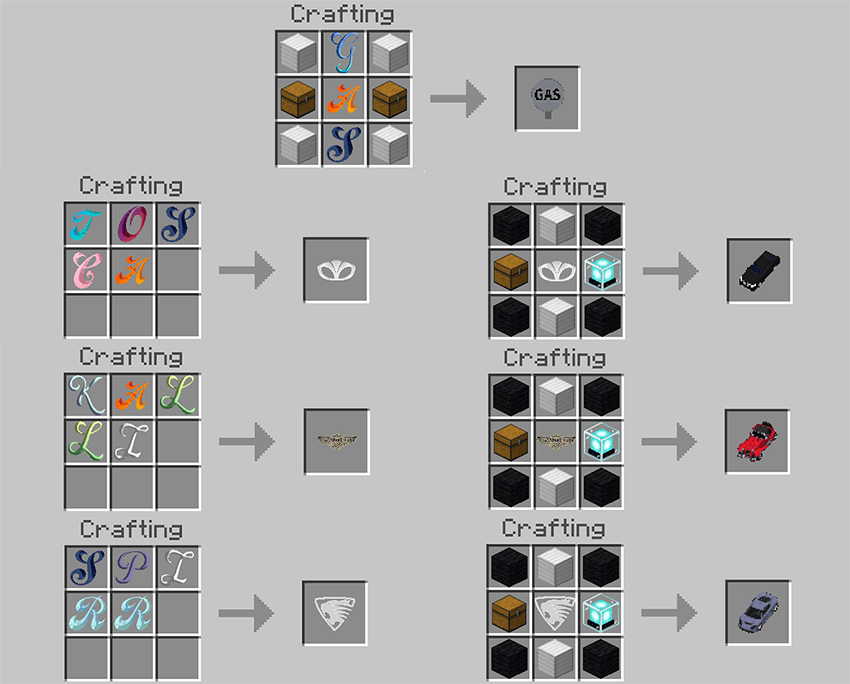
📲🗺️ When applying it to the your map …
When applying it to the map, please ensure that Flux Engine is placed at the top.
For resource packs, if you are using the Non-commercial Kit*, place it behind Flux Engine, as shown in the image below.


*CYBOX vehicle addons are provided without vehicle emblems and logos by default.
This measure ensures compliance with Mojang EULA's commercial use guidelines by removing conflicting elements.
If you want to use the removed elements, you can apply the Non-commercial Kit resource pack, which is offered separately from Flux Engine.
However, any issues arising from using this pack are the sole responsibility of the user.
Credit - CYBOX DIGITAL ENTERTAINMET (fLUX ENGINE)

- iMasterProX – Director, Lead Planner, and General Resource Manager
- NeroLuna – UI Resource Designer
- GooGoo – Icon Resource Artist (External Contributor)
- Saegyun – Particle Effects Designer
- Lemon7679 – Lead Developer, Script Engineer
- Namsic – Assistant Developer, Code Reviewer
Special Thanks
- aparu773 - Assistant Developer when LemonONE
- BirDev01 - Command Consultation
- DominoKorean - PBR Texture Resource Consultation
- elemen- Assistant Developer when LemonONE
- HXXNIVERS - fLux Engine~LemonONE Logo Designer
- killsystem10 - Vehicle System Consultation
- KoreanSL - Assistant Developer when LemonONE
- Our Minecraft Space
We are not related to CYBOX Shader, which operates in MC Java Edition. However, their work is truly impressive! If you play MC Java Edition, we highly recommend trying out CYBOX Shader.
Credit - CYBOX DIGITAL ENTERTAINMET (Panther Kallista)
- iMasterProX – Director, Lead Planner, and General Resource Manager
Special Thanks
- Dr. Neil Watts - Coverting OBJ for Minecraft
- Our Minecraft Space
We are not related to CYBOX Shader, which operates in MC Java Edition. However, their work is truly impressive! If you play MC Java Edition, we highly recommend trying out CYBOX Shader.
⚠️ Notice
- CYBOX vehicle addons are provided without vehicle emblems and logos by default. This measure ensures compliance with Mojang EULA's commercial use guidelines by removing conflicting elements. If you want to use the removed elements, you can apply the Non-commercial Kit resource pack, which is offered separately from Flux Engine. However, any issues arising from using this pack are the sole responsibility of the user.
- fLux Engine is currently in public beta, and some features may not function correctly. If you encounter any issues, please join the CYBOX Experience Center Discord server and submit your bug feedback. We will do our best to fix them! 🚀🔧
- 🚗 If you are a vehicle addon creator, CYBOX provides guidelines and development support to help integrate fLux Engine with your project.
- The source code is strictly private, and the script section is especially managed by CYBOX with great importance. Please do not modify or distribute it without permission. 🚀🔒
- This addon is only distributed through the following official platforms:
- CurseForge-MCPE DL
- Addons for Minecraft
- Our Minecraft Space
- NOT AN OFFICIAL MINECRAFT PRODUCT. NOT APPROVED BY OR ASSOCIATED WITH MOJANG OR MICROSOFT
ENJOY!!
- Edition: Minecraft Bedrock
- File type: .mcpack or .mcaddon
- Minecraft version listed: 26.20
- How to install: Download the .mcpack or .mcaddon file. → Open it — Minecraft imports it. → In your world: Behavior Packs → Available → Activate, then the same under Resource Packs.
- Where to get it: Opens on CurseForge — not every file is mirrored on our own servers.
Install steps are the general flow for this file type — How to install Minecraft Bedrock addons & mods walks through it step by step.
- Pack type: .mcaddon — behaviour and resource pack in one file
- Manifest requires Minecraft 1.21.90 or newer
- Complete pack — everything it depends on is inside the file
- Download size: 61.5 MB
- Download link checked 25 Aug 2026 — working
These come from our own check of the pack file, not from the source page.