Neural Implants: Cybernetic Enhancements
Neural Implamnts adds a variety of cybernetic implants to improve various abilities such as speed, strength, etc
⬇ Download on CurseForge
What are Neural Implants?
Neural implants are craftable items that can increase many physical attributes of your character. These implants can range from strength, speed, mining, vision, armor, and jumping enhancements.
To craft these enhancements, you'll need quartz, redstone, gold nuggets, and an item that corresponds to the implant that you want.
For example, if you want a jumping enhancement, this will be the recipe:
<figure class="image">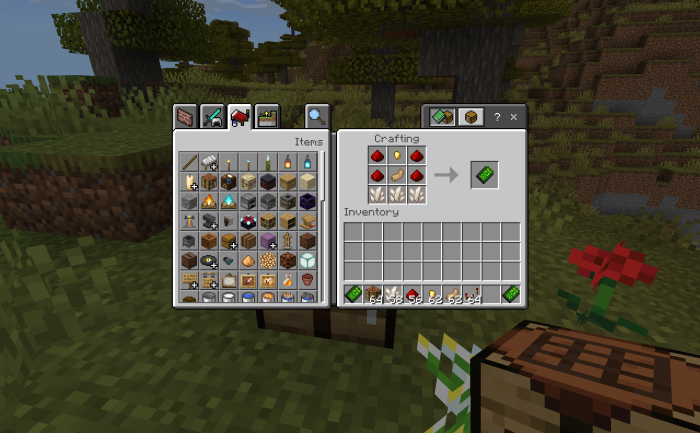 </figure>
The middle item is the only one that changes for implants.
How do I use these implants?
To use the implants, simply right-click (without sneaking) with the "Link Device" in your hand. This will bring up a menu with all of the implants. Clicking on a selection will let you use that implants, assuming you have said implant.
After crafting the implant you want, you can install it by sneaking + right-clicking with it in your hand.
Once you acquire the automation upgrade, you can install that like any other implant. Automations can be enabled or disabled by sneaking & using the Link Device in your main hand.
When automated, all installed implants will activate automatically based on the situation. For example, when you start sprinting, your leg implants will automatically activate, enhancing your speed.
- Edition: Minecraft Bedrock
- File type: .mcpack or .mcaddon
- Minecraft version listed: 1.21.70
- How to install: Download the .mcpack or .mcaddon file. → Open it — Minecraft imports it. → In your world: Behavior Packs → Available → Activate, then the same under Resource Packs.
- Where to get it: Opens on CurseForge — not every file is mirrored on our own servers.
Install steps are the general flow for this file type — How to install Minecraft Bedrock addons & mods walks through it step by step.
- Pack type: .mcaddon — behaviour and resource pack in one file
- Manifest requires Minecraft 1.21.60 or newer
- Complete pack — everything it depends on is inside the file
- Download size: 18 KB
- Download link checked 16 Sept 2026 — working
These come from our own check of the pack file, not from the source page.