Smart Equip V1.1
Bedrock add-on listed for Minecraft 1.21–26.x (behavior + resource pack). File opened and checked on 30 Sep 2026; installs from the MC Bedrock Mods app on Android.
Automatically equips the best piece of armor found in your inventory — no manual swapping, no wasted upgrades. Powered by a weighted scoring system that…
⬇ Download on CurseForge
> Bedrock Add-On - StarMeteor Team
Automatically equips the best piece of armor found in your inventory — no manual swapping, no wasted upgrades. Powered by a weighted scoring system that considers defense, enchantments, and durability.
- Version: v1.0
- Minecraft Bedrock: 1.21.100+
- Cheats Required: No
- Experimental Features: Not required
What it does
Smart Equip monitors every player's inventory in real time. Whenever a piece of armor in your inventory scores higher than what you currently have equipped, it swaps automatically — the old piece goes back to your inventory, and if there's no room, it drops at your feet.
- The addon respects Elytra — it will never replace an equipped Elytra with a chestplate.
Features
⚔️ Weighted scoring
- Each piece is scored by defense points, enchantment value, and a durability multiplier. Cursed or near-broken items are penalized.
🔔 Toast notifications
- Optional action-bar notification shows the equipped item name and its current durability percentage whenever a swap happens.
⚙️ Per-player config
- Each player manages their own settings — enable/disable, notification mode, minimum durability threshold — without affecting others.
🌍 4 languages
- All UI strings are fully localized in English, Spanish, Brazilian Portuguese, and European Portuguese.
Configuration
/smart_equip:config
Opens the configuration panel. Available to all players — no cheats, no operator permission needed.
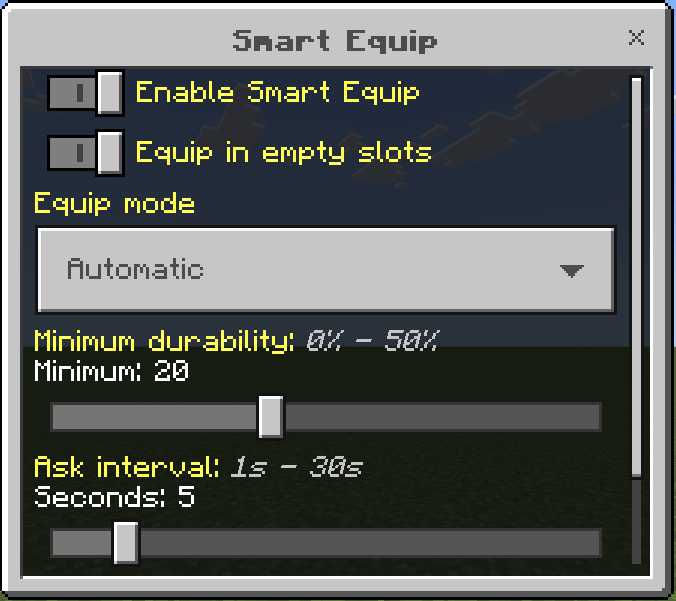
Min. Durability
- Slider 0–50%
Pieces below this threshold will never be auto-equipped, even if their score is higher.
Prevents accidentally equipping nearly-broken armor.
Default: 20%
- Edition: Minecraft Bedrock
- File type: .mcpack or .mcaddon
- Minecraft versions listed: 26.0.02, 26.0, 26.3
- How to install: Download the .mcpack or .mcaddon file. → Open it — Minecraft imports it. → In your world: Behavior Packs → Available → Activate, then the same under Resource Packs.
- Where to get it: Opens on CurseForge — not every file is mirrored on our own servers.
Install steps are the general flow for this file type — How to install Minecraft Bedrock addons & mods walks through it step by step.
- Pack type: .mcaddon — behaviour and resource pack in one file
- Manifest requires Minecraft 1.21.100 or newer
- Complete pack — everything it depends on is inside the file
- Download size: 18 KB
- Download link checked 6 Oct 2026 — working
These come from our own check of the pack file, not from the source page.