
Three Lives Addon
Bedrock add-on listed for Minecraft 1.21 (behavior + resource pack). Needs Beta APIs. File opened and checked on 4 Oct 2026; installs from the MC Bedrock Mods app on Android.
I don't know my version
Overview
Alylica's Three Lives Addon is inspired by the "Life Series" by Grian on Youtube
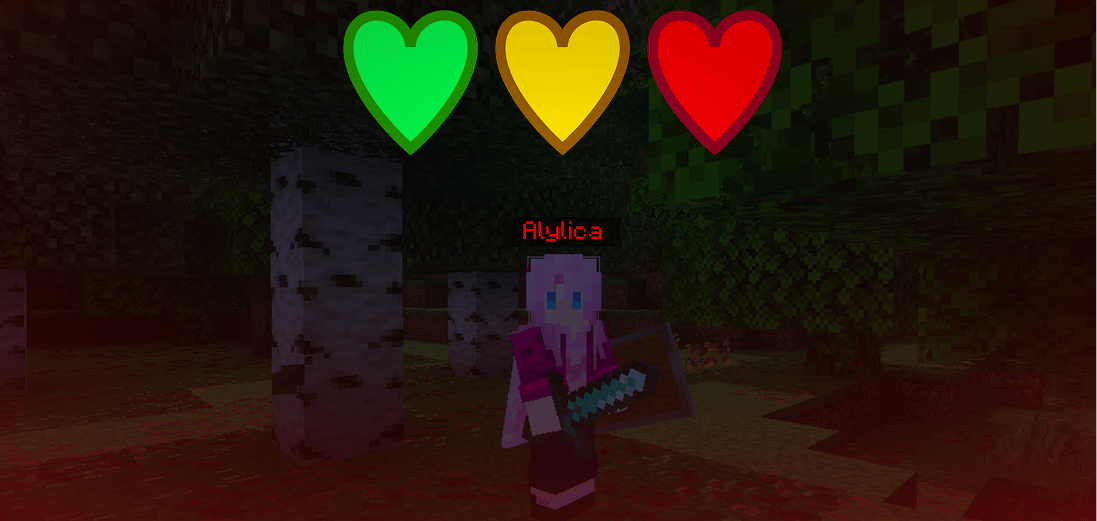
Its a quite simple concept, each player starts with 3 lives and a Green Name
With 2 lives, you drop to a Yellow Name and at 1 life you will have a Red Name - Allowing you to attack other players.
There is also a world border, text-based proximity chat, the boogeyman and more! I will explain those below.
Settings
Boogeyman
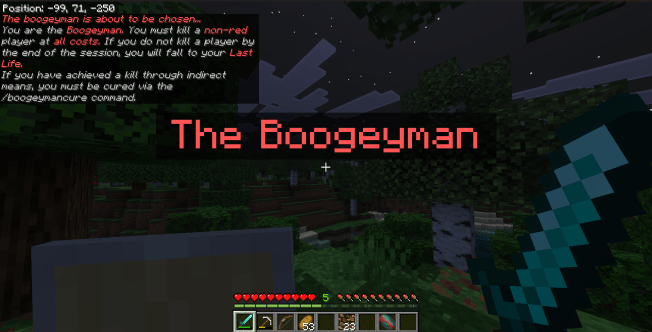
The boogeyman is a role given to a non-red player, the boogeymans job is to kill another non-red player before the end of the session, if they do not, they will become a Red Player
There are numerous commands related to the boogeyman, listed below
/boogeyman - Makes the specified player a boogeyman
/boogeymanrandom - Grants one player the boogeyman role, this command has a visual effect similar to the series "Last Life"
/boogeymancure - Cures a player from the boogeyman (useful if they killed someone, but did so through indirect means)
/boogeymanfailall - All boogeymen remaining will fail, becoming Red Players
Give Life
There is a command called /givelife, this can be used to trade lives between players, although it is disabled by default. To turn it on, an admin must use the /lifesettings command
World Border
There is a border in the overworld that defaults to 700x700 and is centered at the world spawn point, there are a few commands linked to the border
/borderwidth query - Get the current border size
/borderwidth no_border - Disable the world border
/borderwidth <number> - Set the world border to a specified size
Proximity Chat
With Proximity Text Chat, your messages in chat only appear to players in range, although it is disabled by default. To turn it on, an admin must use the /lifesettings command
There is also a proximity chat command used to edit the range
/proximitychat - Sets the range of proximity chat (0-128)
Life Settings
These settings can all be toggled by the /lifesettings command
giveLife - Toggles the /givelife command.
spectatorsCanChat - Toggles the ability for spectators to send chat messages.
helmetsDisabled - Toggles the ability to equip helmets.
eliminationLightning - Toggles the lightning effects that play when someone is eliminated.
proximityChat - Toggles the proximity chat feature.
redKillsEarnLives - Toggles the ability for red named players to earn lives by killing green players.
Installation Details
Make sure that your version of the addon is the most recent one! Also, make sure to enable the Beta APIs toggle
IF YOU SEE THE FOLLOWING MESSAGE THAT MEANS THE ADDON HAS BEEN INSTALLED
However, if you see this After creating the world then the addon has reset any toggled settings, because you either moved the world spawn or did something like /kill @e
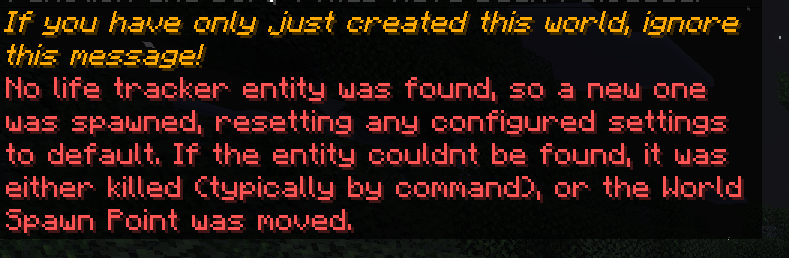
IF NO ENTITY SPAWNS REPEATEDLY, USE THE FORCERELOAD COMMAND
If you have any issues, please ask in my discord server
Join my Discord for future sneak peeks, and more!
- Edition: Minecraft Bedrock
- File type: .mcpack or .mcaddon
- Minecraft versions listed: 1.21.111, 1.21.101, 1.21.100
- How to install: Download the .mcpack or .mcaddon file. → Open it — Minecraft imports it. → In your world: Behavior Packs → Available → Activate, then the same under Resource Packs.
- Where to get it: Opens on CurseForge — not every file is mirrored on our own servers.
Install steps are the general flow for this file type — How to install Minecraft Bedrock addons & mods walks through it step by step.
- Pack type: .mcaddon — behaviour and resource pack in one file
- Manifest requires Minecraft 1.21.100 or newer
- Needs Beta APIs switched on in the world settings
- Complete pack — everything it depends on is inside the file
- Download size: 48 KB
- Download link checked 6 Oct 2026 — working
These come from our own check of the pack file, not from the source page.