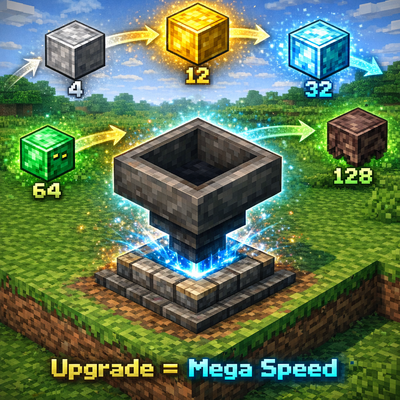
TC Fast Hopper
Bedrock add-on listed for Minecraft 1.21–26.x (behavior pack only). File opened and checked on 26 Sep 2026; installs from the MC Bedrock Mods app on Android.
Upgradeable hopper system with directional control, faster item transfer, particle effects, controller tool, upgrade tiers, redstone support, and…
⬇ Download on CurseForgeThis addon upgrades the default Minecraft hopper into a powerful and customizable item transport system. Players can use a special Hopper Controller tool to rotate hopper directions instantly without breaking them. Hoppers can also be upgraded using Iron, Gold, Diamond, Emerald, and Netherite blocks to increase transfer speed. Each upgrade level adds unique particle effects, making the hopper visually distinct. The system automatically saves hopper data, supports redstone control, collects nearby dropped items, and restores upgrade materials when the hopper is broken.
| Level | Upgrade Block | Transfer Speed (items/tick) |
|---|---|---|
| 0 | Default Hopper | 1 |
| 1 | Iron Block | 4 |
| 2 | Gold Block | 12 |
| 3 | Diamond Block | 32 |
| 4 | Emerald Block | 64 |
| 5 | Netherite Block | 128 |
- Edition: Minecraft Bedrock
- File type: .mcpack or .mcaddon
- Minecraft versions listed: 1.21.101, 1.21.100, 1.21.111
- How to install: Download the .mcpack or .mcaddon file. → Open it — Minecraft imports it. → In your world: Behavior Packs → Available → Activate, then the same under Resource Packs.
- Where to get it: Opens on CurseForge — not every file is mirrored on our own servers.
Install steps are the general flow for this file type — How to install Minecraft Bedrock addons & mods walks through it step by step.
- Save it as TC_FastHopper.mcaddon before opening — it downloads as .mcpack, but it is a .mcaddon pack
- Manifest requires Minecraft 1.21.0 or newer
- Complete pack — everything it depends on is inside the file
- Download size: 334 KB
- Download link checked 6 Oct 2026 — working
These come from our own check of the pack file, not from the source page.