Assets+ Add-On
I don't know my version
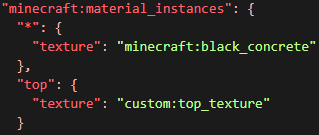
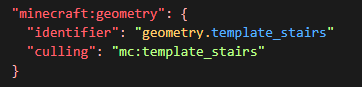
Common Bedrock Edition assets for resource, and behavior packs. This is a library resource pack and does not have any use by itself. This library adds new block textures id's to make using vanilla textures easier.
 Click on the above image, select plan (at least 4GB), use code
 legopitstop to get 25% off your first month and enjoy playing with your friends!
DISCLAIMER
This resource pack does not add anything out-of-box but may be needed by other add-ons or behavior packs.
FAQ
What version of Assets Plus do I use?
Assets Plus is backwards compatible meaning any version can work. However, the dependent addon will throw an error if the correct version is not enabled. Typically to can check the changelog of the dependent addon to get the required version. If the addon doesn't have a changelog or doesn't state which version the latest one should work fine.
Why a separate resource pack?
My last few add-ons use vanilla Minecraft assets, but the default texture id isn't the best, for example, It is impossible to use the White Concrete texture because it is inside an array of textures and thus not able to use the texture in a data-driven block. So making this a separate pack means less copy-pasting of the same block textures.
How do I get this to work with my behavior pack?
You can find information on how to add this library to yours via the Documentation Page
What IDs are supported?
You can find a list of all texture IDs via the Documentation Page
What do I do if I find an issue with the library?
You can submit all issues and suggestions via GitHub
Where are the texture files inside the resource pack?
The resource pack reads Minecraft's built-in textures so there is no need to add all the vanilla textures, however, this does add both debug textures from Java Edition.
Can I make my addon/mod use this library?
Yes! Feel free to use this library for your own use. The only thing I ask is that you don't post this library to the public. However, you can include the mcpack inside the .mcaddon file (Along with your own packs) and post that if you want, But that may cause issues with other addons and will not always be up-to-date.
Badges

https://img.shields.io/badge/Assets Plus-v1.7.0-green[](https://www.curseforge.com/minecraft-bedrock/addons/assets-plus "v1.7.0")
[](https://www.curseforge.com/minecraft-bedrock/addons/assets-plus)- Edition: Minecraft Bedrock
- File type: .mcpack or .mcaddon
- Minecraft versions listed: 26.30, 26.20, 1.21.111
- How to install: Download the .mcpack or .mcaddon file. → Open it — Minecraft imports it. → In your world: Behavior Packs → Available → Activate, then the same under Resource Packs.
- Where to get it: Opens on CurseForge — not every file is mirrored on our own servers.
Install steps are the general flow for this file type — How to install Minecraft Bedrock addons & mods walks through it step by step.
- Pack type: .mcpack — a single pack
- Manifest requires Minecraft 1.26.33 or newer
- Complete pack — everything it depends on is inside the file
- Download size: 123 KB
- Download link checked 25 Aug 2026 — working
These come from our own check of the pack file, not from the source page.