AddonsBedrock
Explorer's Dream
I don't know my version
Open Minecraft and look at the bottom-left corner of the main screen — the version is printed there, like v1.26.30.
The game writes a 1. in front; the buttons above leave it off. v1.26.30 in the game is 26.30 here.
Introduction
This addon adds the "Biome Locator" item, it can find any biome and take you to it.
Images
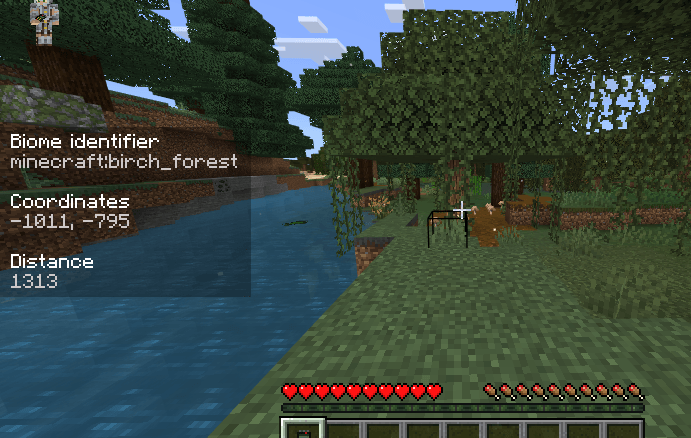
Hud Screen UI
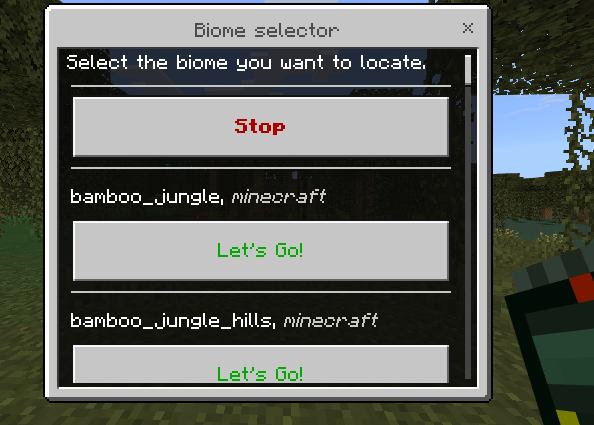
Biome Locator Menu UI
Crafting recipe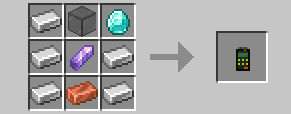
Experiments
- BETA API

How to use
- Press the interact button with the Biome Locator, an UI with all the biomes id will be shown.
- The biomes in the ui are in alphabethical order.
- Press the "Let's Go!" button in the ui to select the biome.
- Press the "Stop" button to deselect the biome.
Quick facts
- Edition: Minecraft Bedrock
- File type: .mcpack or .mcaddon
- Minecraft versions listed: 1.21.90, 1.21.82
- How to install: Download the .mcpack or .mcaddon file. → Open it — Minecraft imports it. → In your world: Behavior Packs → Available → Activate, then the same under Resource Packs.
- Where to get it: Opens on CurseForge — not every file is mirrored on our own servers.
Install steps are the general flow for this file type — How to install Minecraft Bedrock addons & mods walks through it step by step.
Verified by MCModsHub
- Pack type: .mcaddon — behaviour and resource pack in one file
- Manifest requires Minecraft 1.21.90 or newer
- Needs Beta APIs switched on in the world settings
- Complete pack — everything it depends on is inside the file
- Download size: 44 KB
- Download link checked 15 Sept 2026 — working
These come from our own check of the pack file, not from the source page.