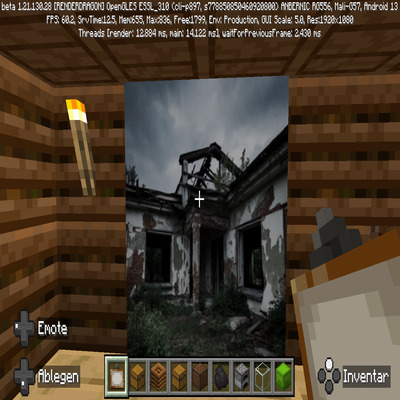
Lost places Wallpapers Version 1
Bedrock add-on listed for Minecraft 1.21 (resource pack only). File opened and checked on 30 Sep 2026; installs from the MC Bedrock Mods app on Android.
⬇ Download on CurseForgeMod Description: "Post-Apocalyptic Ruins Wallpaper"
💾 Name: Abandoned Pripyat (Painting Overhaul)
Type: Resource Pack for Minecraft Bedrock Edition
Function: This pack replaces the standard Minecraft paintings with high-resolution photographs and realistic depictions of abandoned buildings and ruins from post-apocalyptic settings, heavily inspired by locations like Pripyat/Chernobyl.
💀 Key Features:
Realistic Ruins: The paintings feature weathered facades, collapsed roofs, and overgrown interiors. The color palette is muted and atmospheric, dominated by shades of gray, green, and brown.
Intense Atmosphere: The pack creates a strong mood of isolation, decay, and end-of-days feeling, making it ideal for building bunkers, ghost towns, or survival settlements.
Focused Aesthetic: An ideal companion pack for survival or adventure maps that center around deserted civilizations and the reclaiming of structures by nature.
"Turn your walls into windows looking out onto a long-forgotten world. This pack provides the perfect backdrop to transform your Minecraft projects into a grim, post-apocalyptic masterpiece."
⚙️ Installation & Compatibility:
This Resource Pack is designed for the Minecraft Bedrock Edition and exclusively overrides the textures of the painting items. It is compatible with most other Addons that modify different blocks or functions.
🛠️ Installation Guide for CurseForge Bedrock Addons
Since this is a Resource Pack, the installation method follows the standard process we have covered:
1. Downloading the Pack
Download the compatible .mcpack or .mcaddon file for the pack from the CurseForge page.
2. Importing into Minecraft
Double-click the downloaded file to start the automatic import into Minecraft.
Ensure you receive the "Import successful" notification.
3. Activating in Your World
In Minecraft, go to your World Settings (Edit World) and select Resource Packs.
Activate the pack (e.g., "Lost places Wallpapers V1").
The pack must be loaded at a higher priority in the active list to successfully override t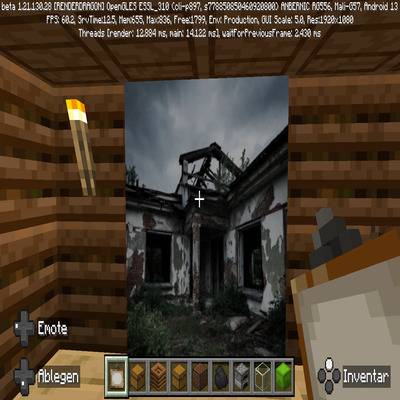 he default paintings.
- Edition: Minecraft Bedrock
- File type: .mcpack or .mcaddon
- Minecraft version listed: 1.21.122
- How to install: Download the .mcpack or .mcaddon file. → Open it — Minecraft imports it. → In your world: Behavior Packs → Available → Activate, then the same under Resource Packs.
- Where to get it: Opens on CurseForge — not every file is mirrored on our own servers.
Install steps are the general flow for this file type — How to install Minecraft Bedrock addons & mods walks through it step by step.
- Pack type: .mcpack — a single pack
- Manifest requires Minecraft 1.21.0 or newer
- Complete pack — everything it depends on is inside the file
- Download size: 40.1 MB
- Download link checked 6 Oct 2026 — working
These come from our own check of the pack file, not from the source page.