Ender Tank
Bedrock add-on listed for Minecraft 1.21–26.x (behavior + resource pack). File opened and checked on 28 Sep 2026; installs from the MC Bedrock Mods app on Android.
If you're looking for a way to store your accumulated experience, this is the best add-on for you! Despite being a simple add-on, it's super useful to use…
I don't know my version
Ender Tank — v1.1
A utility addon focused on precise experience storage, built for Minecraft Bedrock using a consistent raw XP system.
Compatible with Minecraft 1.21.100+
API Version: 2.1.0
Overview
Ender Tank allows players to store, manage, and retrieve experience points in a reliable and predictable way. Instead of using levels, the system is entirely based on raw XP, avoiding vanilla inconsistencies.
- Stores up to 30,970 XP per player (≈ 100 levels)
- Per-player storage system
- Balanced for survival gameplay
Interface
The interface was redesigned in v1.1 using the native modal form system, replacing the previous action-based UI.
- Select exact XP values to deposit or withdraw
- Precise control with slider-based input
- Improved usability and consistency
Storage System
Experience is stored as a numerical value instead of levels. This ensures accurate calculations and prevents scaling issues present in vanilla mechanics.
- No level-based conversion
- No precision loss
- Consistent deposit and extraction behavior
Mechanics
- Automatic interaction when near the tank
- Seamless deposit and extraction flow
- Designed for integration with XP farms and progression systems
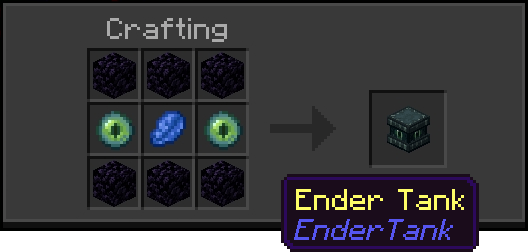
Crafting
- 6x Obsidian
- 2x Ender Eye
- 1x Lapis Lazuli
Localization
- 🇺🇸 English
- 🇧🇷 Português (BR)
- 🇵🇹 Português (PT)
- 🇪🇸 Español
- 🇫🇷 Français
- 🇷🇺 Русский
- 🇮🇩 Bahasa Indonesia
- 🇯🇵 日本語
- 🇰🇷 한국어
- 🇨🇳 中文
Performance
- Built using Script API
- Optimized task handling system
- Stable in multiplayer and Realms
Compatibility
- Multiplayer supported
- Realms compatible
- Lightweight and optimized
Credits
Add-on made by Athan213
- Edition: Minecraft Bedrock
- File type: .mcpack or .mcaddon
- Minecraft versions listed: 1.21.101, 1.21.100, 1.21.111
- How to install: Download the .mcpack or .mcaddon file. → Open it — Minecraft imports it. → In your world: Behavior Packs → Available → Activate, then the same under Resource Packs.
- Where to get it: Opens on CurseForge — not every file is mirrored on our own servers.
Install steps are the general flow for this file type — How to install Minecraft Bedrock addons & mods walks through it step by step.
- Pack type: .mcaddon — behaviour and resource pack in one file
- Manifest requires Minecraft 1.21.100 or newer
- Complete pack — everything it depends on is inside the file
- Download size: 51 KB
- Download link checked 26 Oct 2026 — working
These come from our own check of the pack file, not from the source page.