Lore Chat
Have you ever thought about chatting with your friends with messages above your head? I created this addon to make this experience possible! Why not give…
⬇ Download on CurseForge
⚠ Warning ⚠
This Addon only works in multiplayer, so you will need to invite your friends to your world for the Addon to work.
When you enter your world for the first time, you will receive an item called Lore Chat that will open a chat interface where you can write your messages.
The messages will disappear after 15 seconds, unless you enable the permanent messages button, which will allow the message to always be visible over your head.
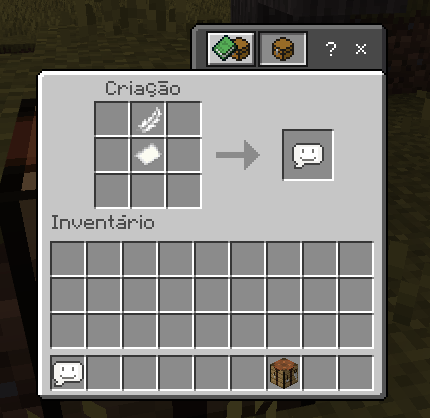
Don't worry if you lose the item. By putting a pen and paper together on a crafting table, you can easily make Lore Chat.
- The messages will only appear over your head. Below your name. Very useful for private conversations and servers.
- Watch the video below:
Dicord Support: Click Here!
- Edition: Minecraft Bedrock
- File type: .mcpack or .mcaddon
- Minecraft version listed: 1.21.101
- How to install: Download the .mcpack or .mcaddon file. → Open it — Minecraft imports it. → In your world: Behavior Packs → Available → Activate, then the same under Resource Packs.
- Where to get it: Opens on CurseForge — not every file is mirrored on our own servers.
Install steps are the general flow for this file type — How to install Minecraft Bedrock addons & mods walks through it step by step.
- Pack type: .mcaddon — behaviour and resource pack in one file
- Manifest requires Minecraft 1.16.0 or newer
- Complete pack — everything it depends on is inside the file
- Download size: 138 KB
- Download link checked 16 Sept 2026 — working
These come from our own check of the pack file, not from the source page.