Dylan`s Discord Addon
Bedrock add-on listed for Minecraft 1.20–1.21 (behavior pack only). Needs Beta APIs. File opened and checked on 4 Oct 2026; installs from the MC Bedrock Mods app on Android.
A powerful addon that bridges your Minecraft server with Discord, allowing real-time chat integration and player activity notifications.
⬇ Download on CurseForge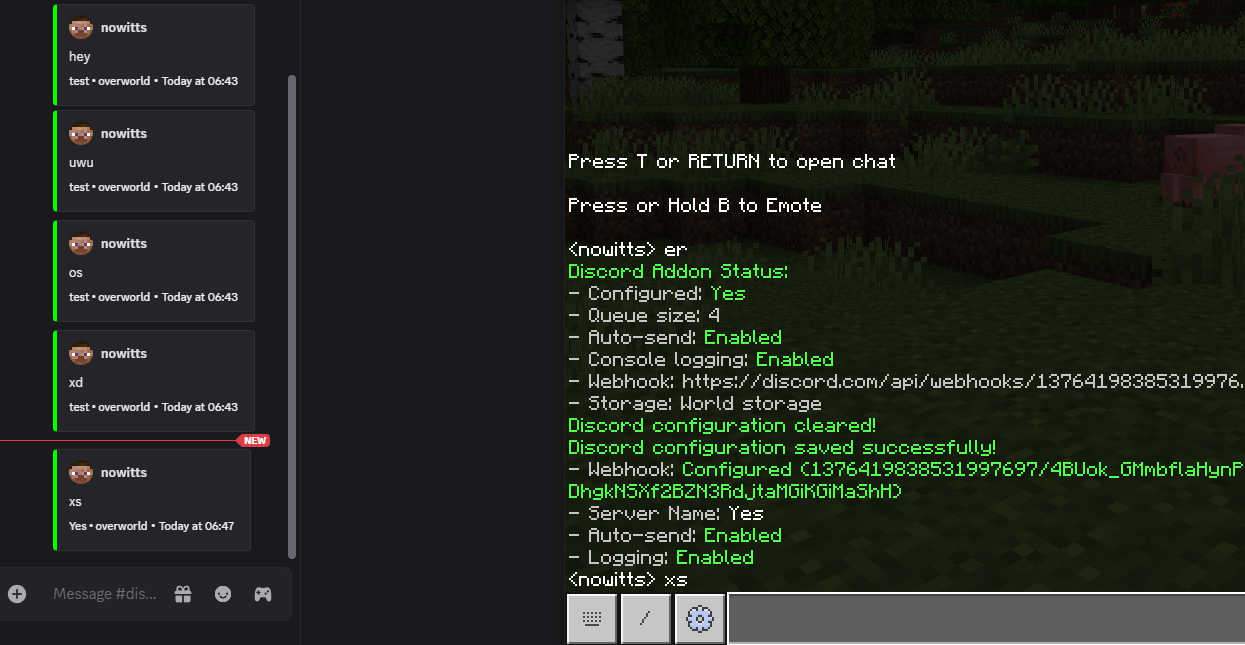
 Discord Chat Integration Addon
**For Minecraft Bedrock Dedicated Servers Only**
A powerful addon that bridges your Minecraft server with Discord, allowing real-time chat integration and player activity notifications.
🎯 What This Addon Does
Real-Time Chat Integration
- In-Game → Discord: Every chat message from players appears in your Discord channel
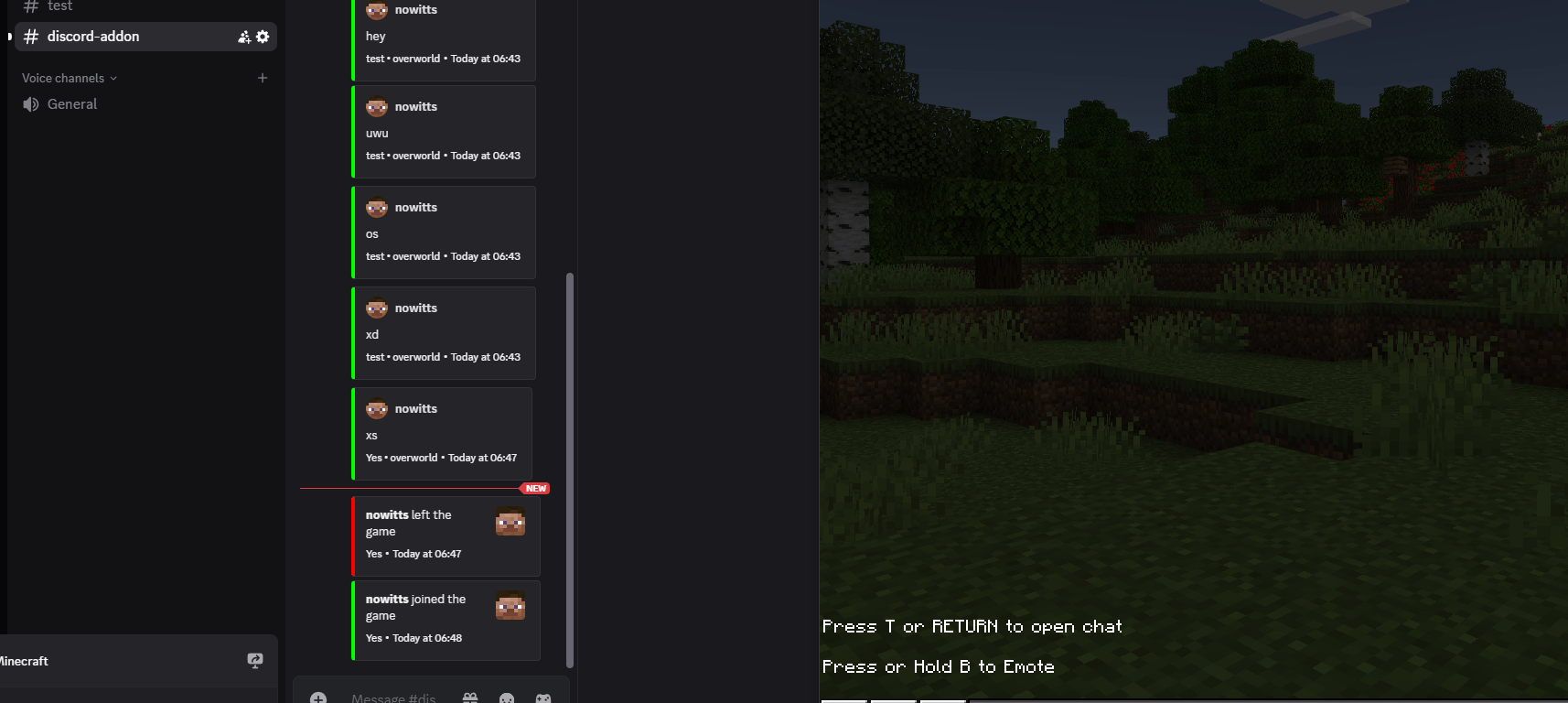
- Player Join/Leave: Automatic notifications when players connect or disconnect
- Rich Embeds: Beautiful Discord messages with player avatars and server branding
Smart Message Management
- Message Queuing: Batches messages for efficient sending
- Auto-Send: Automatically sends messages every 5 seconds (configurable)
- Manual Control: Send messages on-demand when needed
- Error Handling: Retries failed messages automatically
Easy Configuration
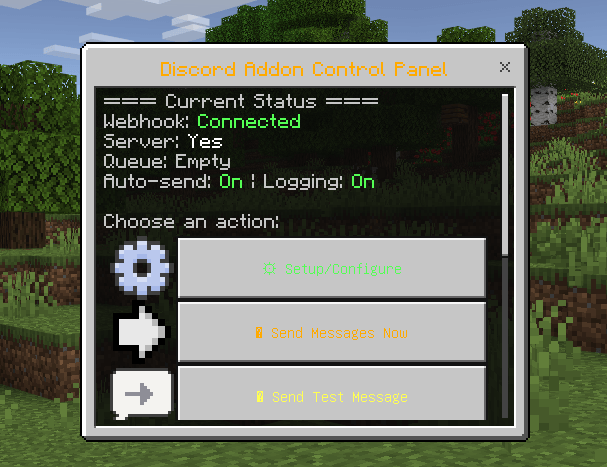
- UI Interface: Beautiful in-game forms for setup (
/discord:ui) - Command Line: Alternative commands for advanced users
- Persistent Storage: Settings saved with your world
- No External Dependencies: Everything runs within Minecraft
🚀 Quick Setup
1. Server Requirements
- Minecraft Bedrock Dedicated Server
- Operator permissions for setup
- Internet connection for Discord webhooks
2. Discord Setup
- Right-click your Discord channel
- Go to Edit Channel → Integrations → Webhooks
- Create a new webhook and copy the URL
- You only need the part after
/webhooks/(e.g.,1234567890/abcdef123456)
3. In-Game Setup
/discord:ui- Enter your webhook ID/token (short format)
- Set your server name
- Configure auto-send and logging
- Save and test!
📋 Commands Reference
Main Commands (Admin Only)
/discord:ui- Open configuration interface ⭐ Recommended/discord:setup <id/token>- Set webhook (short format)/discord:servername <name>- Set server display name/discord:send- Send queued messages now/discord:auto- Toggle automatic sending/discord:status- Show current configuration/discord:test- Add test message to queue/discord:logging- Toggle console logging/discord:clear- Reset all settings/discord:help- Show command help
Webhook Format
Instead of the full Discord URL:
https://discord.com/api/webhooks/1234567890/abcdef123456Just use the short format:
1234567890/abcdef123456🔧 Features
Message Types
- 💬 Chat Messages: Player conversations with avatars
- ✅ Join Notifications: When players connect
- ❌ Leave Notifications: When players disconnect
- 🧪 Test Messages: For configuration testing
Discord Embeds
- Player Avatars: Automatic Minecraft head images
- Color Coding: Green for chat/joins, red for leaves
- Server Branding: Your custom server name in footers
- Timestamps: Accurate message timing
- Dimension Info: Shows which world dimension
Smart Controls
- Auto-Send: Sends messages every 5 seconds when enabled
- Manual Send: Send messages on-demand
- Queue Management: Holds up to 50 messages
- Logging Control: Toggle console output on/off
⚙️ Server Configuration
Required Permissions File
Create or update /home/container/config/default/permissions.json:
{
  "allowed_modules": [
    "@minecraft/server-gametest",
    "@minecraft/server",
    "@minecraft/server-ui",
    "@minecraft/server-admin",
    "@minecraft/server-net",
    "@minecraft/server-editor"
  ]
}
Addon Installation
- Upload the addon to your server's
behavior_packsfolder - Add to your world's
behavior_packsinworld_behavior_packs.json - Restart the server
- Configure using
/discord:ui
🛡️ Security & Permissions
Admin Only Access
- All Discord commands require Operator permissions
- Uses Minecraft's built-in permission system
- Cannot be triggered by command blocks or automation
- Secure webhook URL storage
Data Storage
- Webhook URLs stored securely in world data
- No external files or databases required
- Settings persist with world saves
- Automatic cleanup on configuration reset
🎨 Discord Appearance
Chat Messages
[Player Avatar] PlayerName
Their chat message here
Server Name • overworld | Today at 3:45 PM
Join/Leave Notifications
[Player Avatar] PlayerName joined the game
Server Name | Today at 3:45 PM
🔍 Troubleshooting
Common Issues
- "Not configured": Run
/discord:uito set up webhook - Messages not sending: Check internet connection and webhook URL
- Permission denied: Ensure you have operator status
- UI not opening: Verify
@minecraft/server-uiis in permissions.json
Debug Information
- Use
/discord:debugto see configuration details - Check console logs for detailed error messages
- Use
/discord:statusto verify setup - Test with
/discord:testbefore going live
📊 Technical Details
Dependencies
@minecraft/server(2.0.0-beta) - Core functionality@minecraft/server-net(1.0.0-beta) - HTTP requests@minecraft/server-ui(2.0.0-beta) - Configuration interface
Performance
- Minimal server impact
- Efficient message batching
- Automatic queue management
- Configurable logging levels
Compatibility
- Bedrock Dedicated Servers Only
- Requires operator permissions for setup
- Works with all Minecraft Bedrock versions supporting script APIs
- No client-side installation required
🎉 Ready to Connect Your Server?
- Set up Discord webhook in your channel
- Install the addon on your Bedrock Dedicated Server
- Configure permissions.json with required modules
- Run
/discord:uiin-game to configure - Test with
/discord:testand enjoy real-time chat integration!
Your Minecraft server and Discord community are now connected! 🚀
- Edition: Minecraft Bedrock
- File type: .mcpack or .mcaddon
- Minecraft versions listed: 1.21.81, 1.21.82, 1.21.80
- How to install: Download the .mcpack or .mcaddon file. → Open it — Minecraft imports it. → In your world: Behavior Packs → Available → Activate, then the same under Resource Packs.
- Where to get it: Opens on CurseForge — not every file is mirrored on our own servers.
Install steps are the general flow for this file type — How to install Minecraft Bedrock addons & mods walks through it step by step.
- Pack type: .mcaddon — behaviour and resource pack in one file
- Manifest requires Minecraft 1.20.50 or newer
- Needs Beta APIs switched on in the world settings
- Complete pack — everything it depends on is inside the file
- Download size: 353 KB
- Download link checked 6 Oct 2026 — working
These come from our own check of the pack file, not from the source page.