Survive on Half a Heart lets you set a minimum health limit for players or entities, preventing them from dropping below that threshold no matter how much damage they take. It works for both players and all other entities. To target a specific entity, use/bey:hhidto get its ID and enter that value.
Custom Commands :
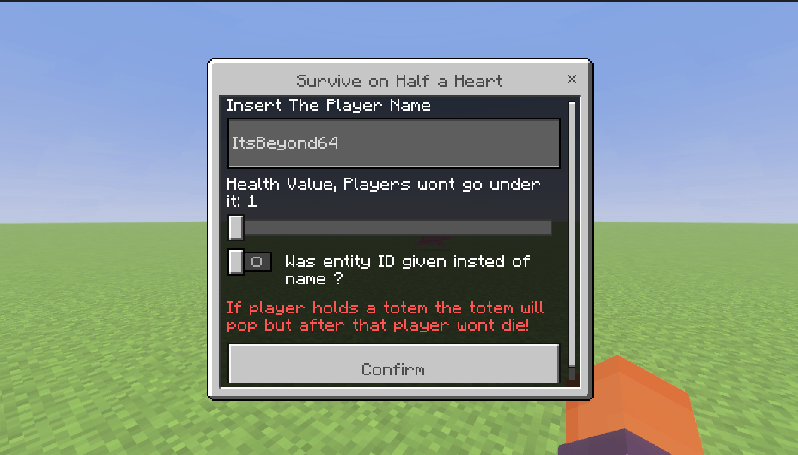
1. /bey:hhui- Opens a ui where you can put a player name or entity id. Then how much min health and save it. Your health wont go under it.
2. /bey:getid- Shows all entities typeId and Id within 10 blocks radius.
3. /bey:hhreset- Removes all hh data of all entities. This will allow you to clearn data If you mistakenly added someone.
Extra: /kill will kill the player or entity even if they are in the data.
Credits:
- Beyond64: Programmer, Creator and artist
For more updates or any additional questions reach us on Discord.
Quick facts
- Edition: Minecraft Bedrock
- File type: .mcpack or .mcaddon
- Minecraft version listed: 26.10
- How to install: Download the .mcpack or .mcaddon file. → Open it — Minecraft imports it. → In your world: Behavior Packs → Available → Activate, then the same under Resource Packs.
- Where to get it: Opens on CurseForge — not every file is mirrored on our own servers.
Install steps are the general flow for this file type — How to install Minecraft Bedrock addons & mods walks through it step by step.
Verified by MCModsHub
- Pack type: .mcaddon — behaviour and resource pack in one file
- Manifest requires Minecraft 1.21.80 or newer
- Complete pack — everything it depends on is inside the file
- Download size: 5 KB
- Download link checked 26 Aug 2026 — working
These come from our own check of the pack file, not from the source page.