
Equipment Durability
Bedrock add-on listed for Minecraft 1.21 (behavior pack only). File opened and checked on 30 Sep 2026; installs from the MC Bedrock Mods app on Android.
This Addon is a powerful utility for Minecraft Bedrock Addon creators. It automatically applies a robust, vanilla-accurate durability system to tools and…
⬇ Download on CurseForgeHello Addon Creators! This addon provides you a comprehensive and robust durability management system for custom tools and armor in Minecraft Bedrock Edition, aiming to replicate vanilla mechanics. Game Version: 1.21.110 or above.
Key features include:
- Accurate Unbreaking Enchantment for Armors and Tools: This addon implements the
Unbreakingenchantment logic, a feature missing for custom armor and tools in Bedrock.- Armors: It calculates the original, pre-reduction damage from an attack. It then uses this value to apply the vanilla-accurate logic of
Unbreakingenchantment to completely negate durability loss for that hit. - Tools: It correctly applies the Unbreaking enchantment logic by giving each use the exact same chance as in vanilla to not consume durability.
- Armors: It calculates the original, pre-reduction damage from an attack. It then uses this value to apply the vanilla-accurate logic of
- Consistent Tool Durability: It ensures tools with the custom component (
equipments_durability:has_durability) lose durability for special actions that are not always captured by default API events. To complete the experience, these interactions are also accompanied by their appropriate sound effects. This includes:- Stripping logs with an axe.
- Tilling dirt/grass into farmland with a hoe.
- Creating path blocks with a shovel.
- The sound of a tool breaking.
How To Use
- Step 1: You custom item must be in format version 1.21.110.

- Step 2: Add the "equipments_durability:has_durability" custom component to your custom tool or armor.

- Step 3: Add the correct tag to your item. If the item is a sword you must add the tag "minecraft:is_sword", if it's a pickaxe add the tag "minecraft:is_pickaxe", etc. Also add the tag "minecraft:is_tool" for tools and "minecraft:is_armor" for armors.
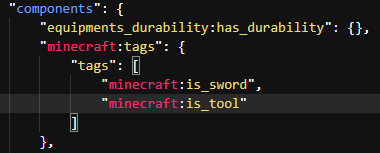
- Step 4: Add the "minecraft:durability" component to your armors and tools.
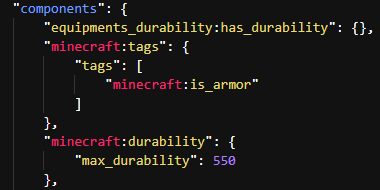
- Step 5: Add this Addon and your Addon to the world!
Examples:
- Armor:
{
}
- Tool:
- Edition: Minecraft Bedrock
- File type: .mcpack or .mcaddon
- Minecraft version listed: 1.21.111
- How to install: Download the .mcpack or .mcaddon file. → Open it — Minecraft imports it. → In your world: Behavior Packs → Available → Activate, then the same under Resource Packs.
- Where to get it: Opens on CurseForge — not every file is mirrored on our own servers.
Install steps are the general flow for this file type — How to install Minecraft Bedrock addons & mods walks through it step by step.
- Pack type: .mcpack — a single pack
- Manifest requires Minecraft 1.21.110 or newer
- Complete pack — everything it depends on is inside the file
- Download size: 17 KB
- Download link checked 6 Oct 2026 — working
These come from our own check of the pack file, not from the source page.