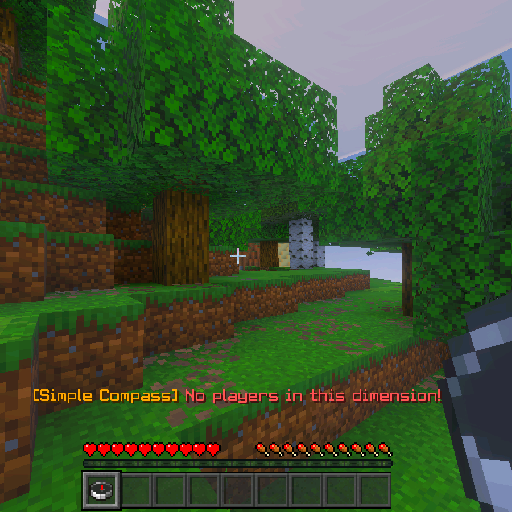
SimpleCompass
Bedrock add-on listed for Minecraft 1.20–1.21 (behavior pack only). File opened and checked on 10 Oct 2026; installs from the MC Bedrock Mods app on Android.
BETA APIs must be open for the mod to work. While the mode is running, you can change it to the furthest or closest person. Redstone particles go towards…
⬇ Download on CurseForgeSimple Compass
Simple Compass is a high-performance, lightweight utility designed for Minecraft Bedrock Edition. It transforms the standard vanilla compass into a sophisticated player tracking radar, making it an essential tool for PvP, Hide and Seek, or multiplayer survival worlds.
CRITICAL SETUP REQUIRED
For this addon to function, you MUST enable the following toggle in your World Settings:
-
Experiments -> Beta APIs: ON
-
(Without Beta APIs, the tracking scripts and particle effects will not trigger!)
Key Features:
-
Smart Tracking Logic: Automatically filters and tracks players within your current dimension (Overworld, Nether, or The End).
-
Dual Tracking Modes: Toggle between finding the Closest or Farthest player with a simple click.
-
Visual Directional Trace: Upon activation, a trail of Redstone Particles spawns from your position, pointing like an arrow directly toward your target.
-
Real-Time HUD Data: Displays the target player's name and their exact distance (in blocks/meters) on your action bar for quick reference.
-
No Commands Needed: Completely survival-friendly. Just craft or grab a standard compass and you are ready to go.
How to Use?
-
Equip: Hold a standard Compass in your main hand.
-
Activate: Right-click (or long-press on mobile devices) to ping the radar.
-
Toggle Modes: * First Click: Locates the CLOSEST player in your dimension.
-
Second Click: Switches to locate the FARTHEST player in your dimension.
-
-
Follow the Trail: Watch the red particles fly toward your target and monitor the distance display above your hotbar.
Technical Specifications:
-
Compatibility: Minecraft Bedrock Edition (MCPE / Windows 10 / Consoles).
-
Version: 1.0.0
-
Format: .mcpack (Behavior Pack).
-
Requirement: Requires Beta APIs experimental toggle.
- Edition: Minecraft Bedrock
- File type: .mcpack or .mcaddon
- Minecraft version listed: 1.21.132
- How to install: Download the .mcpack or .mcaddon file. → Open it — Minecraft imports it. → In your world: Behavior Packs → Available → Activate, then the same under Resource Packs.
- Where to get it: Opens on CurseForge — not every file is mirrored on our own servers.
Install steps are the general flow for this file type — How to install Minecraft Bedrock addons & mods walks through it step by step.
- Pack type: .mcpack — a single pack
- Manifest requires Minecraft 1.20.0 or newer
- Complete pack — everything it depends on is inside the file
- Download size: 126 KB
- Download link checked 6 Oct 2026 — working
These come from our own check of the pack file, not from the source page.