COMMAND CRAFT
The ultimate all-in-one server utility for Bedrock! Adds economy, homes, warps, kits, moderation, and dynamic floating leaderboards via chat commands.
⬇ Download on CurseForge
COMMAND CRAFT - MADE BY NIXO
The ultimate all-in-one server utility for Bedrock! Adds economy, homes, warps, kits, moderation, and dynamic floating leaderboards via chat commands.
BETA API MUST BE TURNED ON FOR THIS ADDON TO WORK.
🌟 Player Commands
(Available to everyone by default. Prefix: !)
💬 Chat & Utility
-
!msg <player> <message> undefined(or !whisper) – Send a private message to another player.
-
!afk – Toggles your AFK status. (Moving your camera or sneaking will automatically remove your AFK status!).
-
!help – Displays the in-game help menu.
🏠 Homes
-
!sethome <name> – Saves your current location as a personal home.
-
!home <name> – Teleports you to your saved home.
-
!listhomes – Shows a list of all your saved homes.
-
!delhome <name> – Deletes a specific home.
-
!delhome all – Deletes all of your saved homes.
🧭 Teleportation & Warps
-
!spawn – Teleports you to the server's world spawn.
-
!rtp – Random Teleport! Safely teleports you to random coordinates with Slow Falling and Resistance to prevent fall damage.
-
!back – Teleports you back to the exact location where you last died.
-
!warp list – Shows all available public server warps.
-
!warp <name> – Teleports you to a specific server warp.
-
!tpa <player> – Sends a request to teleport to another player.
-
!tpahere <player> – Sends a request for another player to teleport to you.
-
!tpaccept / !tpdeny – Accept or deny pending teleport requests.
💰 Economy
-
!bal undefined(or !balance) – Check your current money balance.
-
!baltop – View the top 5 richest players currently online.
-
!pay <player> <amount> – Transfer money to another player.
-
!sell hand – Sells the current sellable item you are holding.
-
!sell all – Automatically scans your inventory and sells all sellable items for cash.
🎒 Kits
-
!kit list – View all available server kits.
-
!kit <name> – Claim a specific kit.
🛡️ Admin Commands
(Requires the player to have the admin tag. Use /tag <player> add admin to grant access).
📢 Server Management
-
!announce <message> undefined(or !broadcast) – Sends a bold, global announcement to the entire server.
-
!afk <player> – Force-toggles the AFK status of another player.
-
!setspawn – Sets the server's default spawn point to your exact current location.
-
!tpall – Instantly teleports all online players to your location.
🏠 Warps & Kits
-
!setwarp <name> – Creates a new public warp at your current location.
-
!warp remove <name> – Deletes a specific public warp.
-
!createkit <name> – Clears whatever is in your inventory and saves it as a new kit for players to claim!
-
!kit remove <name> – Deletes a specific kit.
⚖️ Moderation
-
!mute <player> – Mutes a player, preventing them from using standard chat.
-
!unmute <player> – Removes the mute from a player.
-
!warn <player> <reason> – Issues a formal warning to a player.
-
!warnings <player> – Displays a list of all warnings a player has received.
⛓️ Jail System
-
!setjail <name> – Sets a jail cell location where you are standing.
-
!jail list – Shows all available jails.
-
!jail <player> <jail_name> – Sends a player to a specific jail. They will be repeatedly teleported back if they try to escape!
-
!unjail <player> – Frees a player from jail.
-
!jail remove <name> – Deletes a jail location.
💵 Economy Management
-
!bal <player> – Check the bank balance of another player.
-
!eco give <player> <amount> – Adds money to a player's balance.
-
!eco take <player> <amount> – Removes money from a player's balance.
-
!eco set <player> <amount> – Sets a player's balance to an exact number.
-
!eco reset <player> – Resets a player back to the starting server balance.
🏆 Floating Text Leaderboards
-
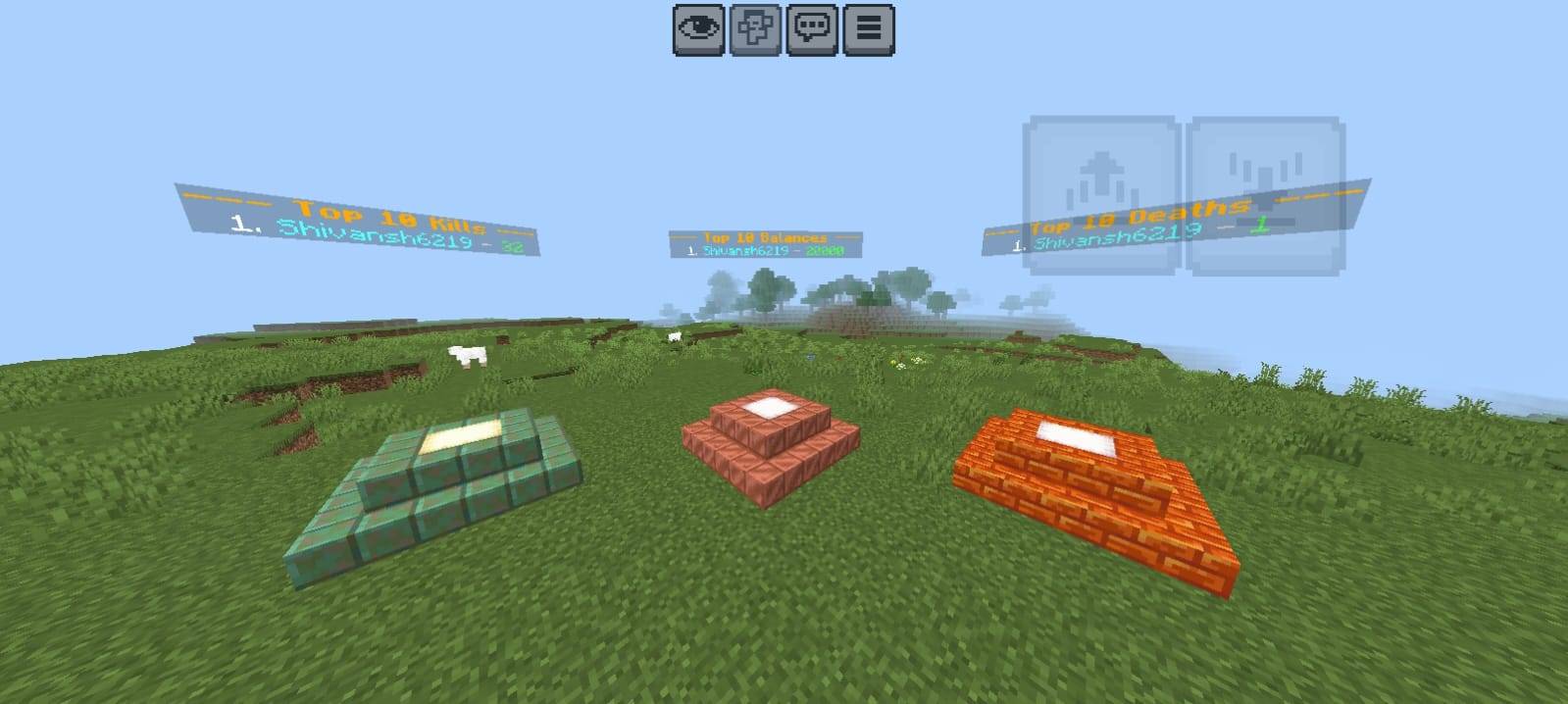
!leaderboard set <money|kills|deaths> undefined(or !lb) – Spawns a permanent, invisible entity that projects a glowing 3D floating text leaderboard. It updates automatically!
-
!leaderboard remove <money|kills|deaths> – Removes the floating leaderboard closest to you.
- Edition: Minecraft Bedrock
- File type: .mcpack or .mcaddon
- Minecraft version listed: 1.21.130
- How to install: Download the .mcpack or .mcaddon file. → Open it — Minecraft imports it. → In your world: Behavior Packs → Available → Activate, then the same under Resource Packs.
- Where to get it: Opens on CurseForge — not every file is mirrored on our own servers.
Install steps are the general flow for this file type — How to install Minecraft Bedrock addons & mods walks through it step by step.
- Pack type: .mcaddon — behaviour and resource pack in one file
- Manifest requires Minecraft 1.21.130 or newer
- Needs Beta APIs switched on in the world settings
- Complete pack — everything it depends on is inside the file
- Download size: 2.2 MB
- Download link checked 16 Sept 2026 — working
These come from our own check of the pack file, not from the source page.