Bedrock BlockRandomizer
A Minecraft Bedrock Edition addon that automatically shuffles blocks in your hotbar as you build. Perfect for creating natural-looking paths, walls, and…
⬇ Download on CurseForge
BlockRandomizer
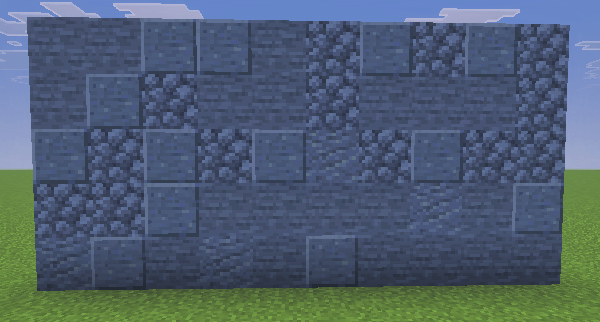
A Minecraft Bedrock Edition addon that automatically shuffles blocks in your hotbar as you build. Perfect for creating natural-looking paths, walls, and structures with varied block palettes.
Features
- Automatic Block Shuffling - Randomly swaps between blocks in your hotbar slots as you place them
- Customizable Slot Range - Choose how many hotbar slots (1-9) to include in the randomizer
- True Randomization - Duplicate blocks in multiple slots gives them higher placement weight
- Auto-Refill - Automatically refills depleted hotbar slots from your inventory (Survival mode)
- Quiet Mode - Option to disable feedback messages and sounds
- Per-Player Settings - Each player has their own preferences that persist across sessions
Installation
- Download the
.mcaddonfile - Double-click the file to import it into Minecraft
- Create a new world or edit an existing one
- Go to Add-Ons and activate BedrockBlockRandomizer under Behavior Packs
Commands
All commands work without cheats enabled:
| Command | Description |
|---|---|
/blockrandomizer:toggle |
Turn BlockRandomizer on or off |
/blockrandomizer:menu |
Open the settings menu |
/blockrandomizer:slots <1-9> |
Set how many hotbar slots to randomize |
/blockrandomizer:status |
Show current settings |
/blockrandomizer:refill |
Toggle auto-refill on or off |
How to Use
- Fill your first few hotbar slots with the blocks you want to randomize between
- Run
/blockrandomizer:toggleor use/blockrandomizer:menuto enable the addon - Start building! Each block you place will randomly swap with another from your selected slots
Tips
- For even distribution: Put one stack of each block type in separate slots
- For weighted randomization: Put multiple stacks of the same block to increase its placement frequency
- Slot 1 is the leftmost slot - slots are counted from left to right
Settings
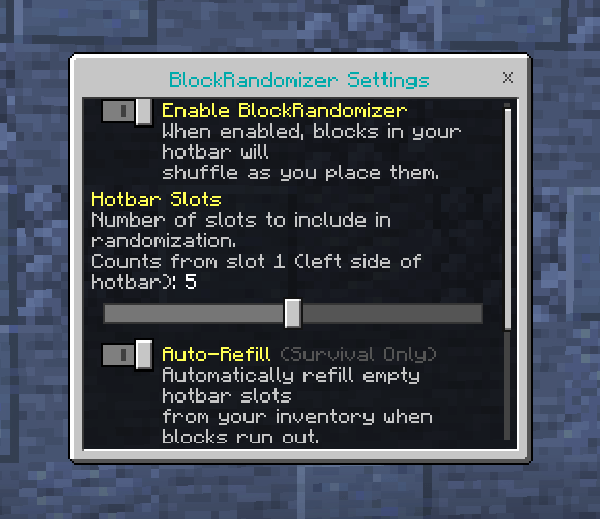
Access the settings menu with /blockrandomizer:menu:
- Enable BlockRandomizer - Turn the randomizer on or off
- Hotbar Slots - Number of slots to include (counts from slot 1)
- Auto-Refill - When a block type runs out, automatically grab more from your inventory
- Quiet Mode - Disable all actionbar messages and sounds
Requirements
- Minecraft Bedrock Edition 1.21.120 or higher
License
This addon is licensed under CC BY-NC-SA 4.0.
You are free to:
- Share and redistribute the addon
- Adapt and modify for personal use
Under the following terms:
- Attribution - Credit the original author
- NonCommercial - No commercial use
- ShareAlike - Derivatives must use the same license
Author
Created by Rob 'myGen' Hall Website: mygen.co.uk
- Edition: Minecraft Bedrock
- File type: .mcpack or .mcaddon
- Minecraft versions listed: 1.21.120, 1.21.122, 1.21.121
- How to install: Download the .mcpack or .mcaddon file. → Open it — Minecraft imports it. → In your world: Behavior Packs → Available → Activate, then the same under Resource Packs.
- Where to get it: Opens on CurseForge — not every file is mirrored on our own servers.
Install steps are the general flow for this file type — How to install Minecraft Bedrock addons & mods walks through it step by step.
- Pack type: .mcaddon — behaviour and resource pack in one file
- Manifest requires Minecraft 1.21.0 or newer
- Complete pack — everything it depends on is inside the file
- Download size: 44 KB
- Download link checked 16 Sept 2026 — working
These come from our own check of the pack file, not from the source page.