Add security to your storage with this addon. Set personalized passwords to lock your containers and prevent unauthorized access. Experience unmatched protection as locked containers become impervious to mining and explosions. Stay vigilant with real-time notifications, alerting you when others attempt to breach or destroy your secured storage. Safeguard your treasures and play with peace of mind, knowing your valuables are shielded by the robust defenses of Safe Storage.
Locking Containers
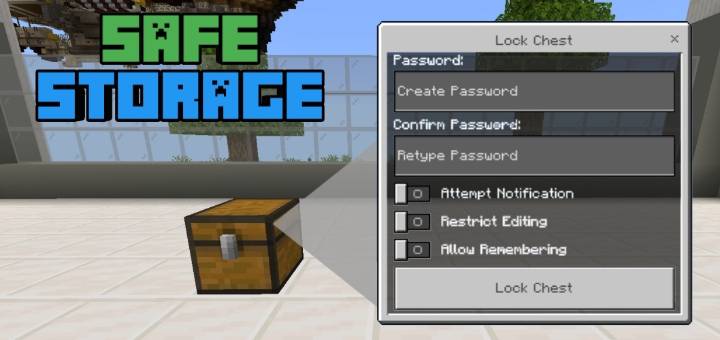
The containers that can be locked are chest, trapped chest, and barrel. To lock containers, renamed the tripwire hook into 'locker' (case insensitive) and use it to interact with the containers you wish to secure, then a Locking Container UI will appear.
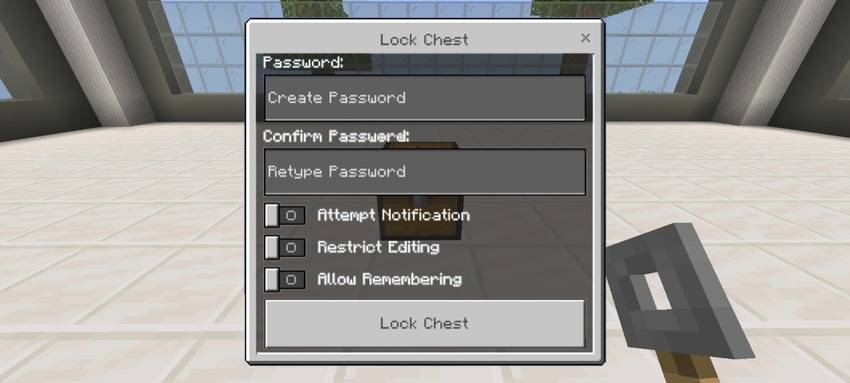
Create a password and click the lock button to locked it. A password you need to create must have at least 5 characters and a maximum of 30 characters. There are also three toggles you can enable:
- Attempt Notification: If enabled, the owner will be notified when someone tried to access it (e.g., putting wrong password), or trying to break it.
- Restrict Editing: If enabled, only the owner can edit it and destroy it.
- Allow Remembering: If enabled, when the player enters a password to unlock this container, a 'Remember Me' button will appear. If the player enters the correct password and this option is enabled, they will no longer need to enter the password again to access the container.
Once successfully locked, the player who locked it will be remembered and will become the owner.
A locked container cannot be able to mine.

They are also protected by any kind of explosion. In the GIF below, the chest in left isn't locked, while chest in right is locked.

Unlocking Containers
A locked container will require players to enter a password before they can access it. If 'Allow Remembering' is enabled, a 'Remember Me' toggle will appear. As shown in the picture below, the left container has no 'Remember Me' toggle, while the right one does.
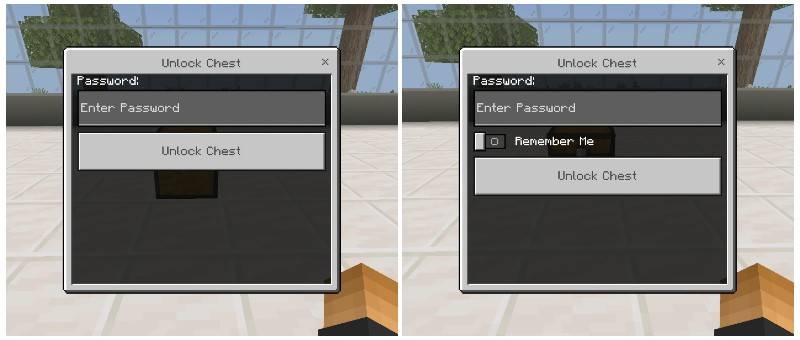
A message will appear when you successfully unlock the container. The unlocked state will last for only 5 seconds before it automatically locks again. However, if the 'Remember Me' toggle is enabled when you unlock it, it will not lock again, you will always be able to open it without requiring password.
Only the player who unlocks the container can access it. Even while it's unlocked, other players will not be able to access it and will need to unlock it themselves.
Editing Containers
Need to change something in your locked containers? You can do so by renaming a tripwire hook to 'editor' (case insensitive) and using it to interact with the containers you wish to edit. You will be prompted to enter a password before proceeding with the edit. Once the correct password is entered, an editing UI with three or four options will appear.
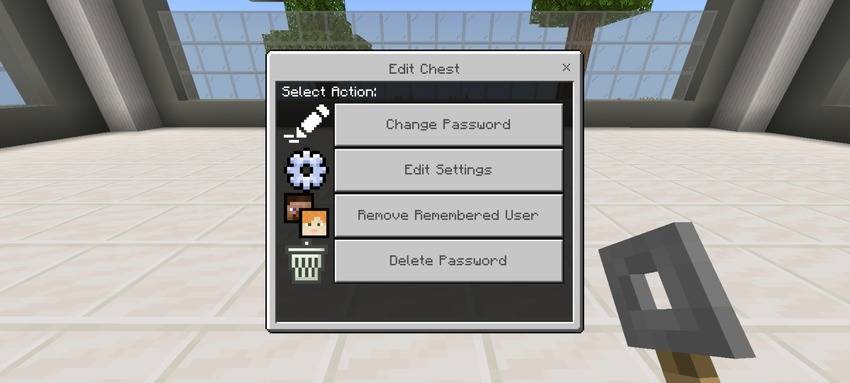
The options are:
- Change Password: Select this option to change the password of the locked container.
- Edit Settings: Select this option to edit the container's settings. You can enable or disable the following options: Attempt Notification, Restrict Editing, Allow Remembering.
- Remove Remembered Users: This option will only appear if there is at least one remembered user. It is used to remove all remembered users, requiring them to re-enter the password to regain access.
- Delete Password: Select this option to delete the password of the locked container, removing all of its data and returning it to an ordinary container.
Forgot Password?
Did you forget your password? No worries, the owner can retrieve it using a tripwire hook, rename it into 'retriever' (case insensitive) and use it to interact with the containers you wish to retrieve the password, and the password will show to you.
Note: A player who set the password for the container is the owner, only the owner and Operator has permission to retrieve password.
Operator Permission:
Player can add themselves an 'operator' tag to gain access with the following:
- Destroy locked containers whether they unlocked it or not.
- Can retrieve the password whether they're the owner or not.
Watch Showcase Here:
Installation:
- Required Minecraft version is 1.21.40 and higher
- No experimental toggle required
- Edition: Minecraft Bedrock
- File type: .mcpack or .mcaddon
- Minecraft version listed: 1.21.30
- How to install: Download the .mcpack or .mcaddon file. → Open it — Minecraft imports it. → In your world: Behavior Packs → Available → Activate, then the same under Resource Packs.
- Where to get it: Opens on CurseForge — not every file is mirrored on our own servers.
Install steps are the general flow for this file type — How to install Minecraft Bedrock addons & mods walks through it step by step.
- Pack type: .mcpack — a single pack
- Manifest requires Minecraft 1.21.20 or newer
- Complete pack — everything it depends on is inside the file
- Download size: 8 KB
- Download link checked 15 Sept 2026 — working
These come from our own check of the pack file, not from the source page.