structure & ruler sticks
Structure Sticks v1.4.5 (Final script version) How to use: Save 1.Get the Save Structure item under the equipment category, or do /give @s…
I don't know my version
Structure Sticks
v1.4.5 (Final script version)
How to use:
Save
1.Get the Save Structure item under the equipment category, or do /give @s structurestick:save_structure
2. Get an anvil
3.Rename the item to the name you want to give the structure
4.click the 1st corner MUST BE A BLOCK
5.click the 2nd corner MUST BE A BLOCK
Load
1.Get the Load Structure item under the equipment category, or do /give @s structurestick:load_structure
2. Get an anvil
3.Rename the item to the name you want to give the structure
4.click on the block you want to load it on
Void Filler
1.Get the void filler item under the equipment category, or do /give @s structurestick:void_filler
2.click the 1st corner MUST BE A BLOCK
3.click the 2nd corner MUST BE A BLOCK
Volumer Ruler
1.Get the volume ruler item under the equipment category, or do /give @s structurestick:volume_ruler
2.click the 1st corner MUST BE A BLOCK
3.click the 2nd corner MUST BE A BLOCK (no distance limit)
Distance Ruler
1.Get the distance ruler item under the equipment category, or do /give @s structurestick:distance_ruler
2.click the 1st block
3.click the 2nd block (no distance limit)
Or just watch this youtube video
https://youtu.be/0eN3PlP9Upc
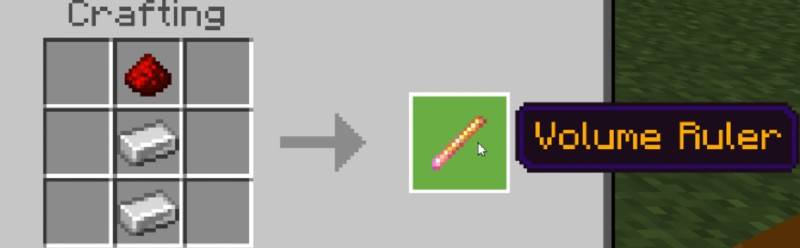
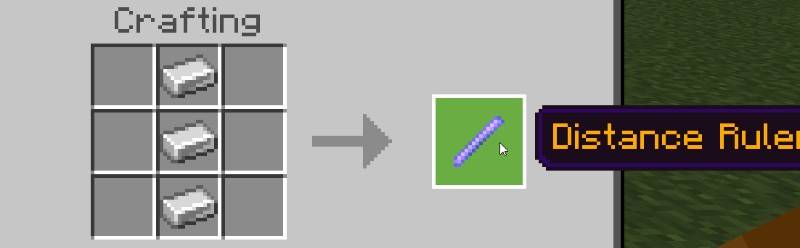
How to craft
(these items are NOT craftable in version 1.4.3)
Volumer Ruler
Distance Ruler
What is what
A structure
A structure is a named & saved build in which you can load or can be loaded, the max size of a structure is 64x384x64 blocks.
Void
Structure voids can be placed as part of a structure and are ignored when the structure file is saved and loaded. This results in the blocks at the location where the structure is placed being maintained and not being overridden.
Distance Ruler
The distance between 2 blocks
Volume Ruler
The volume of a room between 2 blocks
Properties
- uses @minecraft/server 2.1.0 stable
- classes: world & system
- items: structure load (structurestick:load_structure), save (structurestick:save_structure), structure void filler (structurestick:void_filler), volume ruler (structurestick:volume_ruler), & distance ruler (structurestick:distance_ruler)
- script size: 160.72 KB (160,716 bytes)
- tested on Minecraft version 1.21.111
Special thanks to all the people who came in and recomended something new in my discord or comments!
- fruttheloop
- Kalito15
Found a bug? Wanna give feedback? Want to recomend something?
Then just Report it on my discord!
This mod is being discontinued in favor of a new, improved mod version being developed.
- Edition: Minecraft Bedrock
- File type: .mcpack or .mcaddon
- Minecraft versions listed: 1.21.120, 1.21.111
- How to install: Download the .mcpack or .mcaddon file. → Open it — Minecraft imports it. → In your world: Behavior Packs → Available → Activate, then the same under Resource Packs.
- Where to get it: Opens on CurseForge — not every file is mirrored on our own servers.
Install steps are the general flow for this file type — How to install Minecraft Bedrock addons & mods walks through it step by step.
- Pack type: .mcaddon — behaviour and resource pack in one file
- Manifest requires Minecraft 1.21.80 or newer
- Complete pack — everything it depends on is inside the file
- Download size: 152 KB
- Download link checked 15 Sept 2026 — working
These come from our own check of the pack file, not from the source page.