DecoBlocks API
The DecoBlocks API facilitates the creation of Add-Ons with decorative blocks, offering a block configuration system, templates, and many customization…
⬇ Download on CurseForge
This pack is for Add-On creators!
DecoBlockss is a useful tool for creating add-ons with decorative blocks, offering useful configurations and utility custom components.

📕 Description
DecoBlocks adds custom components with functions commonly used in decorative plugins, such as chairs, planters, connected blocks, interactive blocks, and more. It also includes bug-free replicas of the behavior of some vanilla blocks.
Each component has configuration options that you can use to customize your block according to your preferences using a JavaScript. A single component can be applied to multiple blocks at once, and each block can have identical or unique configurations.
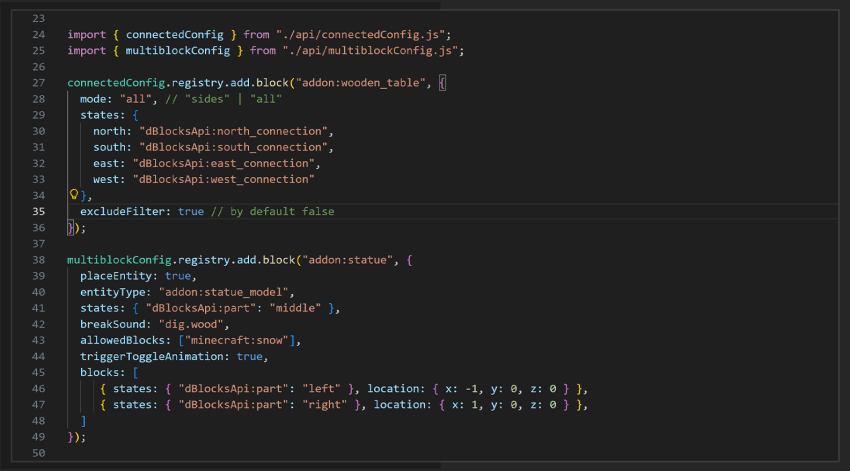
All available components already have default configurations that you can use as a template. If you don't add any configurations, these default values will be used.
📌 The add-on no requires experimental features and also has support for achievements.
⚙️ custom_components
v1.0.0 :
"dBlocksApi:colorConfig" : Makes a block change color.
"dBlocksApi:itemConfig" : Makes a block store items (without entities).
"dBlocksApi:block_toggle : Adds basic interactions to the blocks .
"dBlocksApi:flowerPotConfig : An easy way to make a functional flower pot.
"dBlocksApi:block_ignite : To make blocks that can be "lit," like campfires
"dBlocksApi:stackable_block : To make blocks similar to candles or sea pickles.
"dBlocksApi:candle : To make functional candles, even replicating vanilla ones.
"dBlocksApi:copper : Replicates the vanilla copper block behavior. (in development)
"dBlocksApi:connected : To make blocks that can be connected. (in development)
"dBlocksApi:pillar / "dBlocksApi:pillar_manual : To make pillars with dynamic states.
"dBlocksApi:multiblock": An easy way to make multiblocks with custom shapes.
"dBlocksApi:mob" : Spawns an entity in your block. (in development)
"dBlocksApi:mob_pillar (unstable)" : Spawns an entity at the bottom of the pillar that receives properties according to the height of the pillar.
📕 How to Use
To use this API, you just need to put the pack on your world, then you need to initialize your block configs in your pack with an API file depending on the custom components you need.
The necessary files are in the API, so you'll need to unzip the pack. There you'll find a more detailed guide the full information. (Guide.md).
📝 Notes
You can't claim this pack as yours, steal the code for any addon or texture pack. If your Add-On uses the API, you must share the project using the original Forge or Mcpedl download link, not your own.
If you need help, or just want to keep up with me, here's my Discord Server.
- Edition: Minecraft Bedrock
- File type: .mcpack or .mcaddon
- Minecraft versions listed: 1.21.124, 1.21.130
- How to install: Download the .mcpack or .mcaddon file. → Open it — Minecraft imports it. → In your world: Behavior Packs → Available → Activate, then the same under Resource Packs.
- Where to get it: Opens on CurseForge — not every file is mirrored on our own servers.
Install steps are the general flow for this file type — How to install Minecraft Bedrock addons & mods walks through it step by step.
- Pack type: .mcaddon — behaviour and resource pack in one file
- Manifest requires Minecraft 1.21.20 or newer
- Complete pack — everything it depends on is inside the file
- Download size: 1.0 MB
- Download link checked 16 Sept 2026 — working
These come from our own check of the pack file, not from the source page.