![[Realm Compatible]Ascension X — The Chat Rank 1000‑Level Ladder](https://pub-2ae937f770284535a96c3330f91236aa.r2.dev/img/curseforge/78182.png)
[Realm Compatible]Ascension X — The Chat Rank 1000‑Level Ladder
Ascension X — 1000‑Level Chat Ranks Ladder for Minecraft Bedrock A complete, event‑driven rank system built directly on Minecraft Bedrock’s native level…
I don't know my version
![[Realm Compatible]Ascension X — The Chat Rank 1000‑Level Ladder — screenshot 1](https://pub-2ae937f770284535a96c3330f91236aa.r2.dev/img/curseforge/78182_s347717.png)
![[Realm Compatible]Ascension X — The Chat Rank 1000‑Level Ladder — screenshot 2](https://pub-2ae937f770284535a96c3330f91236aa.r2.dev/img/curseforge/78182_s347718.png)
![[Realm Compatible]Ascension X — The Chat Rank 1000‑Level Ladder — screenshot 3](https://pub-2ae937f770284535a96c3330f91236aa.r2.dev/img/curseforge/78182_s347719.png)
![[Realm Compatible]Ascension X — The Chat Rank 1000‑Level Ladder — screenshot 4](https://pub-2ae937f770284535a96c3330f91236aa.r2.dev/img/curseforge/78182_s347720.png)
![[Realm Compatible]Ascension X — The Chat Rank 1000‑Level Ladder — screenshot 5](https://pub-2ae937f770284535a96c3330f91236aa.r2.dev/img/curseforge/78182_s347721.png)
![[Realm Compatible]Ascension X — The Chat Rank 1000‑Level Ladder — screenshot 6](https://pub-2ae937f770284535a96c3330f91236aa.r2.dev/img/curseforge/78182_s347722.png)
![[Realm Compatible]Ascension X — The Chat Rank 1000‑Level Ladder — screenshot 7](https://pub-2ae937f770284535a96c3330f91236aa.r2.dev/img/curseforge/78182_s347723.png)
![[Realm Compatible]Ascension X — The Chat Rank 1000‑Level Ladder — screenshot 8](https://pub-2ae937f770284535a96c3330f91236aa.r2.dev/img/curseforge/78182_s347724.png)
Ascension X
Step into the ultimate rank progression experience built entirely on Minecraft's native Bedrock level system! Climb to Level 2000, unlock over 100 distinct color-coded chat titles, complete daily bounties, and Ascend to godhood. No extra XP plugins, no artificial counters—just pure, rewarding vanilla progression.

You May Also Enjoy The Addon Below!!
[Realm Compatible] RPG Skills & Prestige: Evolved - Minecraft Bedrock Addons - CurseForge
Key Features
1. The Ascension UI
Access your progression anywhere, anytime. Simply hold and "Use" a Compass, Clock, or Stick to open the beautifully designed Ascension UI menu. Track your level progress, view upcoming ranks, or spend your hard-earned Prestige Tokens!
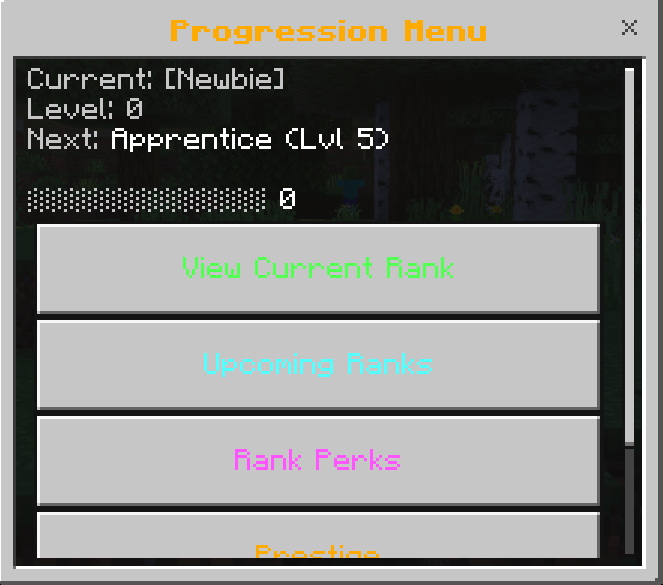
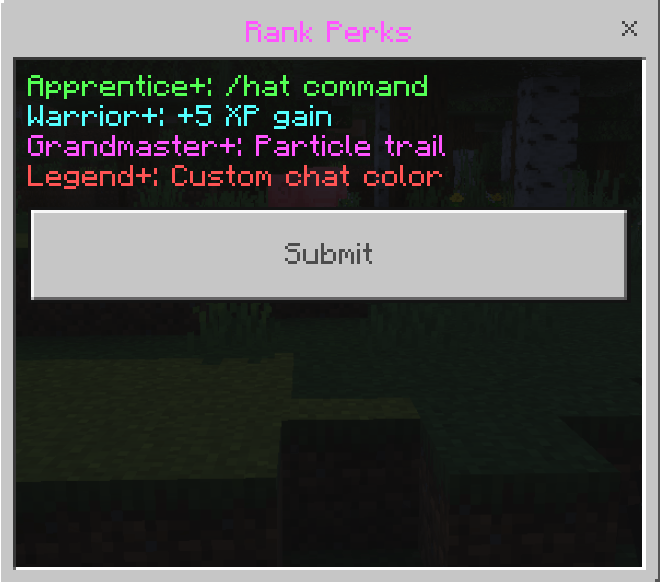
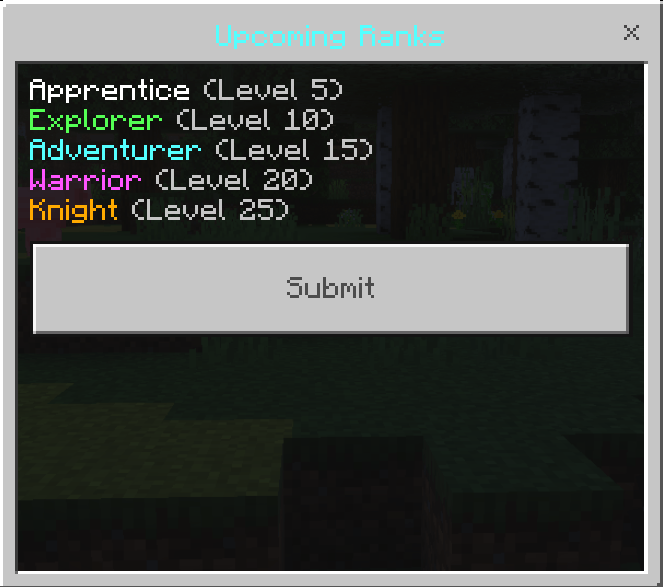
2. The 2000-Level Rank Ladder
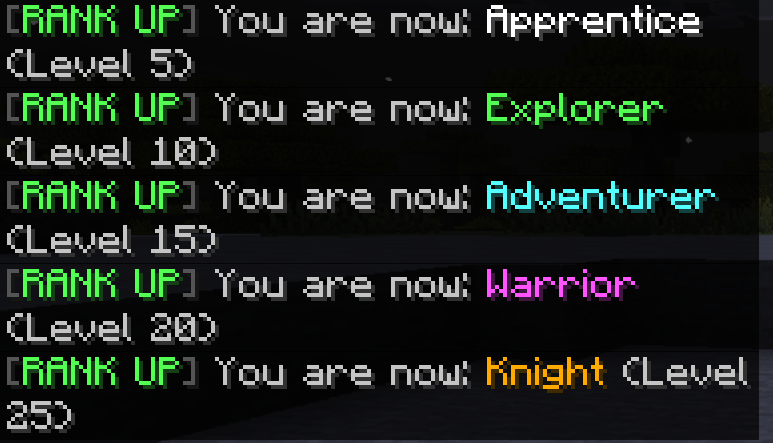
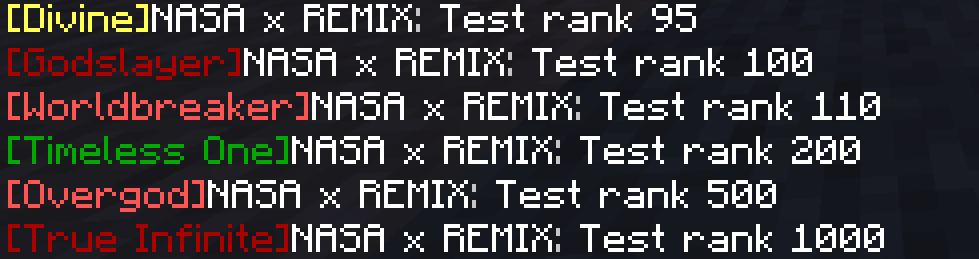
Ascension X features over 100 handcrafted titles with distinct Minecraft color codes. Every rank automatically updates your nameplate in global chat!
- Levels 0 → 100: A new rank every 5 levels for a fast‑paced early climb.
- Levels 100 → 500: Ranks every 10 levels, keeping mid‑game momentum strong.
- Levels 500 → 2000: Epic‑tier ranks every 25 levels, making each one a massive badge of honor.
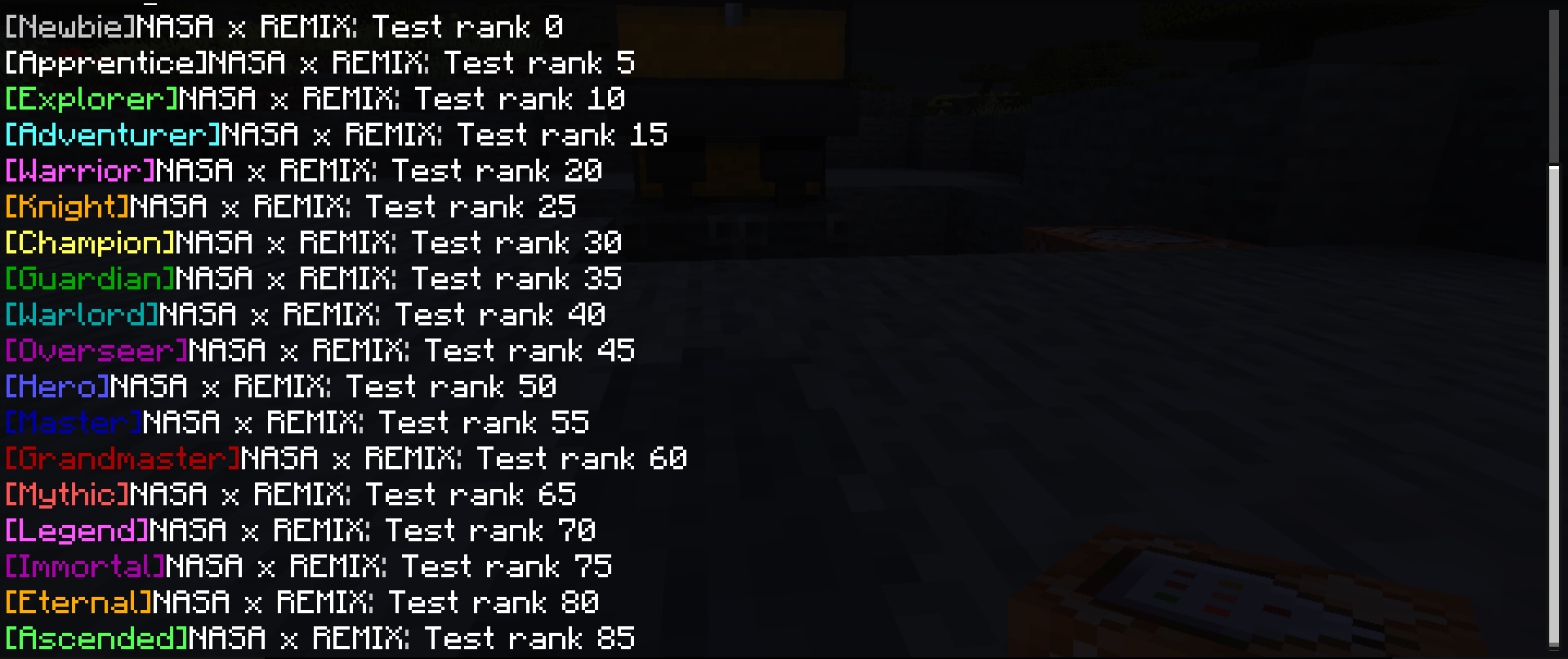
3. Live Rank Notifications & Backend Tags
Whenever you reach a milestone level, a server-wide notification is broadcasted, accompanied by explosive visual effects! Additionally, the addon secretly assigns backend permission tags (e.g., rank_knight) to players based on their title, allowing realm owners to easily create rank-locked doors or VIP zones using standard command blocks!
4. The Daily Bounty Board
Accelerate your climb by accepting dynamic Bounties from the UI.
- Slay 25 Zombies, mine 32 Iron Ore, or hunt Endermen to receive massive XP bursts.
- Don't like your current mission? Use the new Bounty Reroll System to spend 1 Prestige Token and instantly draw a new task!
5. The Carnage Kill-Streak System
Reward aggressive gameplay! Going on an uninterrupted monster killing spree grants immense buffs:
- 10 Kills: Instant Speed Boost.
- 25 Kills: Instant Strength Boost + Bonus XP.
- 50 Kills (Carnage): A massive lightning strike, 5 Free Diamonds, and Huge XP!
6. Prestige & The Ascension Shop
Hit the ultimate level? Reset your level to 0 to earn Ascension Tokens. Spend these tokens in the Shop for permanent cosmic powers:
- +2 Max Hearts: Increase your base HP permanently!
- Permanent Speed & Haste: Farm and run faster than ever.
- Celestial Particle Trail: Show off your prestige with an End-Rod particle trail.
- Gills of the Deep: Permanent Water Breathing.
- Leap of Faith: Permanent Jump Boost.
Admin Control Panel
Server owners have total control! If you hold the admin tag, your Ascension menu unlocks a hidden red button. This allows you to instantly add/remove 10 levels from a player, force prestige them, view their stats, or completely wipe their progress to punish cheaters!
⚠️ Important Requirements & Realms Setup
For this massive addon to function without errors, you MUST enable Cheats and the following experimental world setting:
- Beta APIs
Playing on a Server or Realm?
Because Bedrock does not allow direct activation of script experiments on active Realms, follow this specific deployment process:
- Create a new world (or download your current active Realm) to your local device.
- Navigate to World Settings, and toggle on Cheats and Beta APIs.
- Activate the Addon Behavior Pack and Resource Pack under your world settings.
- Upload this newly configured world file directly back to replace your active Realm slot!
Our Socials
- Nasaremix Studios Discord: https://discord.gg/6rjTGkRBzP
- YouTube Channel: https://www.youtube.com/@Nasaremixstudios
- Twitch Profile: https://www.twitch.tv/nightvorn
Usage Guidelines
What You Can Do:
- Use this addon for worlds, servers, realms, exploration, or learning.
- Share feedback and suggestions to help improve the addon.
- Enjoy its features freely within these guidelines.
- Produce and share gameplay media videos images etc, showcase videos, or live streams (Please credit Nasaremix Studios! and provide direct links do not create own).
What You Can’t Do:
- Do not create separate download links for the addon.
- Do not steal or copy any part of the addon for personal projects.
- Do not redistribute the addon as your own work.
- Do not edit or share modified versions of the addon.
Note
The ONLY official pages to download my addons are:
- Modbay (nasaremix)
- https://mcpedl.com/user/nasa-x-remix/
- https://www.curseforge.com/members/nasaremix/projects
Any other site or repost is unauthorized and may contain stolen or unsafe files.
- Edition: Minecraft Bedrock
- File type: .mcpack or .mcaddon
- Minecraft versions listed: 26.0.02, 26.0, 26.3
- How to install: Download the .mcpack or .mcaddon file. → Open it — Minecraft imports it. → In your world: Behavior Packs → Available → Activate, then the same under Resource Packs.
- Where to get it: Opens on CurseForge — not every file is mirrored on our own servers.
Install steps are the general flow for this file type — How to install Minecraft Bedrock addons & mods walks through it step by step.
- Pack type: .mcaddon — behaviour and resource pack in one file
- Manifest requires Minecraft 1.26.0 or newer
- Needs Beta APIs switched on in the world settings
- Complete pack — everything it depends on is inside the file
- Download size: 424 KB
- Download link checked 15 Sept 2026 — working
These come from our own check of the pack file, not from the source page.