![[Realm Compatible]You Are The Dynamic Light!](https://pub-2ae937f770284535a96c3330f91236aa.r2.dev/img/curseforge/78260.png)
[Realm Compatible]You Are The Dynamic Light!
[1.26.30+ Compatible]Tired of holding torches? This addon gives you a permanent. hands-free light source that follows you everywhere. Explore the darkest…
I don't know my version
![[Realm Compatible]You Are The Dynamic Light! — screenshot 1](https://pub-2ae937f770284535a96c3330f91236aa.r2.dev/img/curseforge/78260_s2178412.png)
![[Realm Compatible]You Are The Dynamic Light! — screenshot 2](https://pub-2ae937f770284535a96c3330f91236aa.r2.dev/img/curseforge/78260_s2178413.png)
![[Realm Compatible]You Are The Dynamic Light! — screenshot 3](https://pub-2ae937f770284535a96c3330f91236aa.r2.dev/img/curseforge/78260_s2178414.png)
![[Realm Compatible]You Are The Dynamic Light! — screenshot 4](https://pub-2ae937f770284535a96c3330f91236aa.r2.dev/img/curseforge/78260_s2178415.png)
![[Realm Compatible]You Are The Dynamic Light! — screenshot 5](https://pub-2ae937f770284535a96c3330f91236aa.r2.dev/img/curseforge/78260_s2178416.png)
![[Realm Compatible]You Are The Dynamic Light! — screenshot 6](https://pub-2ae937f770284535a96c3330f91236aa.r2.dev/img/curseforge/78260_s2178417.png)
![[Realm Compatible]You Are The Dynamic Light! — screenshot 7](https://pub-2ae937f770284535a96c3330f91236aa.r2.dev/img/curseforge/78260_s2178418.png)
![[Realm Compatible]You Are The Dynamic Light! — screenshot 8](https://pub-2ae937f770284535a96c3330f91236aa.r2.dev/img/curseforge/78260_s2178419.png)
You Are The Dynamic Light!
Stop crafting torches. Stop wasting coal. With this addon, you don't need a light source... you ARE the light source!
Welcome to the ultimate hands-free lighting solution for Minecraft Bedrock! This script gives every player a personal, mobile light aura that follows them everywhere they go. Explore the deepest caves and the darkest nights without ever needing to hold, place, or craft a single item.
Designed to be incredibly lightweight, stable, and server-friendly. Works perfectly in Worlds, Realms, and Servers.
Trying to reach 500 subs all support is appreciated :)
You May Also Enjoy The Addon Below!!
[Realm Compatible] RPG Skills & Prestige: Evolved - Minecraft Bedrock Addons - CurseForge
Key Features
- Hands-Free Lighting: No items required! The light is active no matter what you are holding. Your off-hand is free, and your inventory is uncluttered.
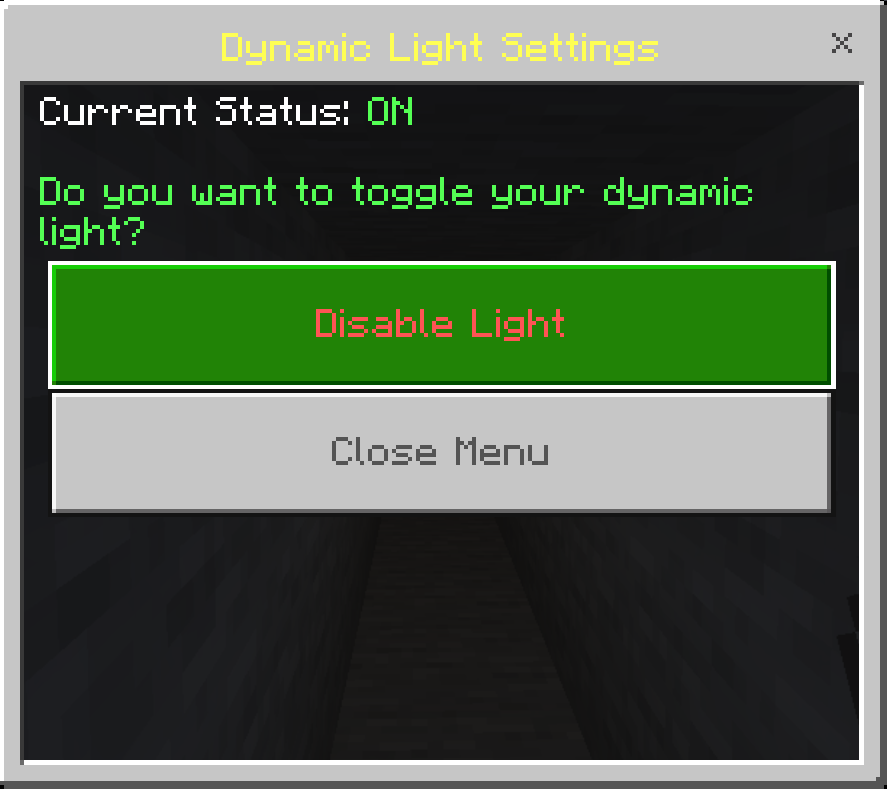
- [NEW] Settings Menu: No need to type commands! Simply Right-Click (or Long Press) while holding a Compass or Stick to open the new visual Settings Menu.
- [NEW] Ambient Particles: Players with active lighting now emit subtle flame particles, letting you know your aura is working.
- Smart & Lag-Free: Highly optimized command-based system. It cleans up after itself instantly, ensuring no "ghost lights" are left behind in your world.
- Safe for Builds: The script only places invisible light in non-solid blocks (air, water, grass), so it will never accidentally replace or break your structures.
- chat command: You can still use
!togglein chat if you prefer the classic method!
⚠️ Important Requirements & Realms Setup
For this massive addon to function without errors, you MUST enable Cheats and the following experimental world setting:
- Beta APIs
Playing on a Server or Realm?
Because Bedrock does not allow direct activation of script experiments on active Realms, follow this specific deployment process:
- Create a new world (or download your current active Realm) to your local device.
- Navigate to World Settings, and toggle on Cheats and Beta APIs.
- Activate the Addon Behavior Pack and Resource Pack under your world settings.
- Upload this newly configured world file directly back to replace your active Realm slot!
Our Socials
- Nasaremix Studios Discord: https://discord.gg/6rjTGkRBzP
- YouTube Channel: https://www.youtube.com/@Nasaremixstudios
- Twitch Profile: https://www.twitch.tv/nightvorn
Usage Guidelines
What You Can Do:
- Use this addon for worlds, servers, realms, exploration, or learning.
- Share feedback and suggestions to help improve the addon.
- Enjoy its features freely within these guidelines.
- Produce and share gameplay media videos images etc, showcase videos, or live streams (Please credit Nasaremix Studios! and provide direct links do not create own).
What You Can’t Do:
- Do not create separate download links for the addon.
- Do not steal or copy any part of the addon for personal projects.
- Do not redistribute the addon as your own work.
- Do not edit or share modified versions of the addon.
Note
The ONLY official pages to download my addons are:
- Modbay (nasaremix)
- https://mcpedl.com/user/nasa-x-remix/
- https://www.curseforge.com/members/nasaremix/projects
Any other site or repost is unauthorized and may contain stolen or unsafe files.
- Edition: Minecraft Bedrock
- File type: .mcpack or .mcaddon
- Minecraft versions listed: 26.0.02, 26.0, 26.3
- How to install: Download the .mcpack or .mcaddon file. → Open it — Minecraft imports it. → In your world: Behavior Packs → Available → Activate, then the same under Resource Packs.
- Where to get it: Opens on CurseForge — not every file is mirrored on our own servers.
Install steps are the general flow for this file type — How to install Minecraft Bedrock addons & mods walks through it step by step.
- Pack type: .mcaddon — behaviour and resource pack in one file
- Manifest requires Minecraft 1.26.0 or newer
- Needs Beta APIs switched on in the world settings
- Complete pack — everything it depends on is inside the file
- Download size: 497 KB
- Download link checked 25 Aug 2026 — working
These come from our own check of the pack file, not from the source page.