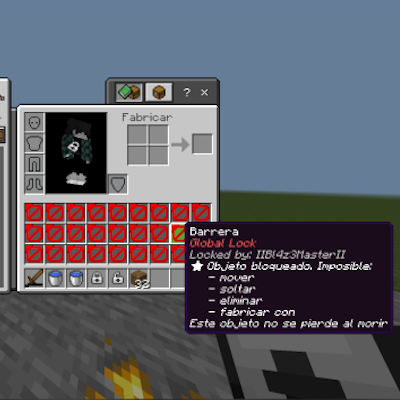
Inventory Lock System – Global Inventory Lock
I don't know my version
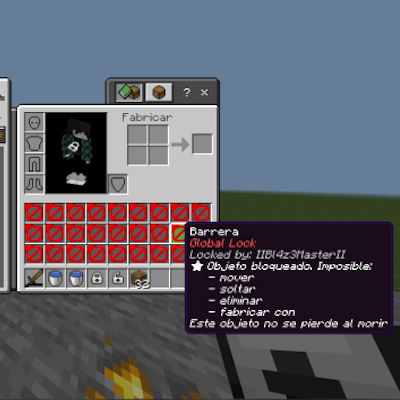
Take full control of player inventories on your Minecraft Bedrock server.
Inventory Lock System is a powerful administrative utility that allows operators to lock specific parts of player inventories or the entire inventory globally. Using a custom in-game UI, admins can choose exactly what to lock and for how long.
The system supports global locks, column locks, row locks, and special equipment slots such as armor and offhand. All locks are applied automatically to every player and persist through deaths, disconnects, and re-joins.
Perfect for server events, moderation tools, punishment systems, roleplay restrictions, or maintenance modes.
━━━━━━━━━━━━━━━━━━━━ Core Features ━━━━━━━━━━━━━━━━━━━━
• Lock the entire inventory of all players instantly
• Lock specific inventory columns (1-9)
• Lock specific inventory rows (Hotbar, Row 1, Row 2, Row 3)
• Lock special equipment slots (Helmet, Chestplate, Leggings, Boots, Offhand)
• Custom UI menu for selecting lock type and duration
• Lock duration configurable in days, hours, minutes, and seconds
• Permanent lock option available
• Automatic unlock when the timer expires
• Locks persist through player death and reconnects
• Locked slots use protected barrier items that cannot be removed
• Real-time lock status viewer for players
• Console logs for server monitoring and debugging
━━━━━━━━━━━━━━━━━━━━ Admin Control System ━━━━━━━━━━━━━━━━━━━━
Admins can open a custom control menu that allows them to:
• Apply global inventory locks
• Lock specific rows or columns
• Lock armor slots or offhand
• Configure lock duration with a simple UI
• View the current lock status
• Remove all active locks instantly
All actions apply automatically to every player currently on the server.
━━━━━━━━━━━━━━━━━━━━ Smart Lock Persistence ━━━━━━━━━━━━━━━━━━━━
The system uses dynamic properties to ensure locks remain active even if players:
• Leave the server
• Rejoin later
• Die in-game
When a player joins again, the system automatically reapplies their locked inventory state.
━━━━━━━━━━━━━━━━━━━━ 📦 Requirements ━━━━━━━━━━━━━━━━━━━━
Minecraft Bedrock Edition
Script API enabled
━━━━━━━━━━━━━━━━━━━━ 📥 Installation ━━━━━━━━━━━━━━━━━━━━
- Download the .mcaddon file
- Import it into Minecraft Bedrock
- Enable Script API / Beta APIs in your world settings
- Enable cheats
- Give yourself admin access and open the control menu
The Inventory Lock System will then allow you to control player inventories directly from the in-game UI.
━━━━━━━━━━━━━━━━━━━━ Use Cases ━━━━━━━━━━━━━━━━━━━━
• Server events and tournaments
• Punishment systems for rule breakers
• Anti-cheat restrictions
• Roleplay gameplay mechanics
• Temporary maintenance control
A lightweight but powerful tool designed specifically for Bedrock server administrators.
- Edition: Minecraft Bedrock
- File type: .mcpack or .mcaddon
- Minecraft versions listed: 26.3, 1.20, 1.20.80
- How to install: Download the .mcpack or .mcaddon file. → Open it — Minecraft imports it. → In your world: Behavior Packs → Available → Activate, then the same under Resource Packs.
- Where to get it: Opens on CurseForge — not every file is mirrored on our own servers.
Install steps are the general flow for this file type — How to install Minecraft Bedrock addons & mods walks through it step by step.
- Pack type: .mcaddon — behaviour and resource pack in one file
- Manifest requires Minecraft 1.21.70 or newer
- Complete pack — everything it depends on is inside the file
- Download size: 1.2 MB
- Download link checked 16 Sept 2026 — working
These come from our own check of the pack file, not from the source page.