
ModsJava
PaperDialogDSL
Java mod listed for Minecraft 1.21–26.x. Download on the author's site.
~~Make Dialog Great Again~~ ` 了,因此产生了这个项目 Paper Dialog DSL…
⬇ Download on Hangar~~Make Dialog Great Again~~
简体中文
# Paper Dialog DSL
> 我实在是受够 `.build()` 了,因此产生了这个项目
Paper Dialog DSL 是一个专为 Paper 1.21.10+ 对话框 API (Dialog API) 打造的 Kotlin 声明式 UI 框架。它彻底消灭了繁琐的 Java Builder 嵌套、生命周期样板代码和危险的组件覆盖问题,带给你极其丝滑、类型安全的 UI 编写体验。
查看项目源码及 `test` 包中的示范用法获取更多帮助,直接拉到本地研究也可以,我不太喜欢写README,嗯
## 对比
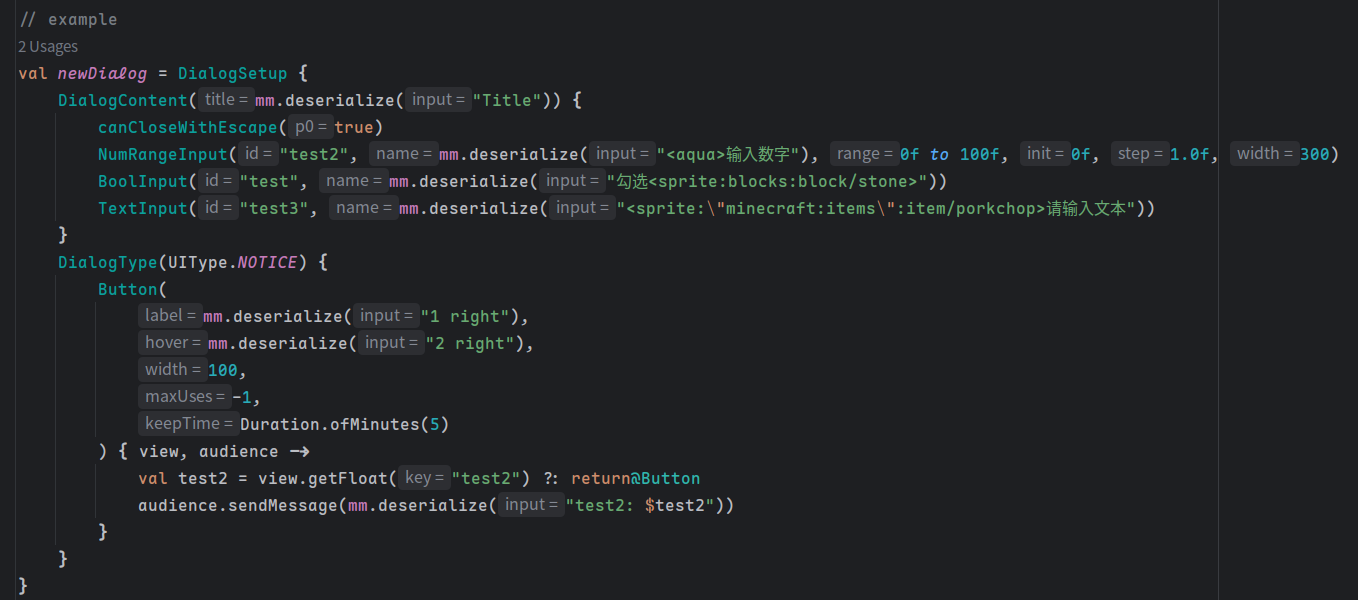
在原生 Paper API 中写一个带有输入框的对话框,你得这么写:
**原生写法:**
```kotlin
val oldDialog = Dialog.create { dialogBuilder ->
dialogBuilder.empty()
.base(
DialogBase.builder(mm.deserialize("Title"))
.canCloseWithEscape(true)
.inputs(
listOf(
DialogInput.numberRange(
"test2",
mm.deserialize("输入数字"),
0f,
100f
)
.initial(0f)
.build(),
DialogInput.bool(
"test",
mm.deserialize("勾选")
).build(),
DialogInput.text(
"test3",
mm.deserialize("请输入文本")
).build()
)
)
.build()
)
.type(
DialogType.notice(
ActionButton.create(
mm.deserialize("1 right"),
mm.deserialize("2 right"),
100,
DialogAction.customClick(
{ view, audience ->
val test2 = view.getFloat("test2") ?: return@customClick
audience.sendMessage(mm.deserialize("test2: $test2"))
},
ClickCallback.Options.builder()
.uses(-1)
.lifetime(Duration.ofMinutes(5))
.build()
)
)
)
)
}
```
**使用这个DSL的写法:**
```kotlin
val newDialog = DialogSetup {
DialogContent(mm.deserialize("Title")) {
canCloseWithEscape(true)
NumRangeInput("test2", mm.deserialize("输入数字"), 0f to 100f, 0f, 1.0f, 300)
BoolInput("test", mm.deserialize("勾选"))
TextInput("test3", mm.deserialize("请输入文本"))
}
DialogType(UIType.NOTICE) {
Button(
mm.deserialize("1 right"),
mm.deserialize("2 right"),
100,
-1,
Duration.ofMinutes(5)
) { view, audience ->
val test2 = view.getFloat("test2") ?: return@Button
audience.sendMessage(mm.deserialize("test2: $test2"))
}
}
}
```
---
## 导入
`build.gradle.kts`:
```kotlin
repositories {
mavenCentral()
maven { url = uri("https://jitpack.io") }
}
dependencies {
implementation("com.github.Axiumyuyu:PaperDialogDSL:Tag")
}
```
---
## 快速开始
### 1. 创建主UI
使用 `DialogSetup { ... }` 块来声明一个静态的注册表对话框。框架将 UI 划分为两个区域:`DialogContent` (展示与输入区) 和 `DialogType` (底部按钮路由区)。
```kotlin
val MainMenuUI = DialogSetup {
// 【上半区:展示与输入】
DialogContent(text("服务器主菜单")) {
// 直接调用原生方法 (Escape Hatch)
canCloseWithEscape(true)
// 渲染文本与物品
Text(text("欢迎来到服务器!请填写或选择以下操作:"))
ItemDisplay(ItemType.DIAMOND.createItemStack())
// 渲染交互输入组件 (自动堆叠在展示内容下方)
TextInput("player_name", text("你的昵称"))
BoolInput("agree_rules", text("同意服务器规则"))
NumRangeInput("age", text("你的年龄"), 1f to 100f)
}
// 【下半区:操作路由】
DialogType(UIType.MULTI_ACTION, columns = 2) {
// 独立的退出按钮
ExitButton(text("关闭"), text("点击退出"), 100)
// 常规回调按钮
Button(text("提交"), text("保存数据"), 100) { view, audience ->
val name = view.getText("player_name")
val agree = view.getBoolean("agree_rules")
audience.sendMessage(text("收到提交:$name, 同意规则:$agree"))
}
}
}
```
### 2. 注册
在你的 `PluginBootstrap` 中,使用提供的 `registerDialog` 扩展函数,将繁琐的 5 层泛型参数压缩为一行代码:
```kotlin
class MyPluginBootstrap : PluginBootstrap {
override fun bootstrap(context: BootstrapContext) {
val manager = context.lifecycleManager
manager.registerDialog(NamespacedKey("playertd","test"), newDialog)
}
}
```
### 3. 动态对话框
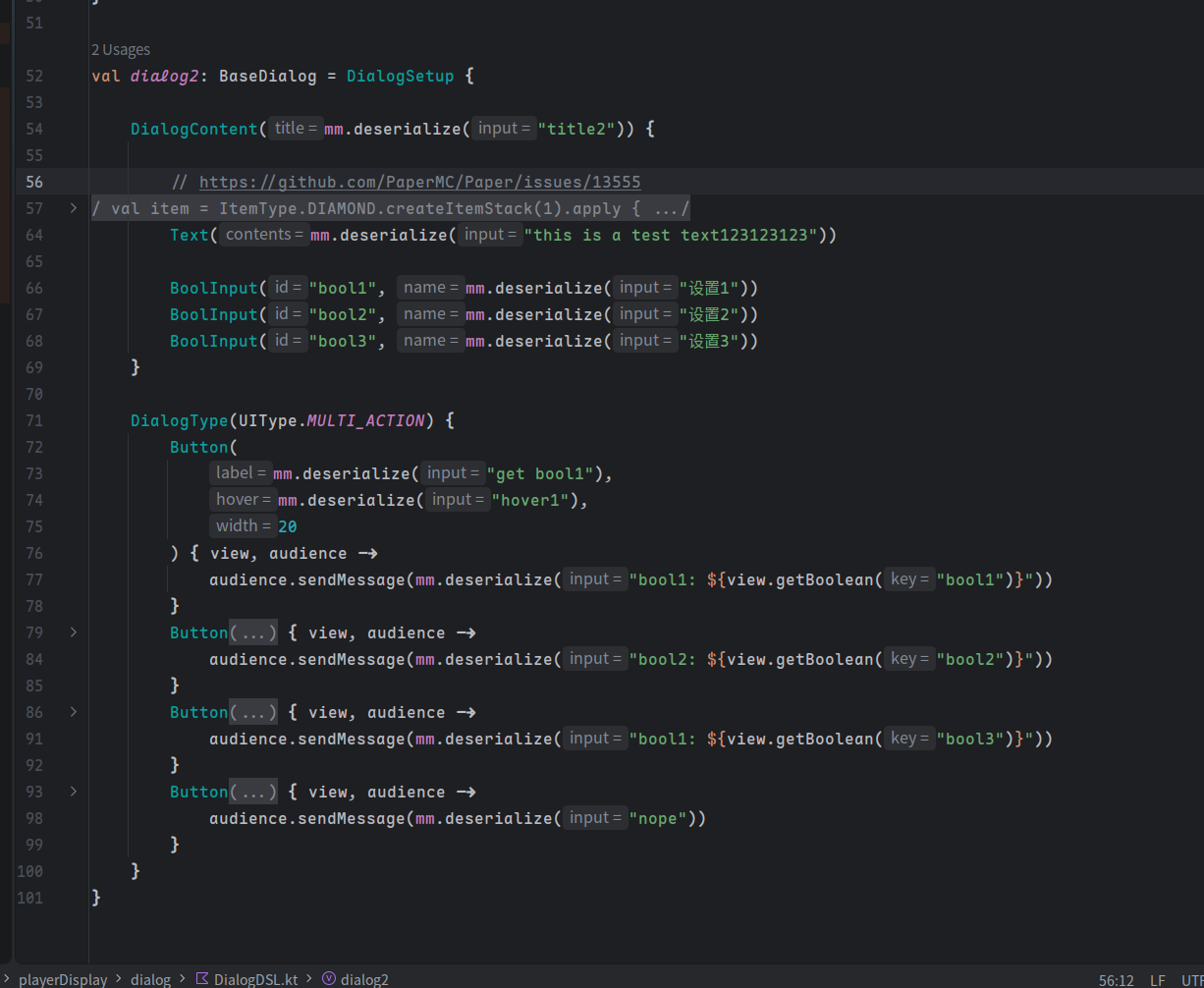
由于Paper 的bug([Issue #13555](https://github.com/PaperMC/Paper/issues/13555)),目前无法在 Bootstrap 阶段使用 `ItemDisplay` ,如果必须使用,则不能在Bootstrap阶段注册,只能使用动态对话框。
```kotlin
// 在命令执行器或事件监听器中:
val dynamicUI = MainMenuUI.build()
player.showDialog(dynamicUI)
```
---
## 支持的对话框类型
DSL 支持所有 Paper 原生的对话框布局:
* `UIType.NOTICE`: 纯展示,允许 0 或 1 个按钮。
* `UIType.CONFIRMATION`: 二选一,严格要求必须定义 2 个按钮。
* `UIType.MULTI_ACTION`: 支持无限按钮,支持 `columns` 参数实现网格排版。
* `UIType.DIALOG_LIST`: 传入 `RegistrySet` 展示多个子对话框列表。
* `UIType.SERVER_LINKS`: 展示服务器配置的外部链接。
---
## 路由系统 (Route)
为多页面对话框场景提供导航栈管理与生命周期安全的声明式路由方案。
### 核心接口
| 接口 | 何时使用 | 要点 |
|------|----------|------|
| `Route` | **绝大多数页面**,如列表页、详情页、表单页等 | 支持后退导航。无状态用 `object`,带参用 `data class` |
| `RootRoute` | **模块入口/主菜单**,作为路由树的根节点 | 配合 `AutoRootSetup` 零样板生成菜单。从指令或事件入口调用 `DialogRouter.openRoot()` 启动 |
| `AtomicRoute` | **高危操作**,如经济扣费、数据库写入、不可中断的多步事务 | 强制实现 `onRollback` 处理断线/死亡回滚;禁止 ESC 关闭;自动检测并触发事务回滚 |
### 快速使用
```kotlin
// 命令/事件中打开根菜单
DialogRouter.openRoot(player, MainMenu)
// 页面内导航
context.navigate(SomeRoute) // 压栈跳转
context.replace(state.copy(x = v)) // 替换当前页(更新状态重绘)
context.goBack() // 返回上一页
context.abortTransaction() // 中断事务(自动调用 onRollback)
```
使用 `AutoRootSetup` 快速创建主菜单:
```kotlin
object MainMenu : RootRoute {
override fun render(context: DialogRouteContext) =
AutoRootSetup(context, mm.deserialize("主菜单")) {
"实体列表" to ListRoute
"编辑" to EditRoute("uuid-1234", "Pig")
"设置" to SettingsRoute()
}
}
```
### 生命周期保护
`RouteCleanUp` 自动监听玩家掉线/死亡事件。若当前页面为 `AtomicRoute`,自动触发 `onRollback` 回滚并清理路由栈,防止事务泄露。
> 完整示例参考 `src/main/.../test/RouteTest.kt` 和 `RouteTest2.kt`。
---
## License
This project is licensed under the MIT License.
English
> I am not a native English Speaker, translated by ai, sorry for the possible mistakes.
# Paper Dialog DSL
> I'm really fed up with `.build()`, so this project was born
Paper Dialog DSL is a Kotlin declarative UI framework built specifically for Paper 1.21.10+'s experimental Dialog API. It completely eliminates verbose Java Builder nesting, lifecycle boilerplate, and dangerous component override issues, giving you an extremely smooth, type-safe UI writing experience.
See the source code and examples in `test` package for more help. I don't like write README, anyway.
## Comparison
Writing a dialog with an input field using the native Paper API looks like this:
**Native approach:**
```kotlin
val oldDialog = Dialog.create { dialogBuilder ->
dialogBuilder.empty()
.base(
DialogBase.builder(mm.deserialize("Title"))
.canCloseWithEscape(true)
.inputs(
listOf(
DialogInput.numberRange(
"test2",
mm.deserialize("输入数字"),
0f,
100f
)
.initial(0f)
.build(),
DialogInput.bool(
"test",
mm.deserialize("勾选")
).build(),
DialogInput.text(
"test3",
mm.deserialize("请输入文本")
).build()
)
)
.build()
)
.type(
DialogType.notice(
ActionButton.create(
mm.deserialize("1 right"),
mm.deserialize("2 right"),
100,
DialogAction.customClick(
{ view, audience ->
val test2 = view.getFloat("test2") ?: return@customClick
audience.sendMessage(mm.deserialize("test2: $test2"))
},
ClickCallback.Options.builder()
.uses(-1)
.lifetime(Duration.ofMinutes(5))
.build()
)
)
)
)
}
```
**Using this DSL:**
```kotlin
val newDialog = DialogSetup {
DialogContent(mm.deserialize("Title")) {
canCloseWithEscape(true)
NumRangeInput("test2", mm.deserialize("输入数字"), 0f to 100f, 0f, 1.0f, 300)
BoolInput("test", mm.deserialize("勾选"))
TextInput("test3", mm.deserialize("请输入文本"))
}
DialogType(UIType.NOTICE) {
Button(
mm.deserialize("1 right"),
mm.deserialize("2 right"),
100,
-1,
Duration.ofMinutes(5)
) { view, audience ->
val test2 = view.getFloat("test2") ?: return@Button
audience.sendMessage(mm.deserialize("test2: $test2"))
}
}
}
```
---
## Import
`build.gradle.kts`:
```kotlin
repositories {
mavenCentral()
maven { url = uri("https://jitpack.io") }
}
dependencies {
implementation("com.github.Axiumyuyu:PaperDialogDSL:Tag")
}
```
---
## Quick Start
### 1. Create the main UI
Use the `DialogSetup { ... }` block to declare a static registry dialog. The framework splits the UI into two areas: `DialogContent` (display & input area) and `DialogType` (bottom button routing area).
```kotlin
val MainMenuUI = DialogSetup {
// 【Upper area: display & input】
DialogContent(text("服务器主菜单")) {
// Directly call native methods (Escape Hatch)
canCloseWithEscape(true)
// Render text and items
Text(text("欢迎来到服务器!请填写或选择以下操作:"))
ItemDisplay(ItemType.DIAMOND.createItemStack())
// Render interactive input components (automatically stacked below the display content)
TextInput("player_name", text("你的昵称"))
BoolInput("agree_rules", text("同意服务器规则"))
NumRangeInput("age", text("你的年龄"), 1f to 100f)
}
// 【Lower area: action routing】
DialogType(UIType.MULTI_ACTION, columns = 2) {
// Standalone exit button
ExitButton(text("关闭"), text("点击退出"), 100)
// Regular callback button
Button(text("提交"), text("保存数据"), 100) { view, audience ->
val name = view.getText("player_name")
val agree = view.getBoolean("agree_rules")
audience.sendMessage(text("收到提交:$name, 同意规则:$agree"))
}
}
}
```
### 2. Registration
In your `PluginBootstrap`, use the provided `registerDialog` extension function to compress the verbose 5‑layer generic parameters into a single line:
```kotlin
class MyPluginBootstrap : PluginBootstrap {
override fun bootstrap(context: BootstrapContext) {
val manager = context.lifecycleManager
manager.registerDialog(NamespacedKey("playertd","test"), newDialog)
}
}
```
### 3. Runtime Dialogs
Due to a Paper bug ([Issue #13555](https://github.com/PaperMC/Paper/issues/13555)), `ItemDisplay` cannot be used at the Bootstrap stage. If you must use it, you cannot register at Bootstrap and must use runtime dialogs.
```kotlin
// In a command executor or event listener:
val dynamicUI = MainMenuUI.build()
player.showDialog(dynamicUI)
```
---
## Supported Dialog Types
The DSL supports all native Paper dialog layouts:
* `UIType.NOTICE`: Pure display, allows 0 or 1 button.
* `UIType.CONFIRMATION`: Two‑choice, strictly requires exactly 2 buttons.
* `UIType.MULTI_ACTION`: Supports unlimited buttons, with a `columns` parameter for grid layout.
* `UIType.DIALOG_LIST`: Pass a `RegistrySet` to display a list of sub‑dialogs.
* `UIType.SERVER_LINKS`: Display external links configured on the server.
---
## Route System
A declarative routing solution for multi-page dialog scenarios, providing navigation stack management and lifecycle safety.
### Core Interfaces
| Interface | When to Use | Key Points |
|-----------|-------------|------------|
| `Route` | **Most pages** — lists, details, forms, etc. | Supports back navigation. Use `object` for stateless, `data class` for parameterized pages |
| `RootRoute` | **Module entry / main menu**, as the root of a route tree | Pair with `AutoRootSetup` for zero-boilerplate menus. Start via `DialogRouter.openRoot()` from commands or events |
| `AtomicRoute` | **High-risk operations** — economy charges, DB writes, non-interruptible multi-step transactions | Must implement `onRollback` for disconnect/death recovery; ESC closure is disabled; auto-detected and rollback triggered on lifecycle events |
### Quick Start
```kotlin
// Open a root menu from a command or event
DialogRouter.openRoot(player, MainMenu)
// In-page navigation
context.navigate(SomeRoute) // Push navigation (keep history)
context.replace(state.copy(x = v)) // Replace current page (update state & re-render)
context.goBack() // Go back to previous page
context.abortTransaction() // Abort transaction (auto-triggers onRollback)
```
Create a main menu quickly with `AutoRootSetup`:
```kotlin
object MainMenu : RootRoute {
override fun render(context: DialogRouteContext) =
AutoRootSetup(context, mm.deserialize("Main Menu")) {
"Entity List" to ListRoute
"Edit" to EditRoute("uuid-1234", "Pig")
"Settings" to SettingsRoute()
}
}
```
### Lifecycle Protection
`RouteCleanUp` automatically listens for player disconnect/death events. If the current page is an `AtomicRoute`, it triggers `onRollback` and cleans up the route stack to prevent transaction leaks.
> See `src/main/.../test/RouteTest.kt` and `RouteTest2.kt` for complete examples.
---
## License
This project is licensed under the MIT License.
Quick facts
- Edition: Minecraft Java
- File type: .jar
- Minecraft versions listed: 1.21.11, 26.1, 26.1.1
- How to install: Install the matching mod loader (Forge, Fabric or NeoForge) for your Minecraft version. → Download the .jar. → Put it in the .minecraft/mods folder and launch that loader profile.
- Where to get it: Opens on Hangar — not every file is mirrored on our own servers.
Install steps are the general flow for this file type — How to install Minecraft Java mods & modpacks walks through it step by step.
PaperDialogDSL is a free Minecraft Java mod. Compatible with Minecraft 1.21.11, 26.1, 26.1.1, 26.1.2 and newer. Downloaded 8 times (via Hangar). Download it and open it directly in the game.