AddonsBedrock
Disenchanter Table
Disenchanter Table adds the ability to remove enchantments from armor or weapons in Minecraft. This is a unique mechanic not previously in the game. It…
⬇ Download
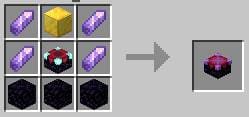
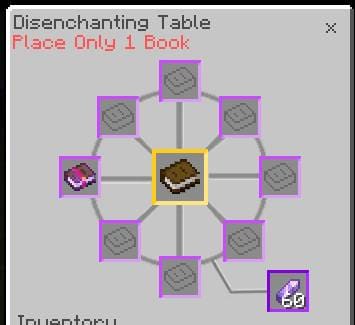
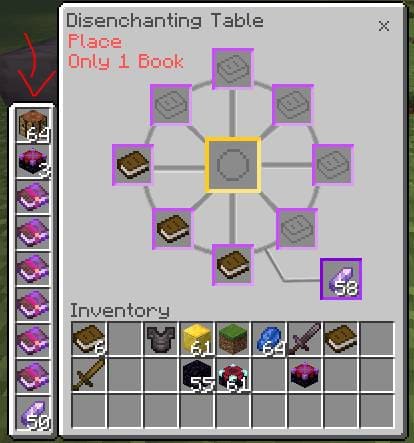



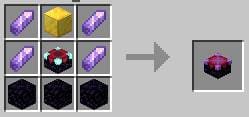
Disenchanter Table removes enchantments from items without losing them - enchantments transfer to books. Process: place enchanted book or equipment in the center, add a regular book in any empty slot, add an amethyst shard below. If interface errors occur, adjust behavior pack settings. Remember to enable Experimental Options in map settings. New version fixed interface bugs.
Quick facts
- Edition: Minecraft Bedrock
- File type: .mcpack or .mcaddon
- Minecraft version listed: 1.21
- How to install: Download the .mcpack or .mcaddon file. → Open it — Minecraft imports it. → In your world: Behavior Packs → Available → Activate, then the same under Resource Packs.
- Where to get it: In MCModsHub, or directly above on this page.
Install steps are the general flow for this file type — How to install Minecraft Bedrock addons & mods walks through it step by step.
Verified by MCModsHub
- Pack type: .mcaddon — behaviour and resource pack in one file
- Manifest requires Minecraft 1.20.80 or newer
- Complete pack — everything it depends on is inside the file
- Download size: 93 KB
- Download link checked 18 Jun 2026 — working
- Mirrored on our own servers — the download does not depend on the original host
These come from our own check of the pack file, not from the source page.