Model Gap Fix
Java mod listed for Minecraft 1.21. File opened and checked on 30 Sep 2026; downloads from the MC Java Mods app on Android.
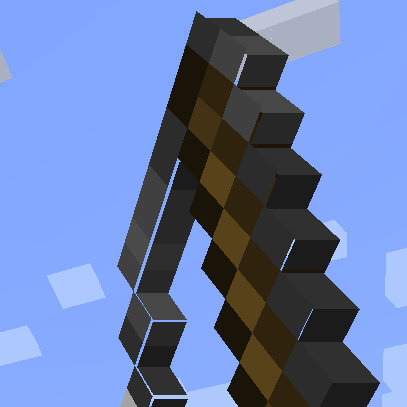
Model Gap FIX This is a simple client mod that fixes which affects both Block Models and Item Models and possibly other models too The mod works by…
⬇ Download on ModrinthModel Gap FIX
This is a simple client mod that fixes https://bugs.mojang.com/browse/MC-73186
which affects both Block Models and Item Models and possibly other models too
The mod works by removing texture zooming, making every model face use 100% of its texture, unlike of what it did previoulsly.
Thisnot only fixes this bugs on items (where it's most noticeable) but with block models too and everything else that might use those functions.
This issue was especially noticeable with custom block models or some 2d items.
Q&A:
- Will this slow down my game?
Not at all! Removing texture zooming just removes some code and has no impact. If you however want to be nit picky the mod also slightly tweaks item models in a way that could add a ouple more quads for concave item textures compared to vanilla so in that case it could very slightly worse that vanilla. This is however negligible and could only be an issue when trying to run high resolution packs
- How does this work?
The base fix is simply removing texture zooming. This is extremly simple to do and immediately "fixes up" all those problematic gaps on models. For 2d item models something else is needed as this alone creates another kind of tiny gaps in them due to the way they are generated, quad by quad. These are very tiny and they flicker so I had to fix those too. To do so I've changed the item model generator to never create a quad that encompasses a transparent pixel and instead create multiple quads for each row of solid pixel in the same direction. This allows me to slightly increase the size of all these side quads without creating new gaps in the process, thus covering all gaps seamlessly. Note that this last part only applies to forge as fabric does not seem to have such tiny lines and the models work right away with no extra quad
- Edition: Minecraft Java
- File type: .jar
- Minecraft version listed: 1.21.10
- How to install: Install the matching mod loader (Forge, Fabric or NeoForge) for your Minecraft version. → Download the .jar. → Put it in the .minecraft/mods folder and launch that loader profile.
- Where to get it: Opens on Modrinth — not every file is mirrored on our own servers.
Install steps are the general flow for this file type — How to install Minecraft Java mods & modpacks walks through it step by step.
- Ships as modelfix-1.21.10-1.12-fabric.jar — drop this file into the mods folder
- Download size: 65 KB
- Download link checked 24 Oct 2026 — working
These come from our own check of the pack file, not from the source page.
![[Minecraft] Model gap fix- Quick mod showcase #minecraft](https://i.ytimg.com/vi/sFHHgk3hOqc/mqdefault.jpg)
