AddonsBedrock
WorldFab 2
The second part of the popular Minecraft add-on — the WorldFab 2 mod. You can install the first part via link. Create large landscapes, easily copy and…
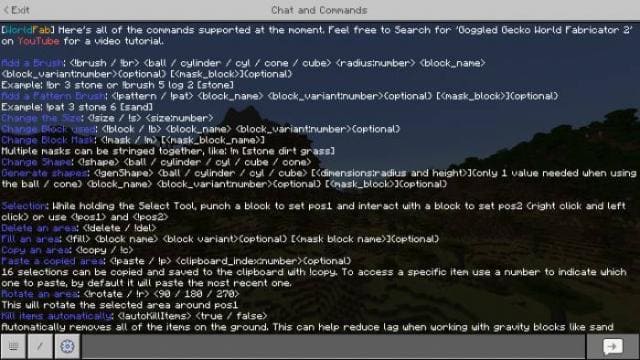
⬇ DownloadOpen in MCModsHubGet it on Google Play →The second part of the popular Minecraft add-on — the WorldFab 2 mod. You can install the first part via link. Create large landscapes, easily copy and edit buildings using simple commands and much more with this build. The second part turned out many times better than the first. Naturally, the add-on is inspired by the popular World Edit program for Java. The author not only took the program as a basis but also added many new features. To display them, you need to enter the !help command. Custom Commands Various commands are available. For example, the !brush ball 8 stone 5 [dirt grass] command gives a brush that replaces dirt and grass with andesite. Brush You can select brush sizes and shapes There is also the ability to paint only the top parts of blocks, creating traps Painting Quick replacement of block surfaces, meaning blocks remain the same but their top part changes Texturing Random painting of blocks in a specific area !pattern brush Command Shapes Using the !genShape command you can create various shapes from blocks: cones, cylinders and cubes with different sizes Area Selection Function works like a structure block that allows you to copy and paste entire areas Don't forget to enable Experimental options in map settings Changes in new version Changed commands Changed code Fixed bugs Many changes to tool shapes Added new interface Changed teleportation after entering
Verified by MCModsHub
- Pack type: .mcaddon — behaviour and resource pack in one file
- Complete pack — everything it depends on is inside the file
- Download size: 330 KB
- Download link checked 18 Jun 2026 — working
- Mirrored on our own servers — the download does not depend on the original host
These come from our own check of the pack file, not from the source page.
Explore more