
Modern UI
Java mod listed for Minecraft 26.x. File opened and checked on 7 Oct 2026; downloads from the MC Java Mods app on Android.
I don't know my version or loader

Modern UI by Icyllis Milica
Description:
Modern UI (by Icyllis Milica) is a desktop application framework designed for standalone 2D and 3D rendering software development. It makes use of modern 3D graphical APIs and technologies to provide real-time rendering with high performance. For good measure, Modern UI improves and optimizes a set of features used by Google Android and its own set of internationalization supporting text engine.
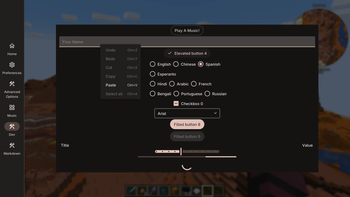
Modern UI for Minecraft, is a Minecraft Mod that is based on Modern UI Core Framework and Modern UI Core Extensions. It provides Modern UI bootstrap program in Minecraft environment and Modding API based on Forge/Fabric, to make powerful Graphical User Interface in Minecraft.
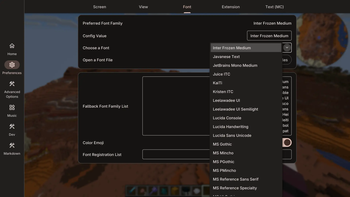
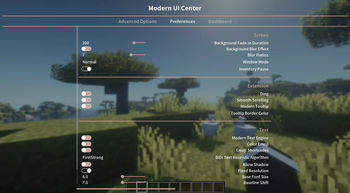
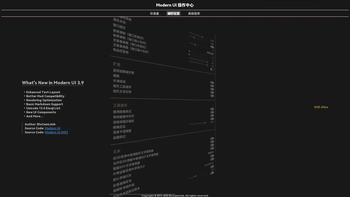
For client, press Ctrl+K or ⌘+K (by default) to open Action Center screen to configure Modern UI. (Note that you can swipe the Preferences screen to configure fonts)
This Mod also includes a powerful text layout engine and text rendering system designed for Minecraft. This engine provides appropriate methods for processing Unicode text and gives you more readable text in any scale, in 2D/3D. In details:
- Real-time preview and reload TrueType/OpenType fonts
- A better font fallback implementation
- Anti-aliasing text and FreeType font hinting
- Use improved SDF text rendering in 2D/3D (also use batch rendering)
- Compute exact font size in device space for native glyph rendering
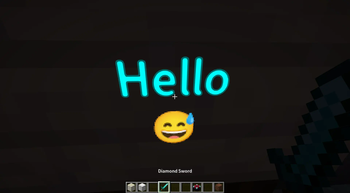
- Use Google Noto Color Emoji and support all the Unicode 15.1 Emoji (September 12, 2023)
- Configurable bidirectional text heuristic algorithm
- Configurable text shadow and raw font size
- Unicode line breaking and CSS line-break & word-break
- Fast, exact and asynchronous Unicode text layout computation
- Faster and more memory efficient rectangle packing algorithm for glyphs
- Use real grayscale texture (1 byte-per-pixel, whereas Minecraft is 4 bpp)
- Compatible with OptiFine, Sodium (Rubidium), Iris (Oculus) and many mods
- Compatible with Minecraft's JSON font definition (bitmap fonts, TTF fonts)
Additionally, this Mod provides many utilities which improve game performance and gaming experience. Currently, we have:
- Changing screen background color
- Gaussian blur to screen backdrop image
- Fade-in animation to screen background
- More window modes: Fullscreen (borderless), Maximized (borderless)
- Framerate limit and master volume fading on window inactive (out of focus) and minimized
- Pausing single-player game when Inventory is open
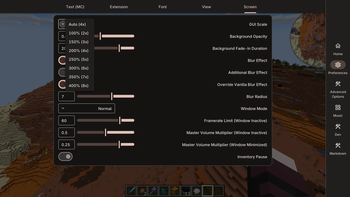
- Changing GUI scale option to Slider and providing hint text
- Playing a "Ding" sound when Minecraft loads and reaches the Main Menu
- Enabling smooth scrolling in Vanilla's Selection List and Forge's Scroll Panel
- Pressing "C" to Zoom that is the same as OptiFine
- Undo/Redo (Ctrl+Z/Ctrl+Y) and Unicode grapheme/word iterator for all text fields
- Playing local music, allowing to seek and view spectrum
- Support Discord/Slack/GitHub/IamCal/JoyPixels emoji shortcodes in Chatting
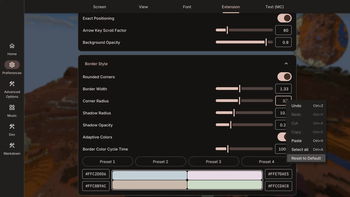
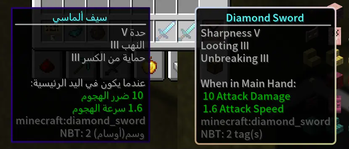
- A fancy tooltip style
- Choose rounded border or normal border (with shadow effect)
- Add title break and control title line spacing
- Auto line wrapping and auto vertical scrolling when out of screen
- Center the title line, support RTL layout direction
- Exactly position the tooltip to pixel grid (smooth movement)
- Change background color and border color (with gradient and animation)
Core Features:
- 2D Graphics Library of Multiple Graphics APIs
- Intermediate Representation and ASTs of Shading Languages
- Symbolic distance function and vector graphics rendering
- Image post-processing effects
- Fast matrix and vector calculation
- Image format conversion
- Animation and transition framework
- Event loop and multi-threading framework
- Text shaping and complex text layout engine
- MVVM and lifecycle handling
- Automatic RTL (right-to-left) UI layout
- Markdown (CommonMark) rendering support
Modern Text Engine for Minecraft:
- Support color Emoji, use Google Noto Color Emoji 15.1, based on Unicode 15.1 Emoji list;
- Support Emoji shortcodes in chat, for example :rofl: to rolling on the floor laughing, support Discord and Slack shortcodes;
- You can use TTF or OTF fonts, configure the font base size, set the baseline shift, and set whether to drop text shadow;
- Scalable vector graphics, automatic switching resolution level (up to 96px), native (non-synthetic) Bold and Italic rendering;
- Supports distance field text rendering in 3D world, but sharpens font atlas in 2D GUI; This enhances a former feature: *Render all characters smoothly on any scale (like when you're away from a sign, or a very small text in GUI)
- Support multilayer text, layout multiple paragraphs together, streaming layout algorithm, and introduce fast layout cache;
- Support fast digit replacement, high-precision layout and alignment, and smoothly draw fast changing digits (fixed width);
- Support mip-mapping, anti-aliasing, linear sampling and supersampling anti-aliasing (SSAA);
- Better and more efficient layout of BiDi text paragraphs (e.g. Arabic, Yiddish); Use sharpen font atlases;
- Configurable BiDi text heuristic algorithm to control text direction more accurately; Support to fix invalid surrogate pairs;
- Use HarfBuzz text shaping, support combining characters rendering, like Thai, Devanagari, Bengali and Tamil;
- Support grapheme cluster break, support Unicode line breaking algorithm;
- Support context-aware and locale-based word break and line break;
- Support pixelated font rendering, support fixed resolution level, support pixel alignment;
- Support bitmap replacement, rendering smoothly for fast changing numbers, support emoji rendering;
- Optimize the layout algorithm, increase your FPS by about 10% when drawing texts in GUI
- Use grayscale pixels to store texture, reduce GPU memory usage
- Reduce unnecessary RAM usage and greatly reduce object creation
Customize Fonts
Press Ctrl+K or ⌘+K (by default) to open Action Center, go to Preferences, swipe the screen to the second page, and you will see Font settings.
- Preferred font family is your most wanted one. It can be either an OS font or a TrueType/OpenType font (collection) file.
- Fallback font families are used when the preferred font family is unavailable.
Modern Text Engine:
Modern UI follows Minecraft's JSON font definition, only glyph provider type 'legacy_unicode' and 'unihex' are ignored. Modern UI font families mentioned above will serve as fallback font families for Minecraft fonts. Default Font Behavior (in Preferences > Text Layout) gives you an option to remove some glyph providers from the Minecraft default font (minecraft:default). To avoid using vanilla ASCII fonts, just set it to Keep Other. Note this option is only valid if you have not turned on Force Unicode Font. If you want to use vanilla Unicode font, just download the OTF version of GNU Unifont.
Additional Features for Minecraft:
- Support setting window mode, such as fullscreen borderless, windowed borderless;
- GUI screen background fade-in animation and 2-pass gaussian convolution blur effect, configurable background gradient color;
- Smooth rounded tooltip style, support RTL layout, configurable background and border color;
- Play a "ding" sound effect when the game is loaded;
- Support pausing the game when your inventory is opened;
- New GUI scale algorithm and slider GUI scale widget (not limited to even numbers, compatible with OptiFine);
- Add smooth scrolling for vanilla and forge scrolling panels;
- Async network handler; Server auto-shutdown;
- All features are configurable in configs or Action Center screen (default shortkey Ctrl+K)
Modern UI for Fabric removed some features (compared to the Forge version):
- OptiFine-like zoom, hide crosshairs in GUI
- Dump more debugging information, crash report extension
Comparison with Caxton text rendering techniques
Caxton mod is known for its MSDF text rendering, you can choose between Caxton and Modern Text Engine.
Similarities:
- Both use HarfBuzz text shaping
- Both support Unicode text processing
- Both support Unicode line breaking and grapheme cluster break
- Both compatible with Iris in raster rendering mode
- Both have an efficient rectangle packing algorithm, further better than Mojang's
Differences:
- Caxton uses a newer HarfBuzz whereas we use a older one (bundled with JDK 17, it's updated in JDK 21)
- Caxton uses multi-channel SDF and renders sharper scaling-up texts, whereas we render over-rounded
- We are compatible with OptiFine, whereas Caxton isn't
- We support color emoji, whereas Caxton doesn't
- We support FreeType font hinting whereas Caxton never support it, font hinting helps on low-res monitor
- We support perfect sampling of native glyph image in screen-space, this is ideal for 2D rendering
- We support single-channel SDF text rendering without additional GPU resources, we always use 1bpp textures
- We have smart SDF sampling method for scaling-down texts, whereas Caxton hasn't
- No need to wait for MSDF texture generation, you can switch fonts in-game with just one click
- We support various text direction heuristics and line break strategies
- We don't use additional native libraries, so Modern UI works on macOS
- We have a slightly higher layout performance than Caxton, and use less RAM
Mod Integration & Compatibility:
Compatible (you should pay attention to):
OptiFine, Sodium, Iris, Create, AoA3
If Shaders are active, Use Modern Text Shaders in 3D is auto disabled, it will cause the outline of glowing text to become invisible.
Mods with similar functions are replaced:
- Blur (ver 1.15 ~ 1.21.8; reason: full functional coverage, better optimization)
- Blur mod claims to use Gaussian blur, but I found it actually uses 2-pass box blur. Whereas Modern UI gives you the true 1-pass Gaussian Blur, which is better than Blur mod.
- Controlling (ver 1.15; reason: another way of implementation)
- TipTheScales (ver 1.15 ~ 1.21.8; reason: another way of implementation)
- Inventory Pause (ver 1.18 ~ 1.21.1; reason: another way of implementation)
- Emojiful (ver 1.18 ~ 1.21.1; reason: we support color emoji rendering since 3.5.0; additionally, Emojiful has really bad code and breaks your game everywhere; you may experience game freezing, high VRAM usage, rendering glitches, and many performance & mod compatibility issues)
- Borderless Window (ver 1.18 ~ 1.21.4; reason: another way of implementation)
- Ding (ver 1.18 ~ 1.21.4; reason: another way of implementation)
- SmoothScrollingEverywhere (ver 1.18 ~ 1.19; reason: another way of implementation)
- FPS Reducer (ver 1.18 ~ 1.21.8; reason: another way of implementation)
Conflict and Solution:
- Emojiful (ver 1.16 ~ 1.21.1; it's not recommended to use Emojiful; if you must use it, disable Modern UI text engine, via config screen or bootstrap properties)
- Legendary Tooltips (ver 1.16 ~ 1.21.4; solution: disable Modern UI tooltip, via config screen)
- FeyTweaks (ver 1.18 ~ 1.21.1; solution: disable TextRendererMixin in FeyTweaks' mixin config)
- SmoothScrollingEverywhere (ver 1.18 ~ 1.19; solution: disable Modern UI smooth scrolling, via config screen)
- Caxton (ver 1.18 ~ 1.21.8; solution: disable Modern UI text engine, via config screen or bootstrap properties)
- ImmediatelyFast (ver 1.18 ~ 1.21.8; solution: for 1.18 ~ 1.21.4: disable ImmediatelyFast's hud_batching, font_atlas_resizing and fast_text_lookup; otherwise, you may experience random game crashes; for 1.21.6 ~ 1.21.8: disable ImmediatelyFast's avoid_redundant_framebuffer_switching)
- Untranslated Items (ver 1.18 ~ 1.21.4; solution: disable Modern UI text component cache, via config screen)
Supported MC versions:
- Actively maintained: 1.21.8, 1.21.7, 1.21.6, 1.21.1, 1.21, 1.20.1, 1.20
- About to be dropped: 1.21.4
- No longer supported: 1.21.3, 1.21.2, 1.20.6, 1.20.4, 1.20.2, 1.19.4, 1.19.2, 1.18.2, 1.18.1, 1.18, 1.17.1, 1.16.5, 1.16.4, 1.16.3, 1.16.2, 1.16.1, 1.15.2, 1.14.4
All descriptions on this page are for Minecraft 1.20.1 and above. Some features may be missing in older versions.
PC Requirements (same as Minecraft Vanilla)
Some people are unwilling to use Modern UI because they believe that Modern UI has a high PC requirements. In fact, as long as you can play Minecraft Vanilla, you can definitely play Modern UI. Unless you forget to update your GPU driver.
- OS: Windows 8.1+, Linux with X11 or Wayland, macOS
- Architecture: x64 or arm64
- GPU: GeForce 210 or better
- GPU Driver: OpenGL 3.3+ or Vulkan 1.1+, higher is better
- Java: Java 17+, higher is better
FAQ:
Q: What is the difference between Default Font Behavior and Force Unicode Font?
A: Firstly, Modern UI always redirects Unicode font to Modern UI default typeface. Default Font Behavior is KEEP ALL in 1.19+, then Minecraft default font is used for ASCII characters. KEEP OTHER means that Minecraft default font is no longer used, but additional fonts, for example, in some minigame maps, are still available. This is the difference from Force Unicode Font (IGNORE ALL).
Q: Does Modern UI have a high overhead? Will Modern UI lower application performance?
A: No, Modern UI does not have a significant impact on CPU, GPU, RAM, and VRAM usage. This is because Modern UI itself has good optimization, but at the same time, Modern UI provides a bunch of new features and effects. Modern UI framework is known to be more efficient than Chromium-based applications. For low-end PCs, screen blur effect may be a performance killer, because Minecraft Vanilla does not allow mipmap generation on render targets. Even so, the blur effect provided by Modern UI is much faster than a mod called 'Blur'.
Q: How to disable all changes to vanilla, I don't want these features.
A: Only GUI scale algorithm and some low-level code are non-configurable, any other features can be disabled in Action Center screen (shortkey Ctrl+K by default), or config files (gameDir/config/ModernUI/), because Modern UI is essentially a framework.
Q: Is this mod a client-only mod? Do I need to install it on the server?
A: Since MC 1.19.2, there is no reason to install this mod on the server anymore. All server features are deprecated and implemented to Forge API and Fabric API.
Q: How to get start to develop my mod based on Modern UI?
A: This project is still in early stages, the specification is still being written. You can view the JavaDoc. Examples include Modern UI itself (Action Center) and Flux Networks. If you have any questions, feel free to join our Discord server.
Issues: All issue reports should go to GitHub issue tracker.
Join my Discord Server for discussion and suggestions.
- Edition: Minecraft Java
- File type: .jar
- Minecraft versions listed: 26.1, 26.1.1, 26.1.2
- How to install: Install the matching mod loader (Forge, Fabric or NeoForge) for your Minecraft version. → Download the .jar. → Put it in the .minecraft/mods folder and launch that loader profile.
- Where to get it: Opens on Modrinth — not every file is mirrored on our own servers.
Install steps are the general flow for this file type — How to install Minecraft Java mods & modpacks walks through it step by step.
- Ships as ModernUI-Fabric-26.1.2-3.13.0.5-universal.jar — drop this file into the mods folder
- Download size: 24.5 MB
- Download link checked 23 Oct 2026 — working
These come from our own check of the pack file, not from the source page.