![]()
![]()
![]()
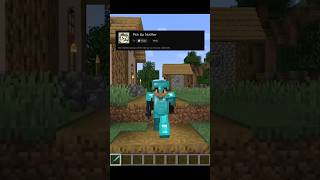
Pick Up Notifier keeps track of everything you collect and displays it in a clean on-screen list, making it easy to see exactly what you've picked up while mining, exploring, farming, or fighting mobs. ✨
Items, experience, and recovered arrows appear as compact notifications that update in real time as more resources are gathered. Entries smoothly fade away after a short time and can automatically combine with similar pickups to keep the display tidy. 📦
The appearance and behavior of the notification list are highly configurable, allowing you to customize its position, scale, styling, animations, display duration, and much more. 🎛️
![]()
![]()
- 📦 Track Every Pickup: See collected items, experience, and recovered arrows in a convenient on-screen list.
- 🔄 Smart Entry Updates: Similar pickups can merge together, while existing entries are refreshed whenever more of the same item is collected.
- ✨ Smooth Animations: Notifications fade away and slide off-screen naturally instead of disappearing abruptly.
- 🔢 Detailed Information: Optionally display pickup counts, item names, inventory totals, and item icons.
- 🎨 Fully Customizable Display: Adjust screen position, scale, colors, backgrounds, spacing, and more.
- ⏱️ Configurable Behavior: Control how long entries remain visible, how many can be shown, and how they are grouped.
- 🌐 Client-Side Friendly: Works in singleplayer, on modded servers, and even on vanilla servers without requiring installation.
![]()
![]()

![]()
![]()
⏩ INSTALLATION REQUIRED ON CLIENT & OPTIONAL ON SERVER
⏩ REQUIRES PUZZLES LIB TO BE INSTALLED (FABRIC & NEOFORGE)
⏩ REQUIRES FABRIC API TO BE INSTALLED (FABRIC)
⏩ REQUIRES FORGE CONFIG API PORT TO BE INSTALLED (FABRIC)
![]()
![]()
If available for a mod, configuration is possible directly from in-game using the mod menu (requires Mod Menu by Prospector to be installed on Fabric).
For manual configuration using an external text editor all files are found at .minecraft/config, named as MOD_ID-client.toml, MOD_ID-common.toml, or MOD_ID-server.toml, depending on the type of config. Not all types might exist for a mod, if any at all.
![]()
![]()
🌟 Thanks to TeamCoFH for the original idea of this mod in a very old version of their CoFH Core mod from the 1.6 era of modded Minecraft!
![]()
![]()
![]()
- Edition: Minecraft Java
- File type: .jar
- Minecraft version listed: 26.2
- How to install: Install the matching mod loader (Forge, Fabric or NeoForge) for your Minecraft version. → Download the .jar. → Put it in the .minecraft/mods folder and launch that loader profile.
- Where to get it: Opens on Modrinth — not every file is mirrored on our own servers.
Install steps are the general flow for this file type — How to install Minecraft Java mods & modpacks walks through it step by step.
- Ships as PickUpNotifier-v26.2.0-mc26.2.x-NeoForge.jar — drop this file into the mods folder
- Download size: 71 KB
- Download link checked 10 Sept 2026 — working
These come from our own check of the pack file, not from the source page.